The problem: expensive machines that must never idle
A compute fleet is rented by the hour whether it works or not. Every idle card burns money continuously. It is the same observation made in Cloud AI, and it leads to blunt arithmetic:
A fleet running at 50% utilization costs twice as much per unit of work done as one running at 100%.
Hence the role of a scheduler: take in requests for compute, decide who runs where and when, and fill every free slot with useful work. Without one, cards sit idle while work waits elsewhere.
A note on vocabulary used throughout this chapter: a job is a request for compute submitted to the scheduler, "train this model on 4 cards for at most 48 hours". A node is a physical machine in the fleet, typically carrying 8 cards.
There are two opposite compute profiles, and that opposition, more than the merits of any one tool, decides which scheduler is right.
Training demands everything, at once, for a long time. A run on 64 cards needs all 64 simultaneously: with 63 it does not run more slowly, it does not run at all, because the cards wait for each other at every step. And it lasts for days.
Inference demands a little, immediately, and variably. Each request is independent, lasts a fraction of a second, and volume rises and falls through the day. Here you want to add and remove machines continuously.
These two needs are nearly contradictory: the first wants block reservations and stability, the second wants permanent elasticity. No tool excels at both, which is why several exist.
Slurm: the high-performance computing standard
Slurm (Simple Linux Utility for Resource Management) runs HPC (High Performance Computing) fleets worldwide: supercomputers, research centres, university clusters. It is also the tool of many teams training large models, because it matches the first profile above exactly.
Three components
- slurmctld: the controller, the central brain, deciding which job runs on which nodes and holding the fleet's complete state in memory;
- slurmd: a daemon (a program running permanently in the background) present on every node, which receives orders and executes work locally;
- slurmdbd: the accountant, recording who consumed what and for how long. Essential for internal chargeback and for sharing access fairly between teams.
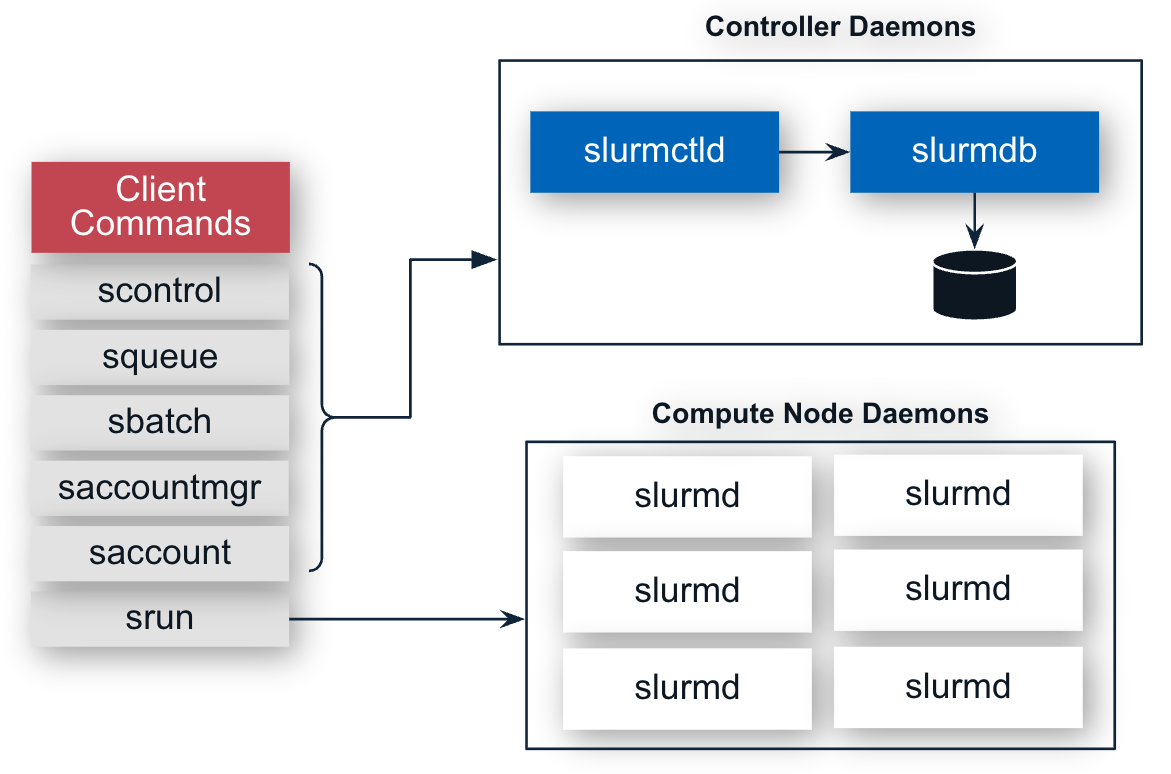
Four notions to know
- a partition is a logical group of nodes, H100 machines on one side, A100s on another, cardless machines for data preparation. You submit a job to a partition;
- QOS (Quality of Service) sets priorities and caps per user or per team: who goes first, and how many cards each may hold at most;
- GRES (Generic RESources) are resources other than processors and memory, graphics cards, principally. You ask for
gpu:h100:4and Slurm finds them; - a batch script describes the requirements (card count, memory, maximum duration, partition) and Slurm queues it until resources free up.
Here is the mechanism that explains why Slurm packs a fleet so well, and it is elegant enough to be worth understanding.
A large 64-card job is waiting for resources that will free up in two hours. Meanwhile, 8 cards sit idle. A naive queue would leave them asleep, since the large job has priority and cannot start.
Slurm does something else: it scans the queue for small jobs that fit in under two hours on 8 cards or fewer, and slots them into that hole. The large job is not delayed by a second, since we verified the small ones will finish first. And the small ones jump ahead.
This is backfill scheduling. Nobody loses, and the fleet fills up. It also explains an observation that surprises newcomers: on a busy fleet, declaring an honest, short maximum duration gets your job running far sooner than declaring a comfortable one, because only short jobs fit in the holes.
Strengths and limits
Slurm is built for dedicated, self-hosted fleets with a high-performance network whose topology it understands, it can place jobs according to how machines are cabled, which matters enormously, as Networking for distributed training shows.
It is poorly suited to web services, to inference whose load varies, and to environments where machines constantly appear and disappear.
Kubernetes: elastic orchestration
Kubernetes, often shortened to K8s (eight letters between the K and the s) is the standard for orchestrating containers, the packages that bundle an application with everything it needs to run. Born at Google for web services, it has extended into machine learning. Most production inference runs on it.
Its basic unit is the pod: one or more containers deployed together on the same node.
Kubernetes alone is not enough
Kubernetes cannot manage graphics cards properly without help. You must add:
- a GPU operator, which installs and maintains drivers on every node automatically;
- a batch scheduler that understands machine-learning constraints, where the native scheduler thinks in terms of web services;
- optionally a full platform built on top, for notebooks, pipelines and deployment.
Gang scheduling: the central problem
This is the most important point in the section, and it follows directly from the axis set out at the top.
For training spread across several nodes, all pods must start at the same time. The reason is mechanical: distributed training libraries (PyTorch's DDP, for Distributed Data Parallel) begin with a phase in which each process waits for all the others to check in.
If the scheduler grants 3 pods out of 4 and makes the fourth wait for space, the first 3 wait forever for a partner that will never arrive, while holding their cards. That is a deadlock, and it is doubly costly: the work does not progress and the resources stay taken.
The fix is called gang scheduling, and its principle is all-or-nothing: first verify that room exists for the entire group, and only then bind all the pods at once.
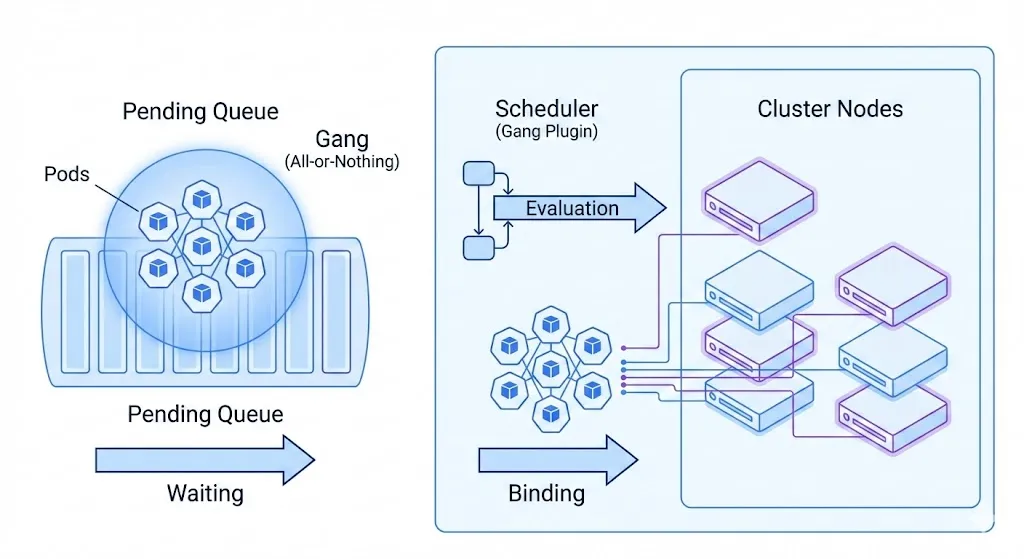
Note that Slurm does this natively, and always has: it is its reason for existing. On Kubernetes it must be added. This is the clearest illustration of the fact that these tools come from different worlds.
Kubernetes shines at inference: automatic adjustment of machine count to traffic, rolling updates without service interruption, and a very rich ecosystem of monitoring tools.
For distributed training it is harder. Three things Kubernetes does not know natively must be made to coexist: direct-memory-access networking (RDMA, Remote Direct Memory Access, which lets one machine write into another's memory without involving either processor), the exact card topology (which card is wired to which switch) and gang scheduling. All of it is configurable, but for heavy training on a dedicated fleet, Slurm is often simpler and more reliable.
Ray: distributing Python without changing profession
Ray turns existing Python code into distributed code with minimal effort. It is the tool for people who want to scale without becoming infrastructure engineers.
The idea
The classic distributed-computing tools (MPI (Message Passing Interface, scientific computing's historical standard) or remote-procedure-call frameworks) require learning a whole programming model. Ray requires adding an annotation:
import ray

@ray.remote
def train(data_chunk):
    # ordinary PyTorch code
    return training(data_chunk)

# Launch ten training runs in parallel across the fleet.
# .remote() returns immediately, without waiting for a result.
futures = [train.remote(chunk) for chunk in chunks]

# ray.get waits for everything to finish and brings the results back.
results = ray.get(futures)
The @ray.remote decorator means "run this somewhere on the fleet". The .remote() call does not return a result but a future: a handle to a computation launched elsewhere, which may not be finished. It is ray.get that waits and collects. In between, the program carries on, which is precisely what lets the ten runs proceed simultaneously.
Ray handles the rest: serialising data, transferring it, choosing machines, coping with failures.
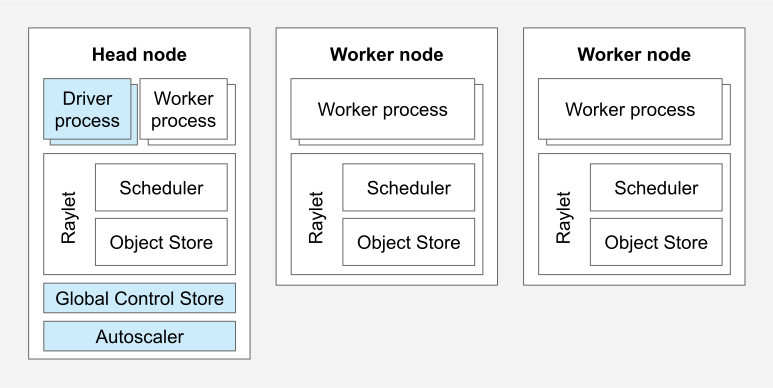
The ecosystem
Ray is more than a function dispatcher. Four libraries build on it: distributed training, model serving with dynamic request batching, hyperparameter search, and streaming data processing that feeds training without having to write everything to disk first.
Ray is used in production by several major AI and technology companies, some have documented it publicly, others have not, and the list often circulates embellished. What is verifiable, and enough for the argument: the project runs at the scale of thousands of nodes and is no longer a prototype.
Strengths and limits
Ray suits existing Python code that needs distributing, and above all pipelines that mix data preparation, training and inference in one program, that is its distinctive advantage, since the other two tools assume those stages are separate jobs.
It suits large HPC fleets less well, where its Python layer adds an overhead Slurm does not have, and cases where raw network performance overrides everything.
Summary
| Need | Tool | Why |
|---|---|---|
| Dedicated self-hosted fleet | Slurm | Built for exactly this |
| Production inference | Kubernetes | Elasticity, rolling updates |
| Distributed training | Slurm, or Ray if it is all Python | Native gang scheduling |
| Pipeline mixing data, training and serving | Ray | One program for all three stages |
| Complete cloud platform | Kubernetes and its extensions | The richest ecosystem |
| Supercomputer | Slurm | The field's standard |
The most advanced organisations often run all three, and that is not incoherent: Slurm for training on the dedicated fleet, Ray for data pipelines and inference, Kubernetes for service life cycles. Each is used where its scheduling model matches the compute profile.
Remember the question that settles it, and it comes before any feature comparison: does my computation need all its resources at once and for a long time, or can it grow and shrink as it goes? The answer names the tool.
1. A scheduler grants 3 of the 4 pods a distributed training job asked for, and queues the fourth. What happens?
2. On a busy Slurm fleet, which strategy gets a small job through fastest?
3. A team runs inference on Kubernetes and wants to move its distributed training there too. What makes that awkward?
4. In a Ray program, calling .remote() returns immediately. What does it actually return?
5. Which question settles the choice between these tools, before any feature comparison?