Why Git isn't enough for data
Git is wonderful for source code: every change is tracked, you can go back in time, compare versions, collaborate via branches. But try putting a 50 GB dataset in Git... it's simply impossible. Git is designed for lightweight text files, not multi-gigabyte binary blobs.
Result: most ML practitioners end up with data that has no history and no traceability. Datasets live in S3 folders with names like dataset_v3_final_FINAL_v2.parquet. And when someone asks "which exact dataset was used to train the model in production?", it's an awkward silence.
Without data versioning, reproducing a past experiment is a nightmare. You can't answer audit questions ("which data produced this model?"), you can't debug a regression ("what changed in the data?"), and you can't roll back if a new dataset degrades performance. It's like coding without Git: it works until it doesn't.
DVC: Git for data and pipelines
DVC (Data Version Control) is an open-source tool that adds to Git to manage large files and data pipelines. It's the most popular tool for data versioning in ML.
How it actually works
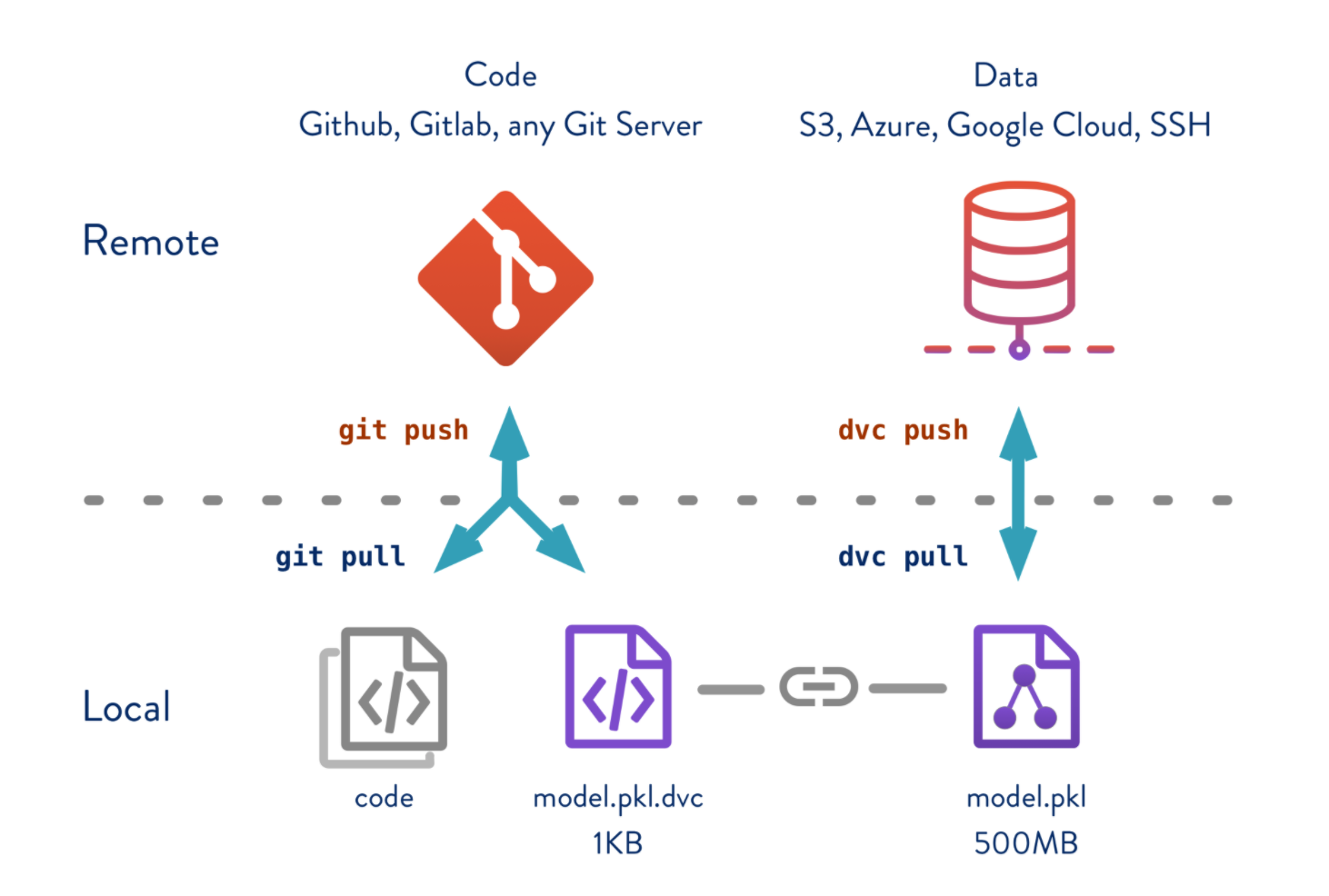
The idea is elegant: Git doesn't store the large files directly, but a pointer to them.
- You have a 50 GB file
data/dataset.parquet - You run
dvc add data/dataset.parquet - DVC computes a hash (SHA-256 digital fingerprint) of the content and creates a small file
data/dataset.parquet.dvcof just a few bytes containing that hash - The
.dvcfile goes into Git (lightweight, versionable). The actual 50 GB file is uploaded to remote storage (S3, GCS, Azure Blob, etc.) - To retrieve the data,
dvc pulldownloads the files matching the hashes of the current Git branch
It's conceptually similar to Git LFS, but specifically designed for ML workflows with additional features like pipelines.
DVC Pipelines: intelligent caching
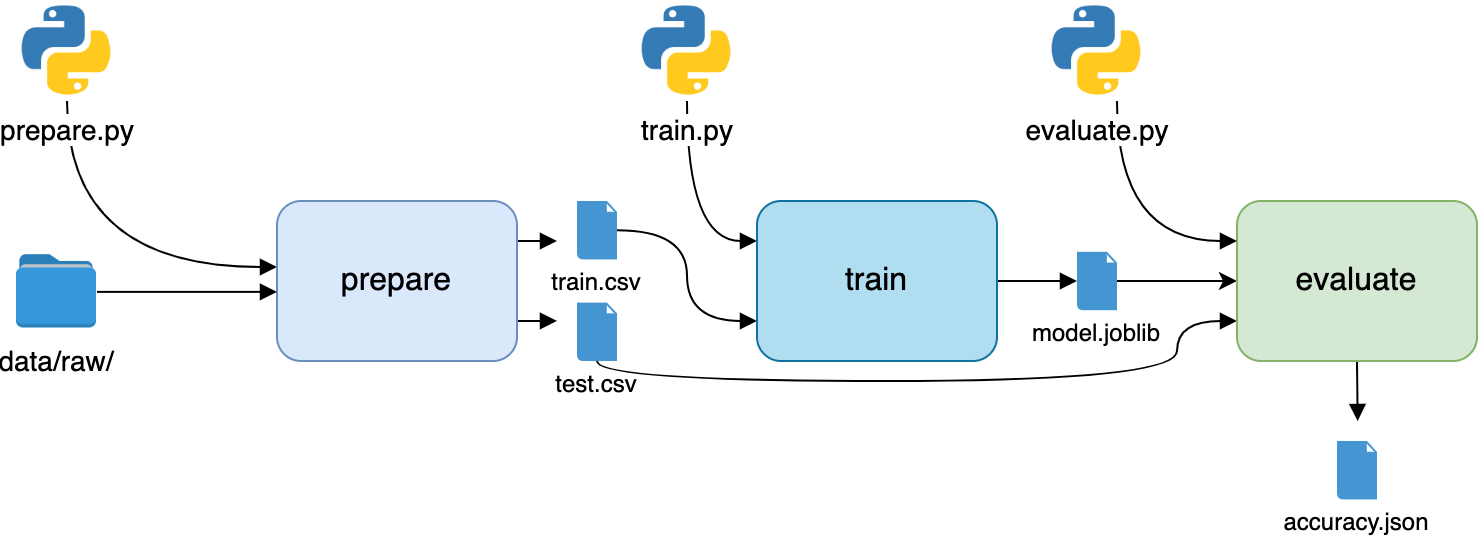
DVC also lets you define processing pipelines in a dvc.yaml file:
stages:
  preprocess:
    cmd: python preprocess.py
    deps:
      - raw/data.csv
    outs:
      - processed/data.parquet
  train:
    cmd: python train.py
    deps:
      - processed/data.parquet
    outs:
      - model.pkl
When you run dvc repro, DVC only executes the stages whose inputs have changed. If raw/data.csv hasn't changed, preprocessing is skipped and DVC uses the cached result. It's intelligent caching based on hashes: change a dependency and only downstream stages are re-executed. Like Make, but for ML data pipelines.
Versioned code (Git) + versioned data (DVC) + frozen environment (Docker) + tracked hyperparameters (MLflow) = complete reproducibility. You can go back to any Git commit and recreate exactly the project state: the data, the code, the environment, and the results. It's every ML engineer's dream.
Flexible remote storage
DVC supports about a dozen backends: S3, GCS, Azure Blob, SSH, HDFS, HTTP, Google Drive, and even a local folder. You start with Google Drive for a personal project, then migrate to S3 in production, without changing your workflow.
Strengths and limitations
Good for: individual projects or small teams, simple file-by-file versioning, reproducible pipelines
Not good for: no native data branches (branches are managed via Git), complex data collaboration, fine-grained versioning within a file (it's all-or-nothing per file)
LakeFS: native Git for your data lakes
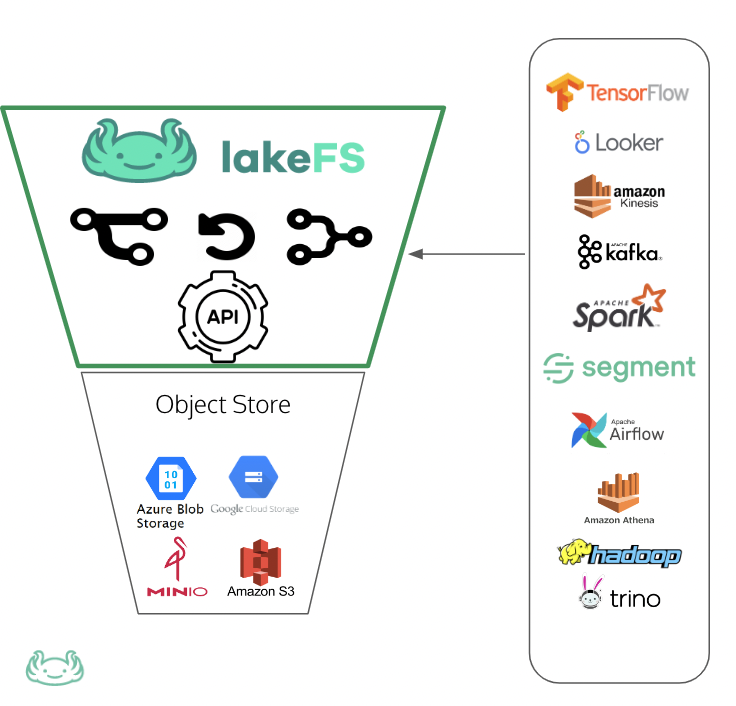
LakeFS goes further than DVC by bringing Git concepts (branches, commits, merge) directly to the data lake. It's not a layer on top, it's a server that sits as a proxy in front of your object storage.
Transparent architecture
LakeFS sits between your applications and your storage (S3, GCS, MinIO). Applications talk to LakeFS exactly as they would talk to S3: same URLs, same APIs. Under the hood, LakeFS manages versioning transparently. Your existing tools (Spark, Trino, dbt) work without modification.
What LakeFS provides
- Branches: create a branch of your data, modify it freely, then merge when it's ready. Exactly like a Git branch.
- Commits: each state is an immutable commit with a descriptive message. You can navigate through history.
- Diff: see exactly which files changed between two commits or two branches
- Merge: merge two data branches, with conflict management
- Pre-commit hooks: run automatic quality checks before each commit (valid schema? Consistent distributions? No PII?)
The workflow becomes natural: you create a branch experiment-new-preprocessing, modify the cleaning pipeline, inspect the results. If it looks good, you merge into main. If it's a failure, you delete the branch. Production data is never touched during experimentation. It's exactly the Git workflow developers know, but for data.
Copy-on-Write: zero duplication
Creating a data branch duplicates nothing. LakeFS uses copy-on-write: only modified files are stored additionally. A 1 TB data lake that's branched only consumes the space of actually modified files. This is fundamental for economic viability: without it, branching TB of data would be prohibitively expensive.
Concrete use cases
- Experiment isolation: each ML experiment works on its own data branch, without interfering with others
- Reproducibility: each training run points to a specific LakeFS commit. You know exactly which data was used.
- CI/CD for data: automatic validation hooks before each merge, like unit tests for code
- Instant rollback: a new preprocessing pipeline corrupted the data? Revert to the previous commit in one command.
- Pre-production testing: test your pipelines on a branch before applying them to production data
Strengths and limitations
Good for: enterprise data lakes, multi-team collaboration, CI/CD for data, environments where traceability is critical
Not good for: more complex to deploy and maintain than a simple tool like DVC, requires a dedicated server
Comparison: DVC vs LakeFS
| Criteria | DVC | LakeFS |
|---|---|---|
| Model | Git extension | Standalone server |
| Deployment | Local CLI, zero infra | Dedicated server to maintain |
| Granularity | Entire file | File/object |
| Data branching | Not native (via Git) | Native with zero-copy |
| S3 compatibility | No | Yes, transparent |
| Ideal use case | Individual projects, small teams | Enterprise data lakes, multi-team |
Data versioning is one building block of reproducibility, not the complete solution. For real reproducibility, you also need to version the code (Git), the environment (Docker/conda), the hyperparameters (MLflow/W&B), and document any manual steps. It's the combination of all these blocks that makes an ML project truly reproducible.
Best practices
- Always record the data version in your experiment logs: DVC hash or LakeFS commit. It's the only way to link a model to its data.
- Automate: integrate versioning into your CI/CD, not as an afterthought. If it's not automatic, it won't get done.
- Separate raw and processed: version raw data and processed data separately. Raw data is immutable; processed data is reproducible.
- Test the data: validate the schema, statistical distributions, and completeness, like a pre-commit hook. Broken data should not be committed.
- Document: each new data version deserves a descriptive commit message. "Added 50K examples from the medical domain" is better than "update data."
Data changes constantly: new examples, label corrections, preprocessing changes. Versioning it gives you the means to understand what happened and why.
1. How does DVC manage to version a 50 GB dataset when Git cannot handle large files?
2. In a DVC pipeline, only the dependency of the last stage has changed. What does dvc repro do?
3. You create a LakeFS branch on a 1 TB data lake for an experiment. How much extra storage does that consume?
4. Is versioning your data with DVC or LakeFS enough to make an ML project reproducible?