The chaos before a Model Registry
You've trained 100 models in 6 months. Which one is in production? Which one was there before? How do you roll back if the new model goes haywire? Which dataset produced this model? What hyperparameters?
Without a registry, it's chaos. Models are scattered across local disks, S3 buckets, different machines. model_v3_final_FINAL_v2.pt: nobody knows what it is, not even the person who trained it 3 months ago.
A Model Registry is a single source of truth for all your models. It's like Git for code, but for ML models. Every model is versioned, documented, traced. You always know exactly which model is in production, where it came from, and how to replace it.
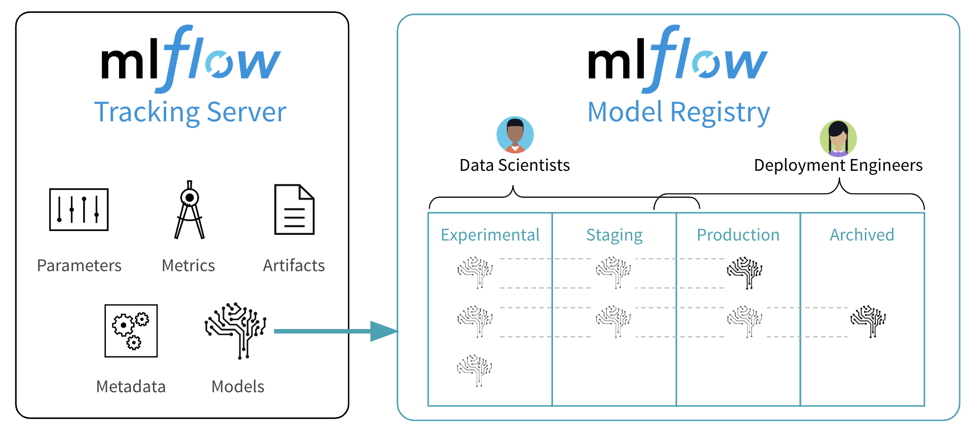
Development (experimentation) -> Staging (pre-production tests) -> Production (live, with real users) -> Archived (retired, but kept for reference). The registry manages these transitions and maintains a complete history. At any point, you know where each model stands.
Core features
Versioning
Each model has numbered versions. V1 = BERT-base trained on 10K examples. V2 = BERT-base with more data. V3 = RoBERTa with a new architecture. Each version is an immutable artifact: once registered, it doesn't change. It's like a Git tag: a frozen snapshot in time.
Complete metadata
For each model version, the registry stores: the code commit hash, the training dataset version, all hyperparameters, metrics on the test set (accuracy, F1, latency), the environment (library versions). Everything. Because without this information, reproducing a result or understanding why a model behaves a certain way becomes a headache.
Model stages
A model goes through well-defined stages: None (not yet ready) -> Staging (undergoing pre-prod testing) -> Production (live with users) -> Archived (retired). Each transition is traced: who promoted it, when, and why. It's a complete audit trail.
Reproducibility
You find a production model making weird predictions. You need to be able to trace back to exactly which code, which dataset, which hyperparameters produced it. Without this traceability, production debugging is a nightmare. The registry is the thread that always leads you back to the origin.
MLflow Model Registry
MLflow is the most widely used model registry tool. It integrates with MLflow Tracking (where you logged your training experiments), creating a natural pipeline: you train, you log, you register the best model in the registry.
The typical workflow
- You train a model via MLflow -> this creates a run with all metrics
- You register the model in the registry -> this creates a version linked to the run
- You move the version to "Staging" -> it's marked for pre-production testing
- You test on your staging environment -> everything looks good
- You move to "Production" -> the model is live
- Problem in prod? -> you revert to the previous version in a few clicks, no panic
The MLflow Model format
MLflow defines a standardized model format called MLmodel. This format encapsulates everything needed to reuse the model:
- The model weights in the native format (PyTorch, TensorFlow, ONNX, etc.)
- An
MLmodelfile describing the supported interfaces (called "flavors") - A
conda.yamlorrequirements.txtto recreate the exact environment - A signature defining the model's input/output schema (which columns as input, what format as output)
"Flavors" are a powerful MLflow concept: a single model can be loaded in multiple ways. A PyTorch model is registered as both pytorch (loadable as a native PyTorch module) and python_function (loadable as a simple Python function with predict()). This allows the serving system to load any model uniformly, whether it's PyTorch, TensorFlow, scikit-learn, or anything else. It's the abstraction that makes deployment framework-agnostic.
Deployment from the Registry
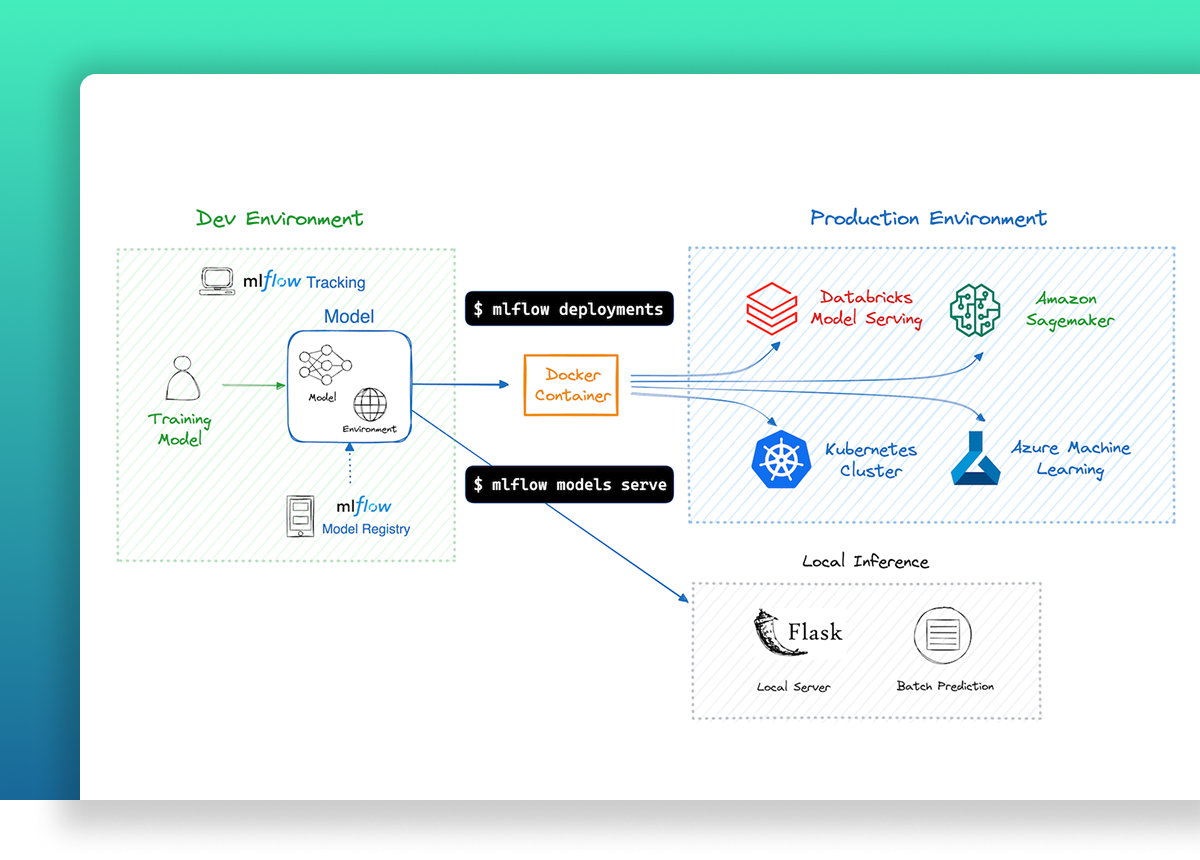
MLflow lets you deploy a model directly from the registry, without copy-pasting files:
- Local inference: load the model via the Python API (
mlflow.pyfunc.load_model()) - REST API:
mlflow models servelaunches an HTTP inference server in one command - Docker:
mlflow models build-dockercreates a container image ready to deploy - Cloud: direct deployment to SageMaker, Azure ML, or Databricks
Strengths and limitations
Strengths: open source and free, native integration with the entire MLflow ecosystem, stage and transition management, standardized format that facilitates deployment, complete Python and REST APIs
Limitations: the web interface is functional but basic for model management, no granular access control without the paid Databricks version, very large models (tens of GB) require adapted storage (S3, GCS)
Hugging Face Hub
The GitHub of ML models
The Hugging Face Hub is a community platform that combines model registry, dataset sharing, and demo application hosting. It's become the GitHub of ML models, with over 500,000 public models. If MLflow is the enterprise registry, the Hub is the global public square of ML.
Features
- Model Cards: structured documentation describing the model, its capabilities, limitations, and biases. It's become an industry standard.
- Git versioning: each model is a Git repository (with Git LFS for large files). You have the complete modification history.
- Inference API: test inference directly from the model page, without writing a line of code
- Spaces: deploy demo applications with Gradio or Streamlit, hosted for free
- Discussions: comments, questions, and pull requests on models (exactly like GitHub)
- Collections: thematic model groupings (e.g., all French-English translation models)
- Leaderboards: model rankings on standardized benchmarks
Hugging Face offers a private Hub (Enterprise Hub) for organizations. Models stay private, with fine-grained access management, audit logs, and SOC2 compliance. It's a popular option for companies that want the Hugging Face workflow and simplicity without exposing their models to the public.
Integration with the HuggingFace ecosystem
The Hub integrates directly with HuggingFace libraries, making it extremely practical:
- Transformers:
model.push_to_hub()to publish,AutoModel.from_pretrained("user/model")to load - Datasets:
load_dataset("user/dataset")to load a dataset in one line - PEFT: sharing LoRA adapters (small files that modify the behavior of a large model)
- Safetensors: secure format for model weights (see the security callout below)
Strengths and limitations
Strengths: massive and active community, Model Cards as a documentation standard, exceptional ease of use, free Inference API for testing, native Git versioning
Limitations: no formal stage management (staging/production) like MLflow, no native integration with enterprise CI/CD pipelines, oriented toward community sharing more than lifecycle management, Enterprise Hub cost for large organizations
Comparison
| Criteria | MLflow Registry | HuggingFace Hub |
|---|---|---|
| Type | Enterprise registry | Community platform |
| Stages (staging/prod) | Yes, native | Not native |
| Versioning | Sequential (v1, v2, v3) | Git (branches, commits) |
| Documentation | Basic (tags, description) | Rich, structured Model Cards |
| Community | N/A | 500K+ public models |
| Deployment | Multi-cloud (SageMaker, Azure) | Inference API + Spaces |
| Hosting | On-premise or cloud (you manage) | Cloud SaaS / Enterprise |
| Cost | Free (open source) | Free (public) / Paid (private) |
ML models can contain malicious code, especially pickle files (used by default by PyTorch). Loading a pickle file is equivalent to executing arbitrary code: a malicious model could delete your files or exfiltrate your data. The safetensors format from HuggingFace solves this problem: it stores only tensors (the numbers) without any executable code. Always prefer safetensors for model storage and sharing.
In practice: combining both
For an enterprise ML team, the most common approach combines the strengths of both tools:
- MLflow Model Registry for internal lifecycle management (staging, production, rollback, audit trail)
- Hugging Face Hub (private or public) for sharing, rich documentation (Model Cards), and collaboration
- Webhooks and CI/CD pipelines to automate transitions between the two systems (e.g., a validated model in MLflow is automatically pushed to the private Hub)
This combination gives the best of both worlds: the rigor of MLflow lifecycle management and the community richness of the Hub.
1. In a model registry, what exactly does « version 3 » of a model refer to?
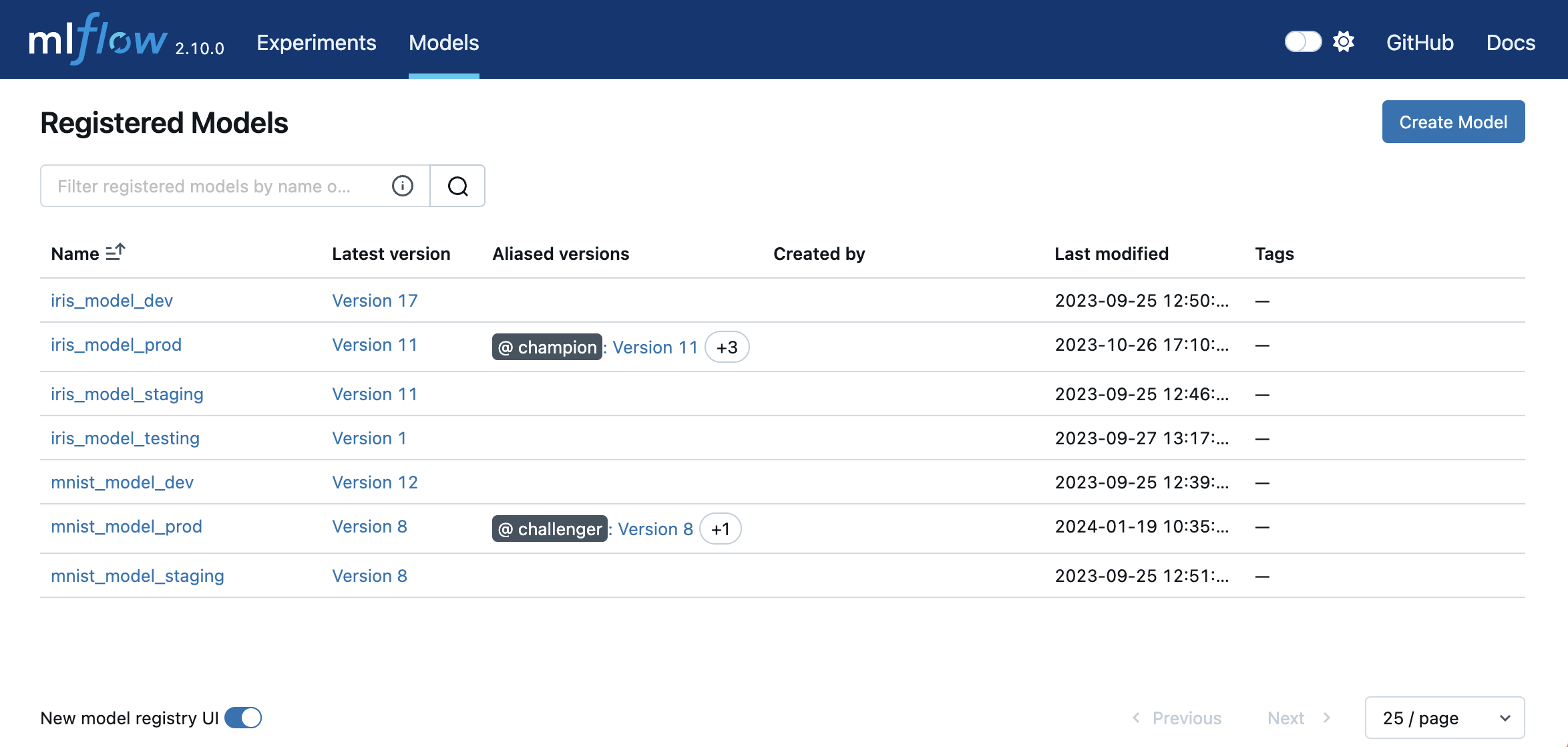
2. Instead of hard-coding « version 7 » in production code, the page shows the use of a champion alias. What does that change?
3. Why does the page recommend the safetensors format over pickle files for storing and sharing models?
4. A team wants to manage staging, promotion to production and rollback for its internal models. Why isn't the Hugging Face Hub alone enough?