The Story: The Prompt That Broke Production
A prompt is the text sent to the model: the standing instruction (the system prompt) plus the user's question. It is the only steering lever you have on a model you did not train yourself. The lesson on prompt engineering covers how to write one; this page covers the next question, which is purely industrial: how do you manage thirty of them once they face customers?
Here is the standard scenario. You deploy a support chatbot. Monday it answers well. Wednesday you change one sentence of the system prompt to make it warmer. The complaints start: the bot answers beside the point.
You ask the developer what changed. The answer: "I don't know, it was hardcoded, someone may have edited a line."
At that point there is no way to know which version was live, and no way to roll back. That gap is what prompt management fills.
The Problem: The Prompt Is the New Code
In a conventional application, behaviour is determined by code. In an application built on a large language model (LLM) behaviour is largely determined by the prompt. Editing it changes the output as much as editing code, sometimes more.
Yet many teams still handle it like this:
system_prompt = """You are a friendly assistant.
You help people.
You are honest.
"""
Hardcoded. No version number, no history, no test. Fine for a prototype. In production, in front of real users, it is a time bomb.
Treating the prompt as code beats treating it as nothing, but the sharper analogy lies elsewhere: the prompt now plays the role the model played in classical machine learning. Nobody hardcoded a model into an application, you had a numbered, tested, evaluated model sitting in a registry. Prompts demand the same discipline. The lesson on the model registry describes that registry for models; what follows is its equivalent for prompts.
The Four Concrete Needs
Knowing who changed what, and when
You have a dozen prompts in service. One was edited yesterday. Which, by whom, why? Without a dated, attributed history the question has no answer. This is precisely what Git gives code, and for the same reason.
Testing a change before suffering it
How do you know a new prompt is better? Shipping it and waiting for complaints is not a protocol. You run it against a set of real questions and compare. That is the subject of evaluating LLMs.
Letting non-programmers iterate
Product managers and domain experts want to adjust prompts themselves. Routing every comma through a developer is slow. A no-code interface is the answer.
Shipping the prompt without shipping the app
Changing a prompt should not require rebuilding and redeploying the whole application. It is a configuration change, not a recompilation.
LangSmith: LangChain's Tooling
Overview
LangSmith is the tool built by LangChain to manage prompts, test chained model calls, and observe what happens in production.
The prompt repository
LangSmith keeps prompts in a central library. Each saved state is a commit, as in Git: a dated snapshot of the text with an explanatory message. The interface shows the diff (what was removed, what was added) between any two versions.
Each commit can carry a tag. LangSmith reserves two tags that map to named deployment targets: staging and production. You are free to create other tags, for instance a working tag for whatever is currently under trial.
Once a version is judged good, you promote it to production. Not a line of the application changes: it fetches, at startup or on each call, whichever prompt carries the production tag. Promoting to production does not remove the version from staging, a commit can sit in both at once.
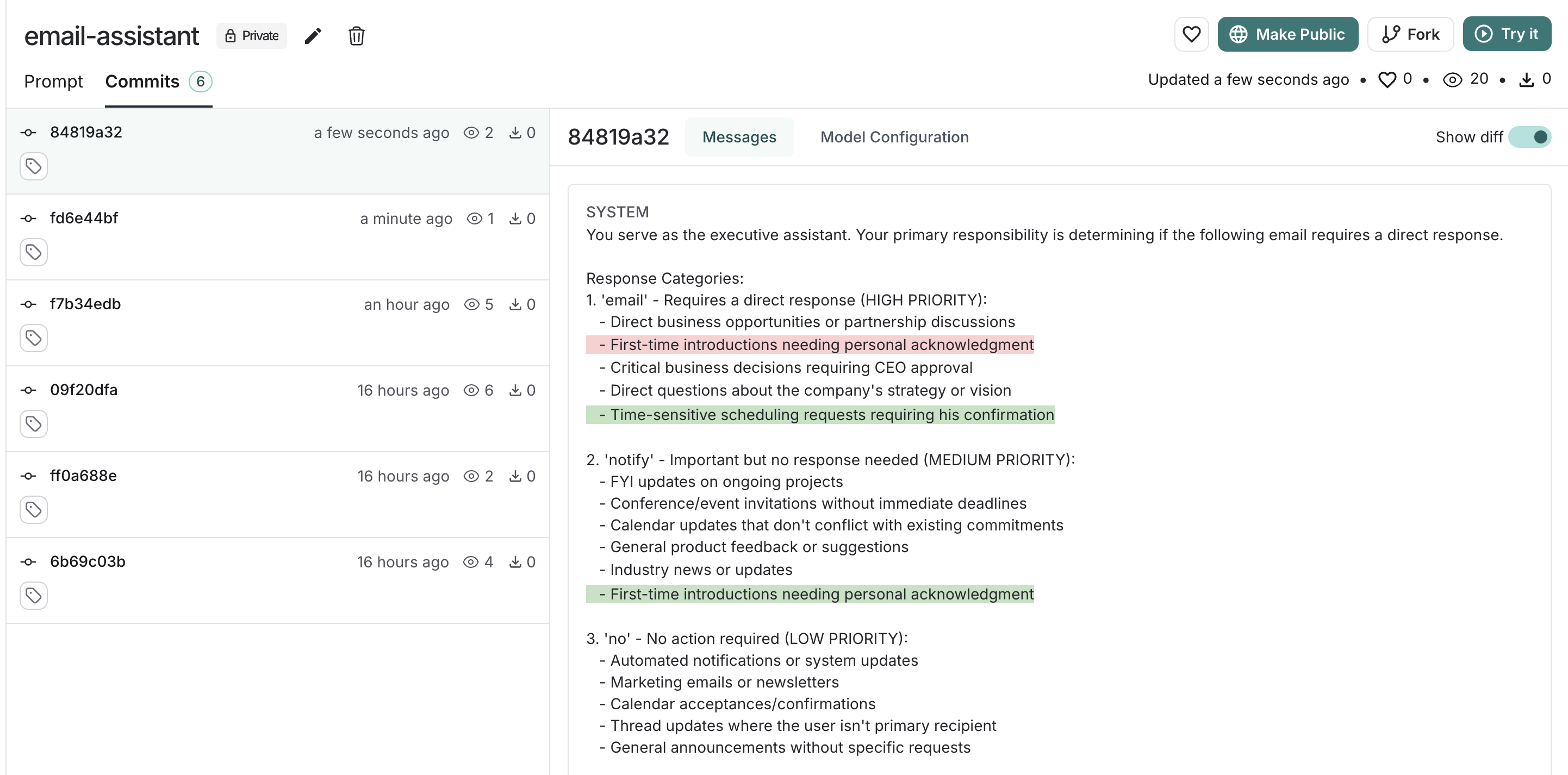
The playground: trying things without writing code
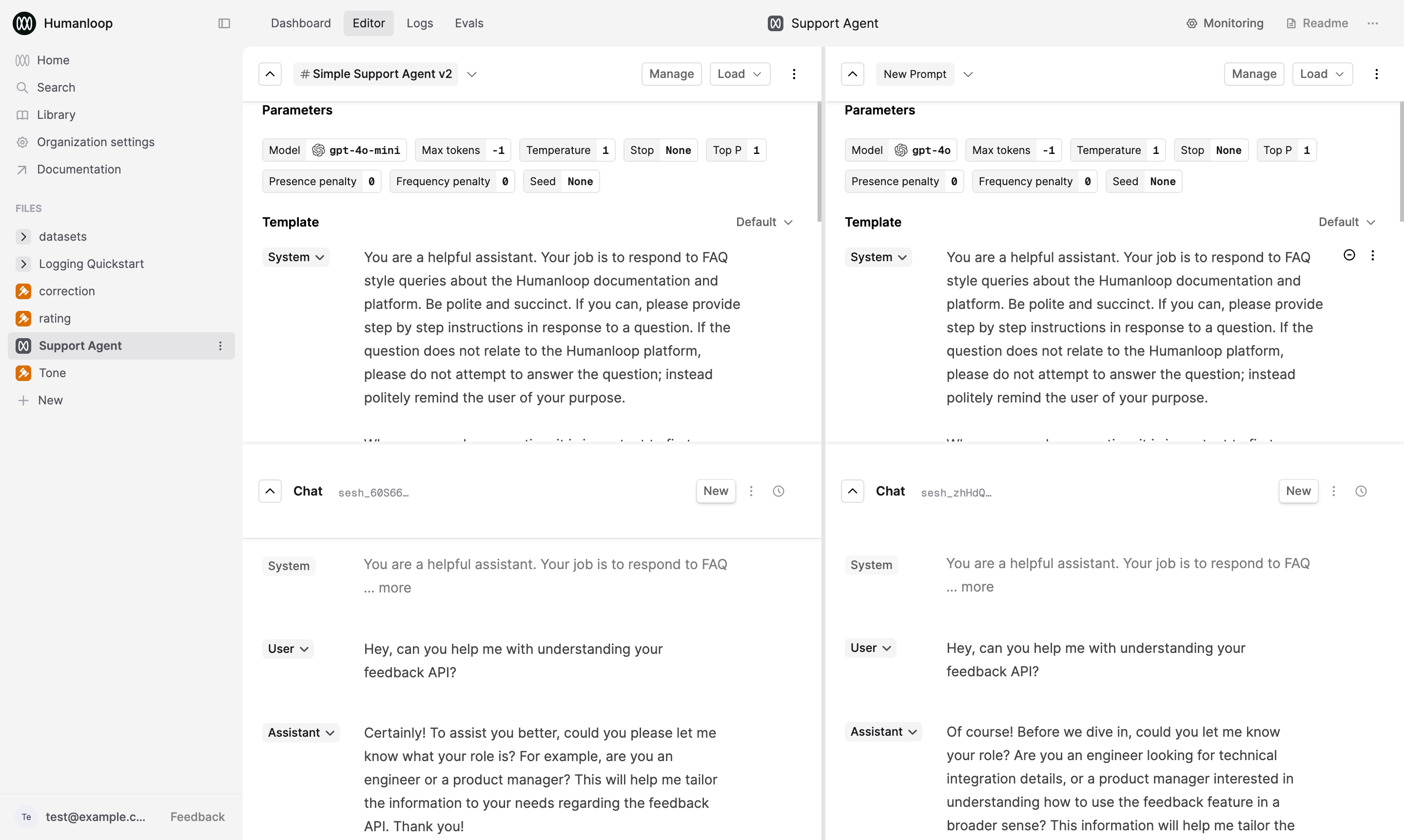
The playground is a page where you type a prompt and an input and see the model's answer immediately. You run through a dozen variants in minutes: this one answers too long, that one too stiff. You adjust and compare.
Evaluation: measuring instead of eyeballing
You build an evaluation set: a few dozen to a few hundred realistic questions, with the expected answer where one exists. On every new prompt version, the tool replays the whole set, scores the answers, and shows the comparison against the previous version.
The exact analogy is the unit test: a net that fires by itself and tells you whether the change broke something. How that set is built, and where it goes wrong, is the subject of evaluating LLMs.
Tracing: seeing what actually happened
For each user question, the tool records an execution trace: which exact prompt was used, which call went to the model provider, how the answer was parsed, which database lookups occurred, how long each step took, how many tokens were burned. That is the subject of LLM observability.
(1) Edit the prompt in the playground. (2) Replay the evaluation set and compare against the live version, the question is never "is it good?" but "is it better than what already runs?". (3) Check token count: a longer prompt costs more on every call, forever. (4) Promote to staging. (5) Watch it on real traffic. (6) Promote to production. (7) Keep watching. None of this touches application code.
Humanloop: the collaborative platform, and its disappearance
Humanloop is gone. Its founders and much of its team joined Anthropic in August 2025 in a deal covering people rather than the company or its intellectual property, and the platform was shut down in September 2025. It is kept here because its screenshots illustrate two mechanisms cleanly, and because its ending makes the one durable point of this chapter: the tool you pick today may not exist in a year. Mechanisms outlive brands.
The visual editor: the prompt as a form
Rather than a raw text file, the editor presents the prompt as an editable document: placeholder variables, written here as {{user_input}}, replaced at run time by the real question; conditionals; a preview that recomputes as you type. Someone who does not program can assemble a parameterised prompt without touching code.
The production A/B test
Two prompt versions run at once. Half the users get version A, half get version B, and you compare the numbers. This is a controlled experiment, exactly the setup described in A/B testing for machine learning, including its traps, chiefly that a gap observed on thin traffic means nothing.
Beware a widespread misconception: this is not one vendor's exclusive feature. The mechanism always reduces to the same gesture (tag two versions, route a fraction of traffic to each) and most prompt-management platforms, LangSmith included, support it.
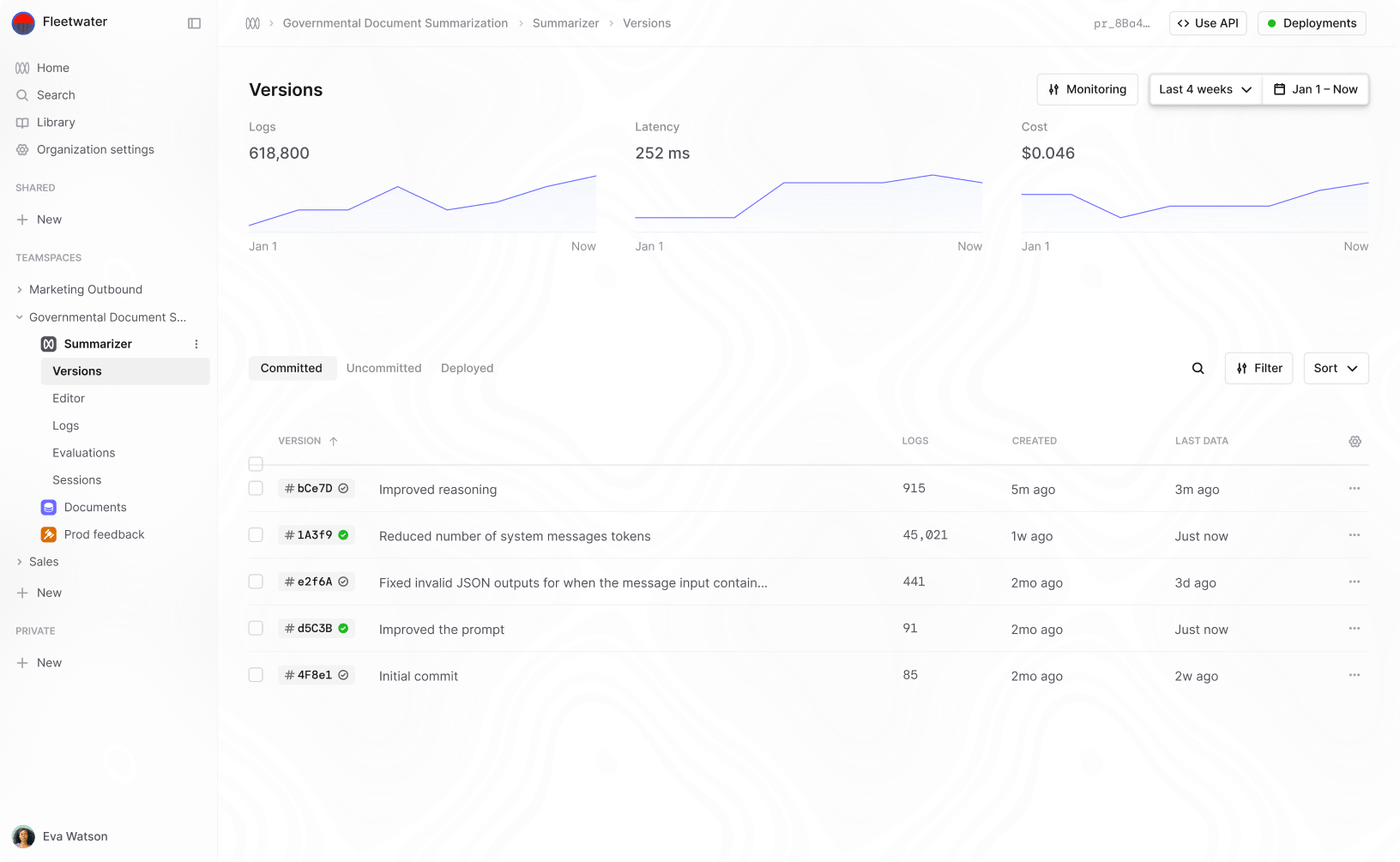
The dashboard: tying numbers to versions
The useful part is not the dashboard itself, it is that the numbers are attached to the prompt version. Four indicators are enough: calls per day, token cost, a satisfaction signal (the thumbs-up or thumbs-down the user can click) and error rate.
Attached to a version, they answer the one question that matters after a deploy: did this change make anything worse?
The phrase in circulation is prompt-as-config: the prompt is treated as a setting, not as code. The application fetches it at call time through the platform's application programming interface (API). The product manager changes the setting; nobody redeploys.
The flip side, which no brochure mentions: an instruction editable without code review is exactly that, editable without code review. The system prompt usually carries the service's safety and refusal rules. Who may promote a version to production is therefore an access-control question, not an ergonomics one. See guardrails in production for what those textual rules do, and mostly do not, guarantee.
The six mechanisms, independent of any brand
Products get renamed, acquired, or shut down; the vocabulary holds. These six building blocks are what you will meet in any documentation or any vendor pitch:
| Mechanism | What it does | What breaks without it |
|---|---|---|
| Versioned snapshot (commit) | Freezes the exact prompt text, dated and attributed | No way to know what was running, or to roll back |
| Diff | Shows what was removed and added between two versions | You hunt for the changed sentence by eye |
| Deployment tag | Designates the live version, per environment | Code and prompt must ship together |
| Placeholder variables | Separates fixed text from request data | Every use case duplicates the whole prompt |
| Replayable evaluation set | Replays the same questions on every version | Regressions surface as customer complaints |
| Execution trace | Records call, latency, tokens, version used | No numbers to attach to a decision |
A few names in circulation when this page was written, all worth re-checking before any choice: LangSmith (LangChain's, hosted, detailed tracing), Langfuse (open source, self-hostable, the deciding factor when the prompts themselves are confidential), PromptLayer (logging and versioning, aimed at non-technical teams), Braintrust (evaluation-centric), Portkey (a call gateway with prompt management built in, see gateway and load balancing).
Hardcoding prompts works, and it is faster to start with. The tipping point is not a magic number of prompts: it is the day more than one person can edit them, or the day a customer depends on the behaviour. From then on, missing history is not an inconvenience, it is an inability to investigate.
Why this matters when reading documentation
Products and papers about operating a model very often describe a prompt-management scheme without using that name. Three motifs recur, and it is worth knowing which are unremarkable:
- Automatic prompt selection based on the request, the customer, or the language. Common.
- Automatic prompt generation or rewriting from measured results, the system edits its own instruction in light of its errors, with no human in the loop. This is where the interesting claims live, because the feedback loop is the non-obvious part.
- Promotion gated by automatic evaluation: the new version reaches production only if it beats the incumbent on a test set, by a stated numeric criterion. The tagging mechanism is unremarkable; the decision rule may not be.
The rule of thumb: versioning a prompt has been standard practice for years. What distinguishes a system is whatever decides the content or the promotion.
Best Practices
- Record every change, however small. A history is only worth anything if it is complete.
- Test before deploying, on a representative evaluation set that grows with every real incident. An incident not added to the set will recur.
- Write down why. The message attached to a version should say what was wrong and what was tried, not what was typed, the diff already shows that.
- Keep prompt and code separable, so either can be fixed without redeploying the other.
- Watch after the deploy, with the numbers attached to the version: satisfaction, token cost, latency. A prompt does not rot on its own, but the underlying model can be updated or retired by its provider, see model lifecycle.
1. One sentence of the system prompt was changed « somewhere in the code » and the bot has been answering off the mark since Wednesday. What is missing, according to the page?
2. How does a team change the production prompt without redeploying the application?
3. Prompt-as-config lets the product manager edit the instruction without going through a developer. What downside does the page flag?
4. In a side-by-side comparison, panel A runs the old prompt on one model, panel B runs the new prompt on a different model. What is the problem?