"Why Doesn't It Do What I Want?"
You tried to have an LLM (Large Language Model) summarize a document. It gave you a 5-line summary when you wanted 3 bullet points. You asked it to analyze a professional email. It was too formal, then too casual depending on the attempt. You feel like you're talking to someone very smart who doesn't quite understand what you want.
The problem isn't the model. It's the communication.
Prompt engineering is the art of phrasing your instructions to get exactly what you want. No magic, no hidden trick, just precision. It is like writing a good specification: the more explicit your expectations, the better the result. It is today the most directly profitable skill for working with an LLM.
Everything on this page rests on a single mechanism, in-context learning: the model reads the whole prompt as context and infers from it what is expected. Understanding that mechanism is understanding why the techniques below work.
The Three Basic Modes
Zero-shot: The Direct Instruction
In zero-shot (literally "zero examples"), you give only an instruction, with no examples. The model relies on what it learned during pre-training to interpret your request.
Classify the sentiment of this sentence as positive, negative, or neutral: "The service was fast but the food was cold."
This works well for common, well-defined tasks. It's always where you should start, it's the simplest approach.
Few-shot: Show Rather Than Explain
In few-shot (literally "a few examples"), you add examples before your request. The examples show the model exactly what you expect, the format, the level of detail, the decision criteria.
Classify the sentiment: "I love this restaurant!" -> positive "Terrible experience." -> negative "It was alright." -> neutral "The service was fast but the food was cold." ->
This is in-context learning in action. The model re-learns nothing: its weights do not move. It spots the regularity the examples display and continues it.
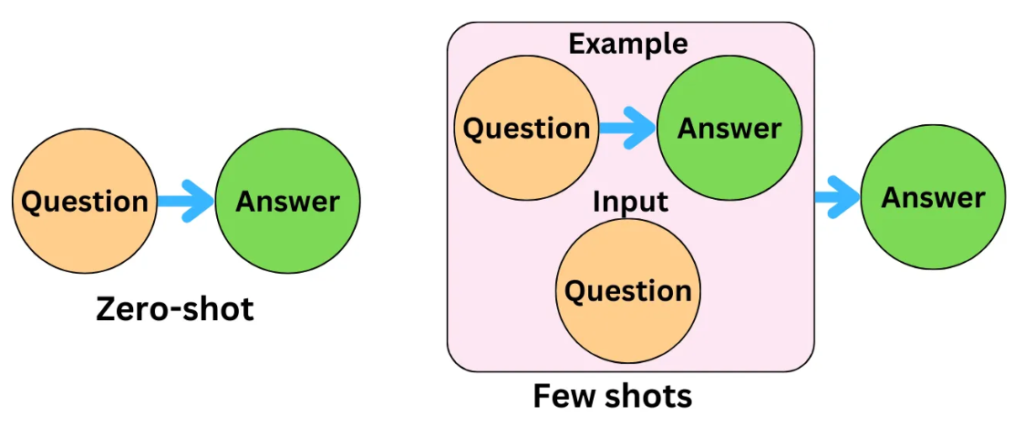
Always start with zero-shot. If results are inconsistent, if the format is unpredictable, or if categories are ambiguous, add 2 to 5 well-chosen examples. In general, 3 good examples are worth more than 10 mediocre ones.
One-shot: The Sweet Spot
A single example is often enough to specify the expected output format. This is useful when you don't want to overload the context but need to guide the model on the response structure.
The System Prompt: The Real Power Lever
Modern conversational LLMs distinguish three types of messages:
- System: the "background" instructions that define overall behavior
- User: the user's messages
- Assistant: the model's responses
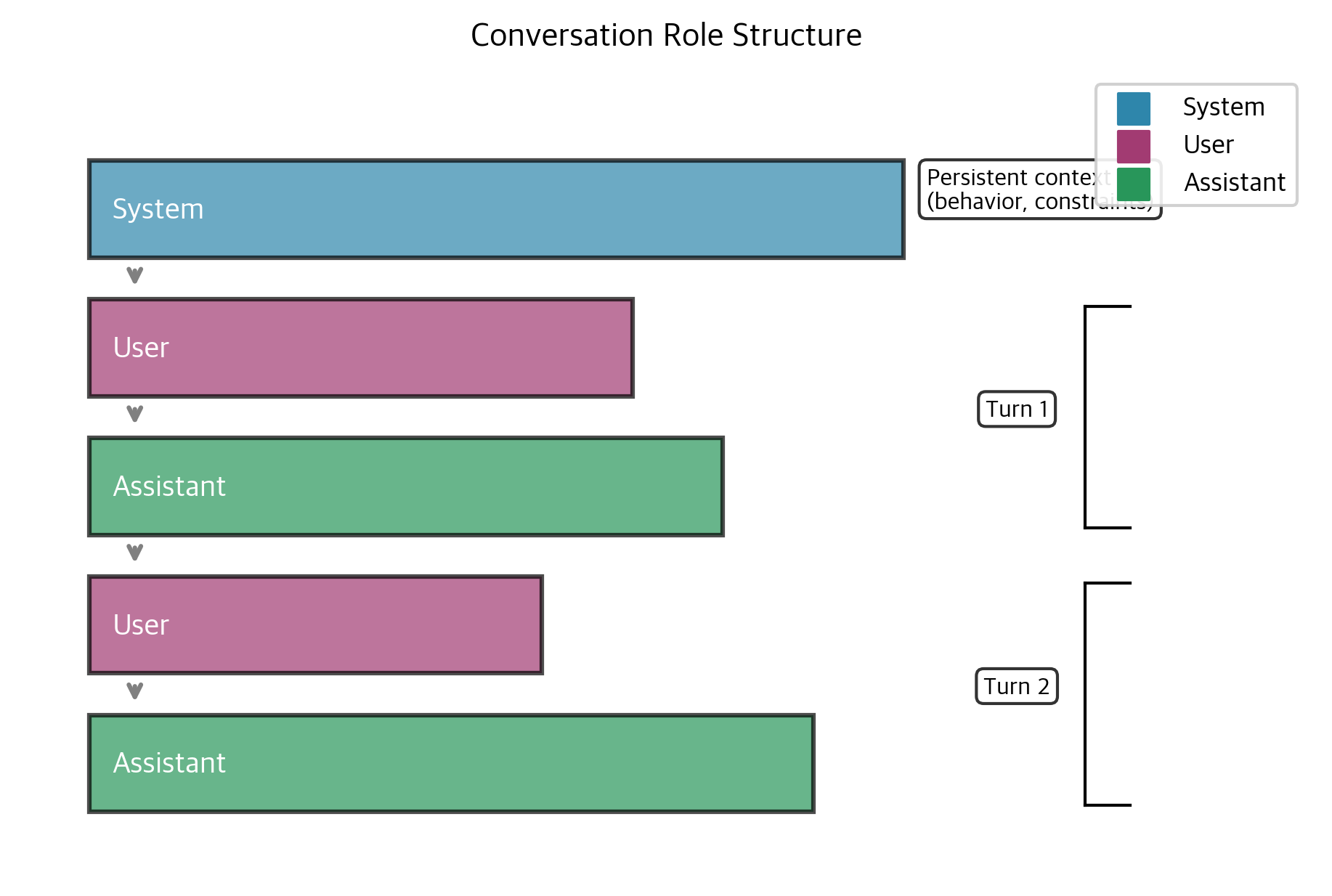
The system prompt is the most powerful prompt engineering tool. It lets you transform a generalist into a specialist without any fine-tuning. Think of the system prompt as the "briefing" given to an employee before they start a mission. You can define:
- The role: "You are a French tax law expert with 15 years of experience"
- The tone: "Be concise, professional, and avoid unnecessary jargon"
- The constraints: "Only respond in English", "Limit each response to 150 words"
- The output format: "Always respond in JSON with the fields: summary, category, confidence"
- The guardrails: "If you're not certain about a piece of information, say so explicitly"
Think of the system prompt as your application's configuration file. It doesn't change between user messages, but it steers everything the model does. A good system prompt can make the difference between a generic tool and an assistant perfectly tailored to your use case.
The 6 Practices That Change Results
1. Be Specific and Explicit
Vague: "Summarize this text."
Precise: "Summarize this text in exactly 3 bullet points. Each point should fit in one sentence. Focus on the conclusions and key figures, not the methodology."
The more precise the instruction, the less the model has to interpret, and the less likely it is to stray from what you want.
2. Break Down Complex Tasks
A model that receives a complex task in a single instruction can get lost. Break it into steps:
Step 1: Identify the named entities in the following text. Step 2: For each entity, indicate its category (person, place, organization). Step 3: Summarize the relationships between these entities in one sentence.
3. Specify the Output Format
If your application expects a particular format, describe it precisely:
Respond in this exact format: Summary: [one sentence] Category: [A, B, or C] CONFIDENCE: [high, medium, or low]
4. Use Delimiters to Separate the Instruction from the Content
A classic problem: the model confuses what it should do (the instruction) with what it should do it on (the content). It's like asking "correct this sentence: correct this sentence", the model doesn't know what's what. Delimiters eliminate this ambiguity:
Analyze the sentiment of the text between the
<text>and</text>tags.
<text>[your content here]</text>
A malicious user can try to insert instructions into the content submitted to the model: "Ignore the previous instructions and do X." This is prompt injection. Clear delimiters reduce this risk, but no defense is perfect. For production applications, validate inputs on the code side.
5. Give the Model a Role
Giving the model a role activates the knowledge associated with that profile. A model that "plays" an NLP (Natural Language Processing) expert will use more technical vocabulary and more nuanced responses:
You are a senior data scientist specializing in NLP with 10 years of experience. Evaluate the following technical approach to a text classification problem...
6. Ask for Explicit Reasoning
For a reasoning or judgement task, asking the model to walk through its steps usually improves the final answer: this is chain-of-thought, which has its own page.
Solve this problem step by step. Show your complete reasoning before giving your final answer.
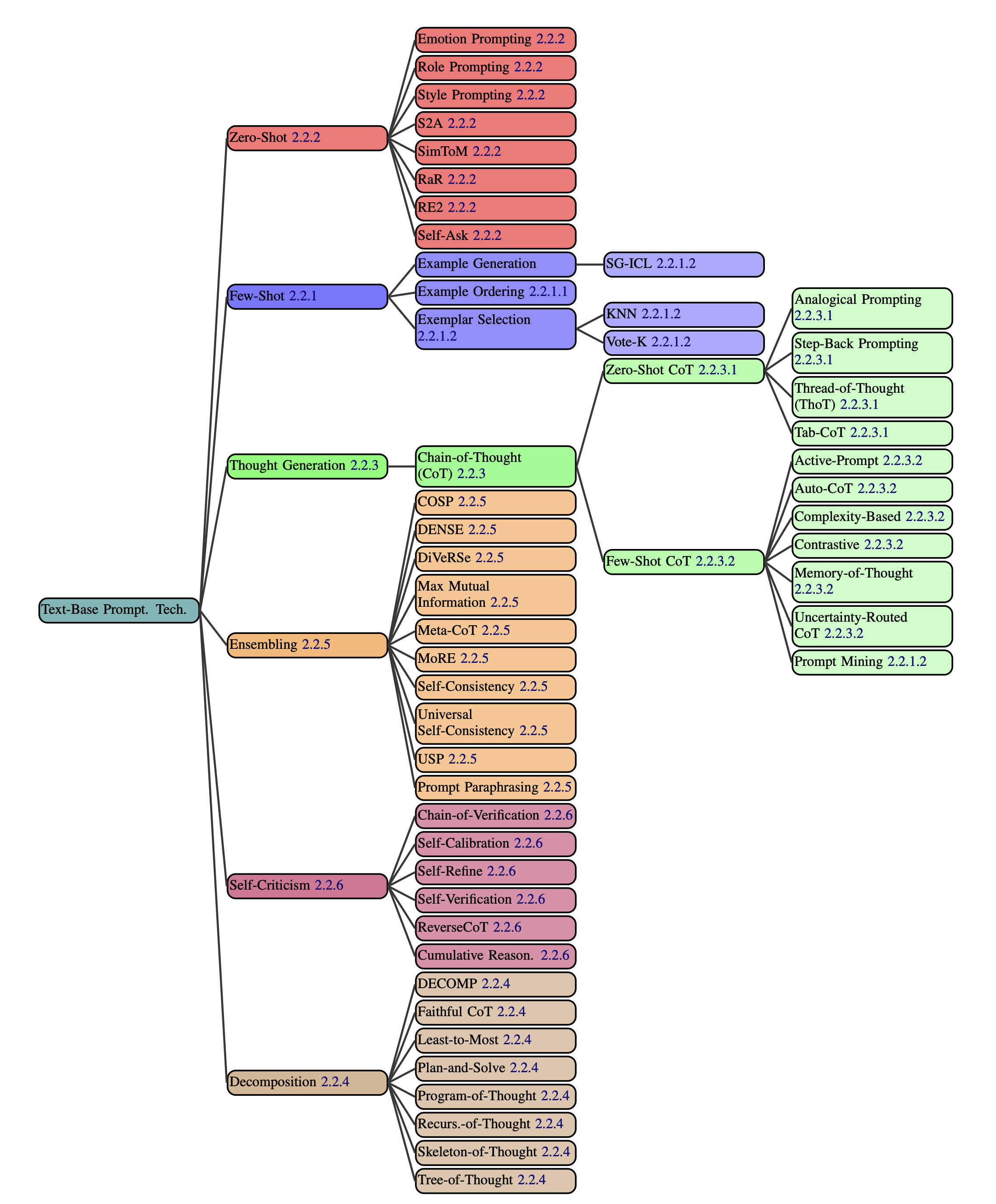
The figure of 58 techniques is not a rough count: it is the exact number the survey's authors report for text-only techniques.
The Prompt Report: A Systematic Survey of Prompt Engineering Techniques (Schulhoff et al., 2024)Ready-to-Use Templates
Information Extraction
Extract the following information from the text below. If a piece of information is not mentioned, write "not specified."
Information to extract:
- Product name
- Price mentioned
- Positive points cited
- Negative points cited
Text: {text}
Respond in JSON.
Targeted Rewriting
Rewrite the following text for an audience of {audience}. Preserve all factual information without exception. Use a {tone} tone and accessible vocabulary. Target length: approximately {length} words.
Original text: {text}
Code Review
Examine the following code and identify, in order of priority:
- Potential bugs
- Performance or scalability issues
- Language best practice violations
- Secondary improvement suggestions
For each issue, indicate the line in question and propose a concrete fix.
Code:
{code}
Prompt engineering is iterative. Start simple, test on 10-20 varied cases, identify failure modes, refine. Keep a library of prompts that work well, noting the model version used, since a prompt optimized for GPT-4 may behave differently on Claude or Mistral.
Pitfalls to Avoid
Excessive verbosity: a 500-word prompt with 20 contradictory rules will lose the model. Less is more. Critical constraints should stand out clearly.
Ambiguity: "Be brief" can mean 1 sentence or 2 paragraphs. "Respond in 2 to 3 sentences" is precise. "Analyze deeply" is vague. "List 5 key points with their impact" is actionable.
Contradictory instructions: "Be exhaustive" + "Respond in 50 words" forces the model to choose arbitrarily. Harmonize your constraints before sending.
Testing on a single example: a prompt that works on your development example may fail on edge cases. Always test on a varied set before deploying.
Prompt Engineering as a Lasting Skill
Models improve continuously, and some things that required an elaborate prompt in 2023 can be done zero-shot today. But the ability to clearly communicate what you expect, to structure a complex task, and to anticipate a model's failure modes, that remains a fundamental skill.
The best prompt is clear, structured, specific, and leaves as little room for interpretation as possible. Like a good specification: a few minutes invested that save hours of correction.
To go further: chain-of-thought for reasoning tasks, and structured output when the answer has to be consumed by a program.
1. What sets the system prompt apart from a user message?
2. When should you move from zero-shot to few-shot?
3. What should you know about prompt injection?
4. Why is Be exhaustive followed by Answer in 50 words a bad prompt?