The Local Inference Revolution
In March 2023, Georgi Gerganov created llama.cpp: a pure C/C++ project that runs LLMs without CUDA (NVIDIA's GPU programming language), without Python and without an NVIDIA GPU. Overnight, everyone could run a 7 billion parameter model on an ordinary laptop. No cloud needed, no expensive graphics card needed.
Like GPTQ and AWQ, GGUF quantization is post-training: you take an already trained, published model, convert it, and train nothing. It sits at the opposite end from QAT, which imposes the constraint during training. So what sets GGUF apart from its cousins is not which side of the line it is on, but its target: ordinary hardware rather than datacentre GPUs.
llama.cpp democratized LLMs. Instead of paying a provider per token or renting a GPU by the hour, you run the model on your own machine: no data leaves it, and no remote service is required. This project spawned an entire ecosystem of applications: Ollama, LM Studio, Jan, GPT4All, and many more.
The GGUF Format: Everything in One File
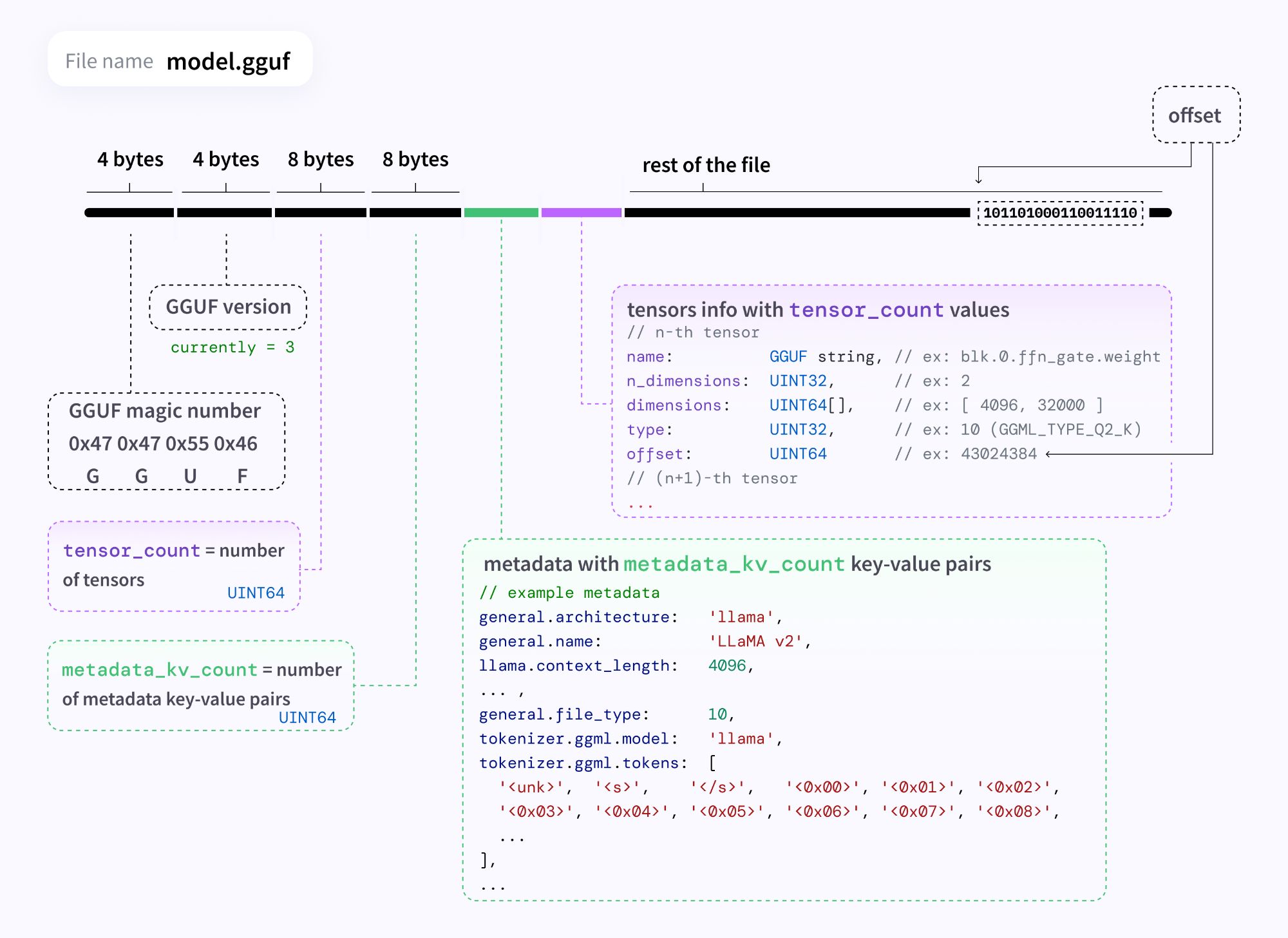
GGUF is llama.cpp's file format, the abbreviation reads GGML Universal File, after GGML, the project's compute library, which also gave its name to the earlier format. It is a binary format designed to be self-sufficient. A single file contains absolutely everything you need for inference:
- Header: format identifier, version, number of tensors (the arrays of numbers that make up the model)
- Metadata: model architecture, settings, the complete tokenizer (the thing that cuts text into tokens), and the chat formatting template
- Tensors: the model weights themselves
The advantage is huge: no more juggling between a config file, a tokenizer file, and separate weight files. You download one file, you run it. That's it.
GGUF Quantization Types
This is where things get interesting. GGUF offers several compression levels, each with a different tradeoff between size and quality.
How to read these names, because they follow a rule: the digit is the target bit width, the letter K marks the "k-quant" family, and the _S, _M or _L suffix (small, medium, large) says how generous the mixture is.
Q-quants (first generation)
- Q4_0/Q4_1: 4 bits, the original format. Functional but rudimentary.
- Q5_0/Q5_1: 5 bits, better quality but larger.
- Q8_0: 8 bits, nearly lossless but takes a lot of space.
k-quants (recommended today)
They combine two distinct ideas, which often get conflated:
1. Two-level scales. Instead of one scale factor per group of 32 weights, k-quants gather 256 weights into a "super-block" split into 16 sub-blocks of 16. Each sub-block gets its own scale, but encoded in only 6 bits, and those small scales are themselves scaled by one global value for the super-block. So you get a very local scale (hence faithful rounding) at far less metadata cost than storing 16 full-precision scales.
2. A mixture of precisions across tensors. That is what the _S, _M, _L suffixes encode: tensors judged more sensitive (typically the attention value projections and some feed-forward layers) get a more generous format than the rest. Hence file sizes that never land exactly on the number in the name.
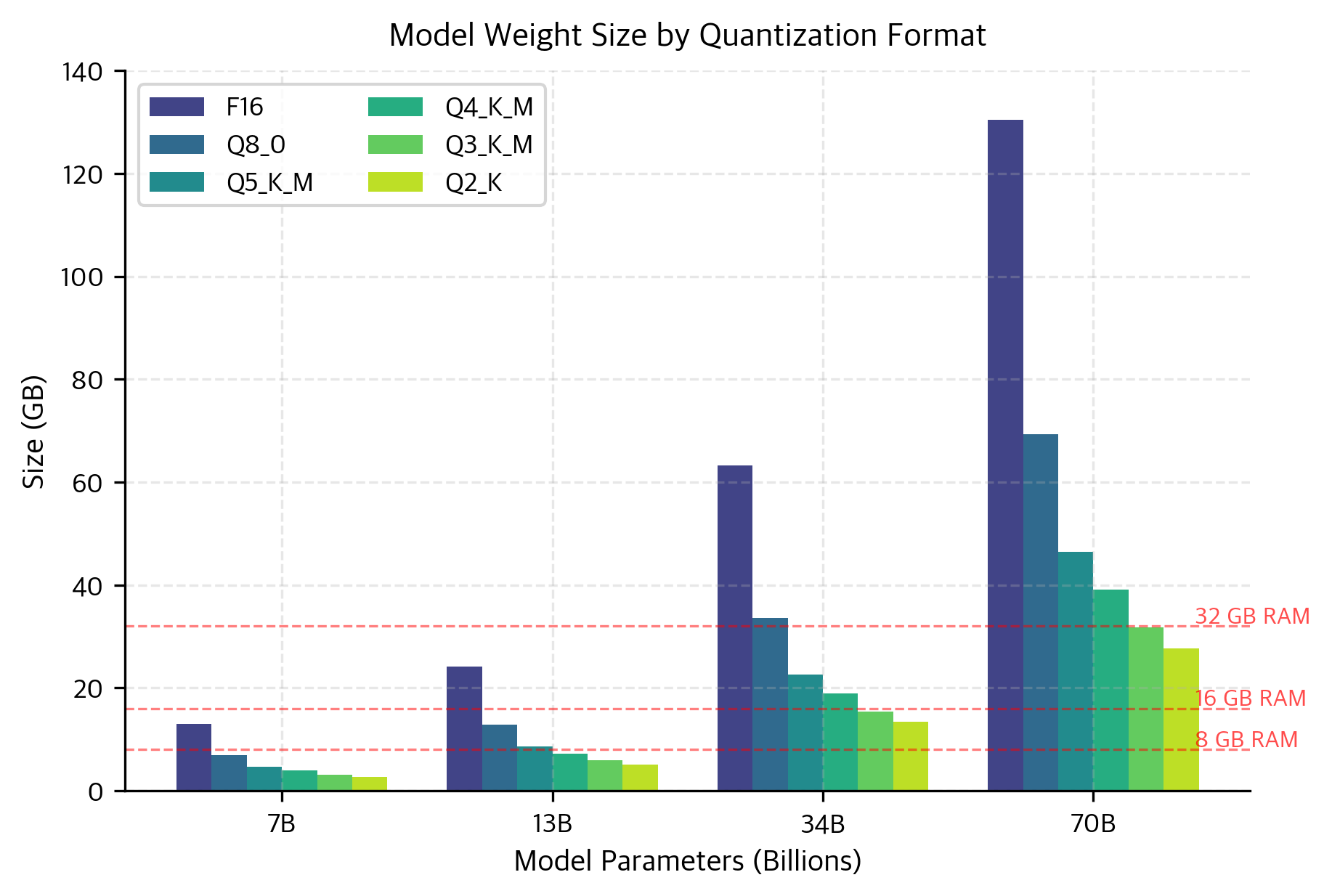
Here are the sizes actually measured by the llama.cpp project on Llama-3.1-8B. The "bits per weight" column is the average over the whole file, metadata and unquantized tensors included, which is why it always exceeds the number advertised in the format name:
| Format | Bits per weight (real average) | File size |
|---|---|---|
| F16 (reference) | 16.00 | 14.96 GiB |
| Q8_0 | 8.50 | 7.95 GiB |
| Q6_K | 6.56 | 6.14 GiB |
| Q5_K_M | 5.70 | 5.33 GiB |
| Q4_K_M | 4.89 | 4.58 GiB |
| Q3_K_M | 4.00 | 3.74 GiB |
| Q2_K | 3.16 | 2.95 GiB |
Read the Q4_K_M row carefully: the format is called "4-bit" and actually costs 4.89 bits per weight, 22% more. And Q2_K, the "2-bit" format, costs 3.16 bits, over 50% above its label. This is not false advertising, it is the sum of the quantization scales and the tensors left in high precision, exactly as explained in quantization concepts.
Q4_K_M is the format to try first: at 4.89 bits per weight the file is 3.3 times smaller than the 16-bit version (16.00 ÷ 4.89), and it is the point where the community reckons the degradation stays hard to notice in conversational use. Move up to Q5_K_M if you have the memory, drop to Q3_K_M only under pressure. Careful, though: "hard to notice" is not a measurement, if your use case is code or arithmetic, evaluate on your own cases before trusting this format.
Hardware Compatibility: llama.cpp Runs Everywhere
One of llama.cpp's great strengths is its multi-platform support:
A backend, here, is simply the layer of code that knows how to talk to one kind of hardware.
| Hardware layer | Target hardware | Performance |
|---|---|---|
| CPU with AVX2 (Advanced Vector Extensions 2, the Intel and AMD vector instruction set) | Any modern x86 PC | Good |
| Metal (Apple's graphics and compute interface) | Mac M1-M4 | Excellent |
| CUDA | NVIDIA GPU | Excellent |
| Vulkan (cross-vendor graphics interface) | AMD, Intel GPU | Good |
| CANN (Compute Architecture for Neural Networks, Huawei's software stack) | Ascend chips | Good |
The Apple Silicon Case (M1-M4)
On a Mac, llama.cpp goes through Metal to use the integrated GPU, and unified memory works in its favour: the processor and the GPU share the same memory, so there is no transfer between them to pay for.
What sets the speed, here as everywhere, is memory bandwidth (see quantization concepts). So you can compute a ceiling on speed without inventing anything. Take a 30 billion parameter model in Q4_K_M: roughly 30 × 0.6 = 18 GB of weights to re-read for every token produced. A Mac M2 Max advertises about 400 GB/s of memory bandwidth. The absolute ceiling is therefore 400 ÷ 18 ≈ 22 tokens per second, and reality stays below that, since this arithmetic assumes the machine does nothing whatsoever except read weights at full speed.
That one division is far more useful than a number measured on somebody else's machine: it applies to any model-hardware pair, as long as you know the model size and the advertised bandwidth.
Estimating Required Memory
A simple rule, and one that derives. Q4_K_M costs on average 4.89 bits per weight, i.e. 4.89 ÷ 8 = 0.61 bytes per parameter. So for a model with N billion parameters:
Q4_K_M: approximately GB
Check against the sizes published by the project for Llama 3.1: 8 billion → 8 × 0.6 = 4.8 (measured 4.9 GB); 70 billion → 42 (measured 43.1 GB); 405 billion → 243 (measured 249.1 GB). The rule holds to within a few percent across three orders of magnitude.
On top of that comes the attention cache, whose size depends on context length and not on the weight format, see the KV cache. For an 8000-token context, expect 1 to 2 additional GB depending on the model.
How to Quantize a Model
Step 1: Convert from Hugging Face Format
python convert_hf_to_gguf.py ./model_hf \
    --outtype f16 \
    --outfile model.f16.gguf
This creates an intermediate, uncompressed FP16 file. It's large, but it's the mandatory starting point: you can only quantize well from a faithful version.
Step 2: Quantize to the Desired Format
./llama-quantize model.f16.gguf model.Q4_K_M.gguf Q4_K_M
And there you go: for a 7 billion parameter model, a file of about 4.3 GB (7 × 0.61) replacing the 14 GB of the 16-bit version.
Advanced Features
Partial GPU Offloading
If your model doesn't fit entirely in the GPU's video memory, llama.cpp can split the work: some layers on the GPU (fast), the rest in the processor's memory (slower). It's less performant than all-GPU, but it lets you use a card with limited memory without giving up acceleration entirely.
Reusing the Attention Cache
You can save the attention cache for a fixed system instruction and reuse it for every subsequent request. With a hundred requests sharing the same 2000-token instruction, you compute it once. See the KV cache for the mechanism.
Formal Grammars (GBNF)
You can constrain generation to a specific format (JSON, XML, code...) using a formal grammar. GBNF stands for GGML BNF, after Backus-Naur Form, a standard way of writing down the rules of a syntax. The model then emits its tokens one at a time while following the imposed structure, instead of producing free text that might turn out invalid.
You often read that GGUF just does round-to-nearest. That was true of the early Q4_0 and Q5_0 formats; it is no longer true of the k-quants: those search, block by block, for the scale that minimizes the error, and the quantization tool accepts an importance matrix (computed by pushing text through the model, exactly like GPTQ's or AWQ's calibration) to weight that search. So the difference from GPTQ is not "with or without data", it is in the mechanics: GPTQ corrects neighbouring weights to absorb an error, k-quants merely place their levels better. In practice the quality gaps are modest, and GGUF's real argument lies elsewhere: it runs on anything.
The GGUF Ecosystem
Ollama
The simplest interface that exists:
ollama run mistral
A single command. The model is downloaded, quantized, and launched. Perfect for beginners and quick tests.
LM Studio
A desktop application with a graphical interface. You browse a model catalog, click, and it runs. Ideal for those who don't want to touch the terminal.
Jan, GPT4All
Other desktop clients for local inference, each with its own approach to user experience.
Hugging Face
Thousands of already-quantized GGUF models are available on the Hub. Well-followed contributors publish every new model there in all variants, which in practice spares you from quantizing anything yourself.
In Summary
GGUF + llama.cpp have made LLMs truly local and accessible. Zero dependencies, zero APIs, private data. It's the ideal entry point for experimenting with LLMs, and a viable production tool for cases where privacy or network latency are constraints.
1. What makes the GGUF format distinctive compared with the usual way models ship, split across config, tokenizer and weight files?
2. The Q4_K_M format is labelled « 4 bits », yet measurement gives 4.89 bits per weight on average over the file. Where does the gap come from?
3. On a Mac M2 Max (about 400 GB/s of memory bandwidth), a 30 billion parameter model in Q4_K_M (roughly 18 GB of weights) will never exceed about 22 tokens per second. Where does that ceiling come from?
4. You often read that « GGUF just does round-to-nearest, so its quality is below GPTQ or AWQ ». What does the page say?