The problem: one model, several formats
A trained model is a large pile of numbers plus a description of how to chain them together. What remains is deciding how to write that pile into a file. Every inference tool made a different choice: PyTorch has its historical format, llama.cpp expects GGUF, ONNX Runtime expects ONNX, TensorRT wants its own compiled program.
Converting between formats is therefore an unavoidable step between training and deployment. It is rarely exciting, often frustrating, and above all: it is not always neutral. Some conversions merely rewrite the same numbers differently; others change them. That distinction runs through this page.
Does this conversion change the numbers, or only their packaging? A change of packaging is riskless: you can go back and recover the original bytes. A change of numbers is irreversible and is paid for in quality, even when the loss is small.
The formats, and what each one guarantees
The historical PyTorch format (.bin, .pt)
For a long time PyTorch saved models with pickle, Python's standard mechanism for writing an object to a file.
The problem is one of security, and it is serious. pickle does not store data alone: it stores reconstruction instructions, executed at load time. A malicious .bin file can therefore run arbitrary code on whatever machine opens it. This is not a bug, it is the format working as designed, and it is incompatible with the actual use case, which is downloading weights published by strangers.
Loading a .bin or .pt file of unknown origin is equivalent to running an unknown program on your machine. Safetensors was created precisely to remove that risk.
Safetensors (.safetensors)
Published by Hugging Face, now the default format for sharing models.
Its structure alone explains its two properties. The file starts with eight bytes giving the length of the header, then a header in JSON (JavaScript Object Notation, a text format for describing data) which, for each array of numbers, states its type, its dimensions and the byte range where it sits later in the file. The raw data block follows.
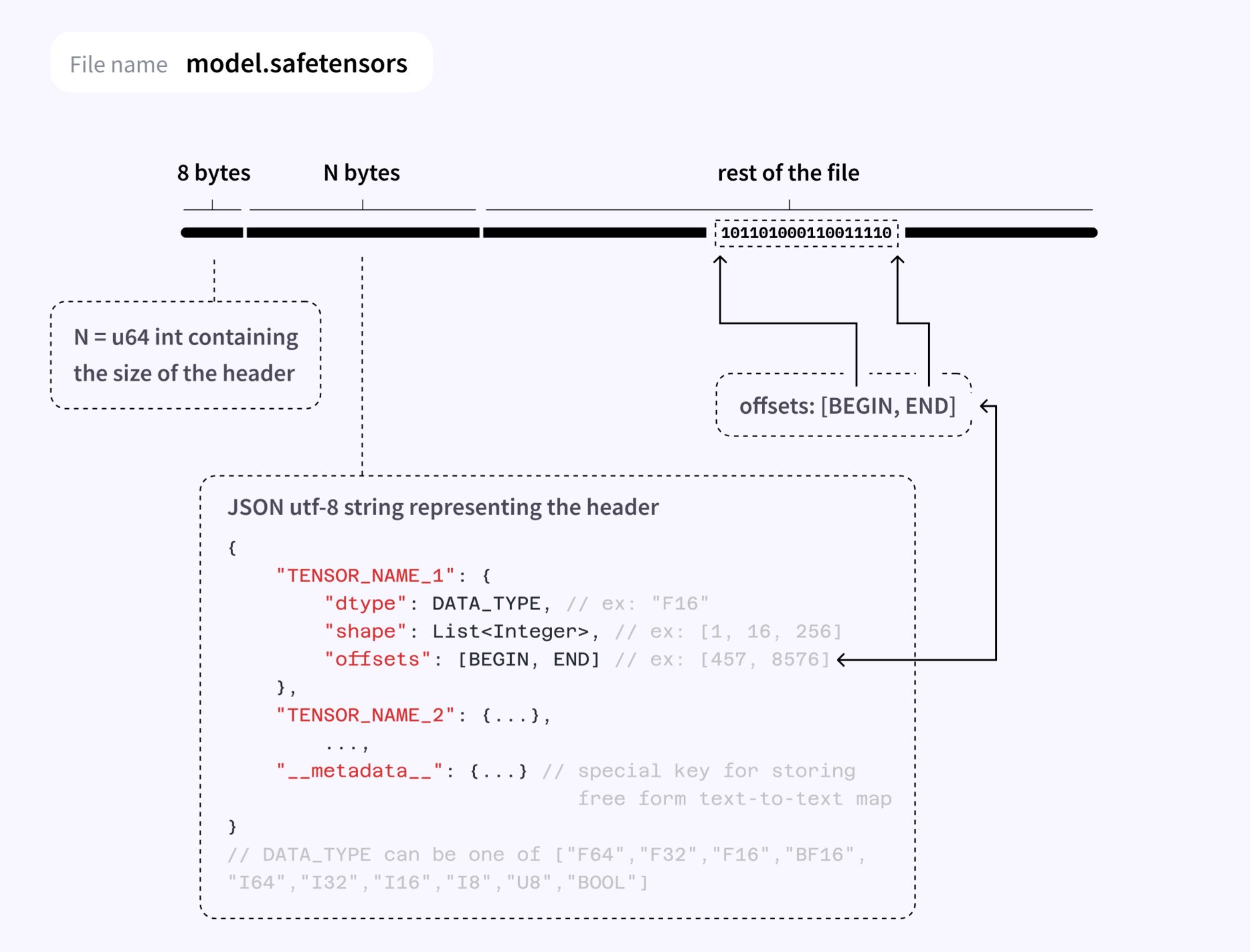
From that structure follow:
- Safety. The header describes data only. There is nothing to execute, so nothing to subvert.
- Load on demand. Knowing the exact position of every array, the system can use memory mapping: you declare to the operating system that the file is a region of memory, and it only pulls in pages as they are actually read. Start-up feels immediate because nothing is copied up front, and several processes opening the same file share the same pages in memory instead of each making a copy.
Large models are split across several files (for example model-00001-of-00004.safetensors) with a JSON index stating which file holds which array. That is a purely physical split, with no effect on the content.
GGUF (.gguf)
The llama.cpp format, designed for local inference on a central processor, or split between processor and graphics card. The name stands for GGML Universal File, after the GGML compute library that llama.cpp is built on.
Its distinguishing feature is being self-contained: a single file holds the weights, the architecture description, the context length, the quantization format used, and even the tokenizer vocabulary. Where a safetensors model ships with a configuration file and tokenizer files beside it, a GGUF file stands alone, which is exactly what an application installed on a user's machine needs.
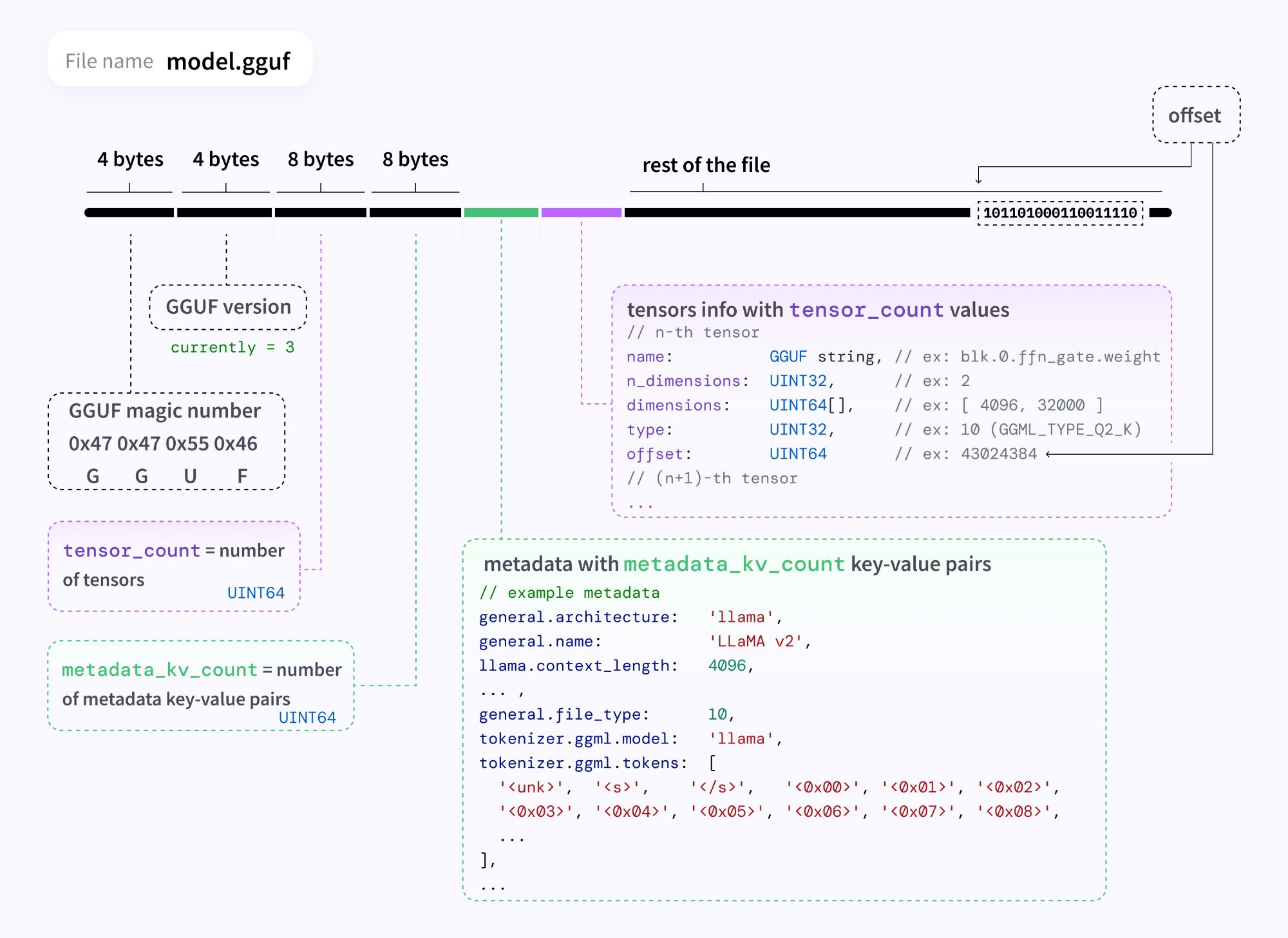
Second distinguishing feature: quantization is written into the format. A GGUF file is not merely smaller, it stores its weights in reduced-precision formats specific to llama.cpp, with names like Q4_K_M or Q8_0. Those formats and the choice between them are covered in GGUF and llama.cpp.
Finally, llama.cpp's compute kernels are written to exploit processor SIMD instructions, Single Instruction, Multiple Data, one instruction applied to several numbers at once. That is what makes inference on a central processor usable without a graphics card. See Ollama and llama.cpp.
ONNX (.onnx)
ONNX (Open Neural Network Exchange) describes the model as a graph of operations, independently of the framework that produced it. The same file can be read by ONNX Runtime, by TensorRT, by Intel's or Apple's engines. That is what the ONNX Runtime lesson covers in detail.
Its main limitation is that of a catalogue: ONNX defines a list of permitted operations, and a hand-written operation in a recent model's code is not necessarily on it. ONNX is therefore often an intermediate step rather than a destination format.
TensorRT (.engine, .plan)
This is not really a model format: it is a compiled program for one specific NVIDIA graphics card. An .engine file built for an A100 will not run on an H100, nor even on an A100 with a different TensorRT version. Building it takes anywhere from a few minutes to several hours.
What compilation buys and what it costs is the subject of the TensorRT-LLM lesson. In one sentence: maximum speed on one piece of hardware, in exchange for giving up all portability.
Safetensors: storing, sharing, training, serving from Python. The default choice. GGUF: running a model on an ordinary computer with no dedicated graphics card. ONNX: moving between frameworks, or targeting varied hardware. Often a step, not an end. TensorRT: production on an NVIDIA fleet known in advance, when latency has a price.
What a conversion can break
This is the part that stays true when tool names change. Three things break, always the same three.
Numeric precision
A conversion that reduces precision changes the weights, permanently. Quantization, described in Quantization: the concepts, rounds each weight to a shorter number.
Be careful with the arithmetic of those savings, which is routinely overstated. Take Q4_K_M, llama.cpp's most common setting. The weights do fit in 4 bits, but the file additionally stores, for each small block of weights, the scaling factors needed to reconstruct them. The real cost measured in llama.cpp's own documentation on Llama-3.1-8B is 4.89 bits per weight, against 16 bits in FP16, a file going from 14.96 to 4.58 gigabytes. The saving is therefore a factor of 3.3, not 4. That difference matters when you are sizing a machine.
Conversions that are lossless in theory can also introduce small discrepancies, for two distinct reasons:
- an implicit precision conversion, when the destination tool works in FP16 while the source was in FP32;
- a difference in how the same operation is implemented. The best example is RMS normalization, root mean square, the operation that brings a layer's values back to a comparable scale. The formula is the same everywhere, but the order of the additions and the point at which computation returns to full precision vary between libraries, and that alone is enough to make the last digits diverge.
The tokenizer
This is the most frequent and most insidious trap, because it raises no visible error. The tokenizer cuts text into units before handing it to the model. If the converted format's tokenizer does not reproduce the original split exactly (one space handled differently, one special character, a missing conversation-start token) the model receives a sequence of numbers that does not match what it was trained on. It does not crash: it answers, worse, and with no clue as to why.
Standard tokenizers convert cleanly. Ones that have been modified, extended with special tokens, or whose model expects a particular conversation layout, need checking character by character.
Unsupported operations
Every conversion tool knows only a finite set of architectures and operations. Faced with a hand-written attention variant, an unusual layer, or an operation whose behaviour depends on the data, the conversion fails, or, more rarely and far worse, produces a file that loads and gives wrong answers. An architecture published a month ago is almost always in this situation: support arrives afterwards, added by the tool's authors or by the community.
The usual conversion chains
PyTorch to safetensors
A pure change of packaging: same numbers, same bytes, reversible.
from safetensors.torch import save_file
import torch

state_dict = torch.load("model.bin")
save_file(state_dict, "model.safetensors")
In practice Hugging Face's transformers library writes safetensors directly when asked to save a model.
Safetensors to GGUF
Handled by llama.cpp's convert_hf_to_gguf.py script, followed by the quantization tool. Three steps:
- read the weights at full precision, FP16 or BF16;
- apply the chosen quantization, for example
Q4_K_M; - package the reduced weights with the tokenizer and metadata into one file.
Step 2 is lossy, and that is where the size-versus-quality trade is made.
PyTorch to ONNX to TensorRT
The classic chain for NVIDIA production: the ONNX export produces a graph, an optimization pass simplifies it, then NVIDIA's trtexec tool compiles that graph into an executable program for one card.
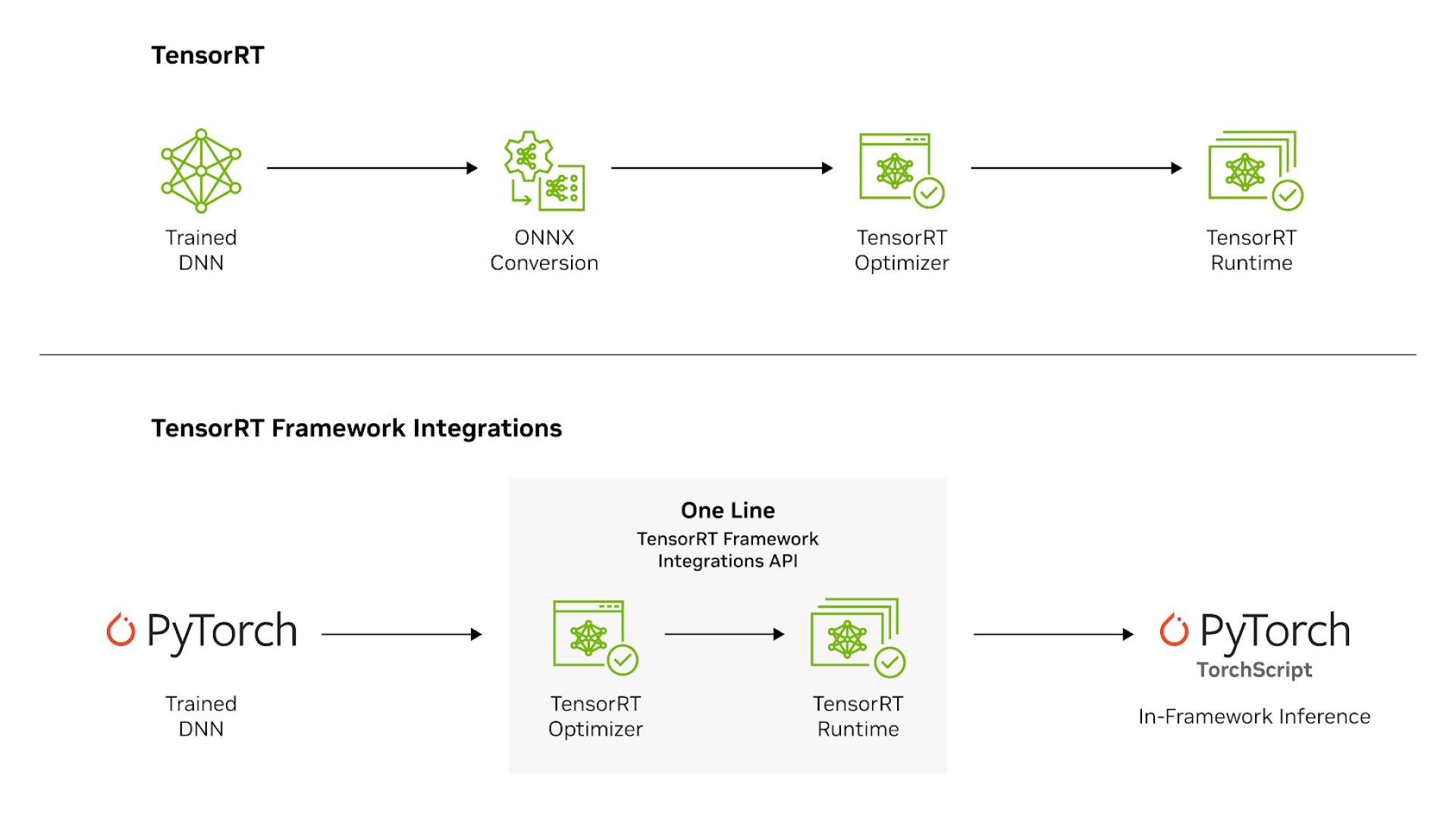
# 1. Export the ONNX graph
optimum-cli export onnx --model meta-llama/Meta-Llama-3-8B ./onnx_model/

# 2. Compile for the card present on this machine
trtexec --onnx=model.onnx --saveEngine=model.engine --fp16
TensorRT-LLM skips the ONNX detour: it reads a Hugging Face checkpoint directly and builds the program, adding the optimizations specific to text generation, paged attention cache, continuous batching, splitting across several cards. It is NVIDIA's recommended path for a language model, and it sidesteps the ONNX operator-catalogue problem entirely.
The tools, and what they do
| Tool | From what to what | What to know |
|---|---|---|
transformers | PyTorch to safetensors | automatic, lossless |
convert_hf_to_gguf.py then llama-quantize (llama.cpp) | safetensors to GGUF | quantization is a separate, lossy step |
optimum (Hugging Face) | Hugging Face to ONNX | only knows already-supported architectures |
trtexec (NVIDIA) | ONNX to a TensorRT program | the result is valid for one card and one version only |
| TensorRT-LLM | Hugging Face to a TensorRT program | language-model specific, skips ONNX |
Validating after conversion, and how
A model that loads without error is not a correct model. Weights matched to the wrong layers, a forgotten layer, or over-aggressive quantization produce a model that "works" and writes incoherent text.
The reference check is to compare the logits (the model's raw outputs before the next token is drawn, that is, one score per word in the vocabulary) on the same input texts, in the original format and in the converted one. A small gap is normal after quantization; a large gap, or disagreement about which word ranks first, signals a failed conversion.
A tokenizer mismatch shows up neither at load time, nor in the file size, nor on a short example. It shows up when you compare outputs. A few minutes of comparison save weeks of unexplained degradation in production.
What to take away
- Safetensors is the default format: safe, readable on demand, and converting to it from PyTorch changes no number.
- GGUF is the local-inference format: self-contained, quantization included.
- ONNX is a pivot format, often an intermediate step; TensorRT is not a format but a program compiled for one card.
- Three things break in conversion, always the same three: numeric precision, the tokenizer, unsupported operations.
- Advertised size savings need recomputing. Four bits per weight does not give a file four times smaller, because the scaling factors have to be stored too.
- Always validate by comparing outputs, never by observing that the file loads.
1. What question should you ask before any format conversion?
2. Why does PyTorch's historical format (.bin, .pt) pose a security problem?
3. A model in FP16 weighs 15 GB. Quantized to Q4_K_M (4 bits per weight) will it weigh about 3.75 GB, four times less?
4. After conversion, the tokenizer handles one space slightly differently from the original. How does this defect show up?
5. How do you verify that a conversion succeeded?