The problem: every engine is married to some hardware
TensorRT-LLM runs only on NVIDIA graphics cards. llama.cpp targets the central processor first. Every inference engine is tied to a hardware family, and switching hardware means redoing the deployment work from scratch.
ONNX (Open Neural Network Exchange) attacks this with a move that is a classic in computing: instead of connecting every training framework to every piece of hardware, you invent a pivot format in the middle. Each framework learns to export to that one format; each execution engine learns to read it. Instead of N × M bridges to write, you need N + M.
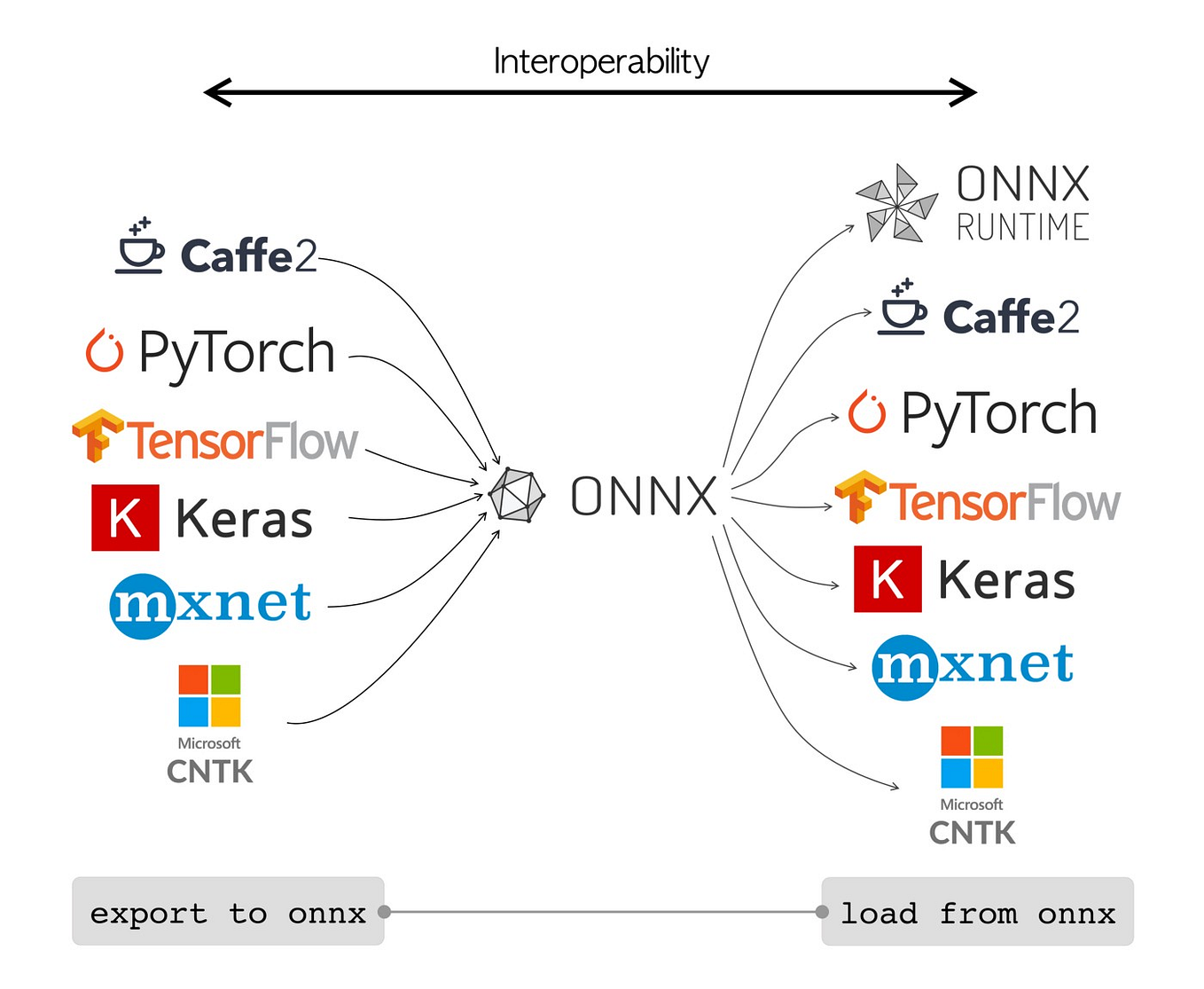
Two things are worth keeping apart, because they are routinely conflated:
- ONNX is a file format. It describes the model as a graph of operations (this matrix multiplication, that addition, that activation function) with the weights attached. It is a description; it does not run.
- ONNX Runtime is the engine that reads the file and runs it. That is where the interesting work happens.
ONNX Runtime is also a compiler, of a different kind
Like TensorRT-LLM (see TensorRT-LLM), ONNX Runtime transforms the graph before running it: it merges several operations into one, drops useless nodes, reorders computations. The difference is in when that transformation happens and how far it goes.
TensorRT-LLM compiles once, ahead of time, and produces a frozen program valid only for one specific card. ONNX Runtime does most of its work when the model is loaded, on every start, discovering the hardware actually present on the machine. It gives up the most aggressive optimizations (the ones that require knowing exact dimensions in advance) and in exchange gains the ability to run more or less anywhere.
Execution providers
The mechanism that makes this possible is called an execution provider: a module that knows how to run pieces of the graph on a given kind of hardware.
| Provider | Target hardware | What it uses underneath |
|---|---|---|
| CUDA | NVIDIA graphics cards | NVIDIA compute libraries |
| TensorRT | NVIDIA graphics cards | TensorRT compilation, more aggressive |
| ROCm | AMD graphics cards | AMD's counterpart to the NVIDIA libraries |
| DirectML | any graphics card on Windows | the operating system's graphics interface, DirectX 12 |
| OpenVINO | Intel processors, cards and accelerators | Intel libraries |
| CPU | any central processor | the processor's vector instruction sets |
Two acronyms in that last row deserve unpacking, because they explain why inference on a central processor became viable at all. AVX-512 (Advanced Vector Extensions) is an instruction set that applies one operation to sixteen numbers at a time instead of one. VNNI (Vector Neural Network Instructions) adds instructions dedicated to the single most frequent operation in neural networks: multiply two 8-bit integers and accumulate the result. A recent processor is not a graphics card, but it is no longer laughable.
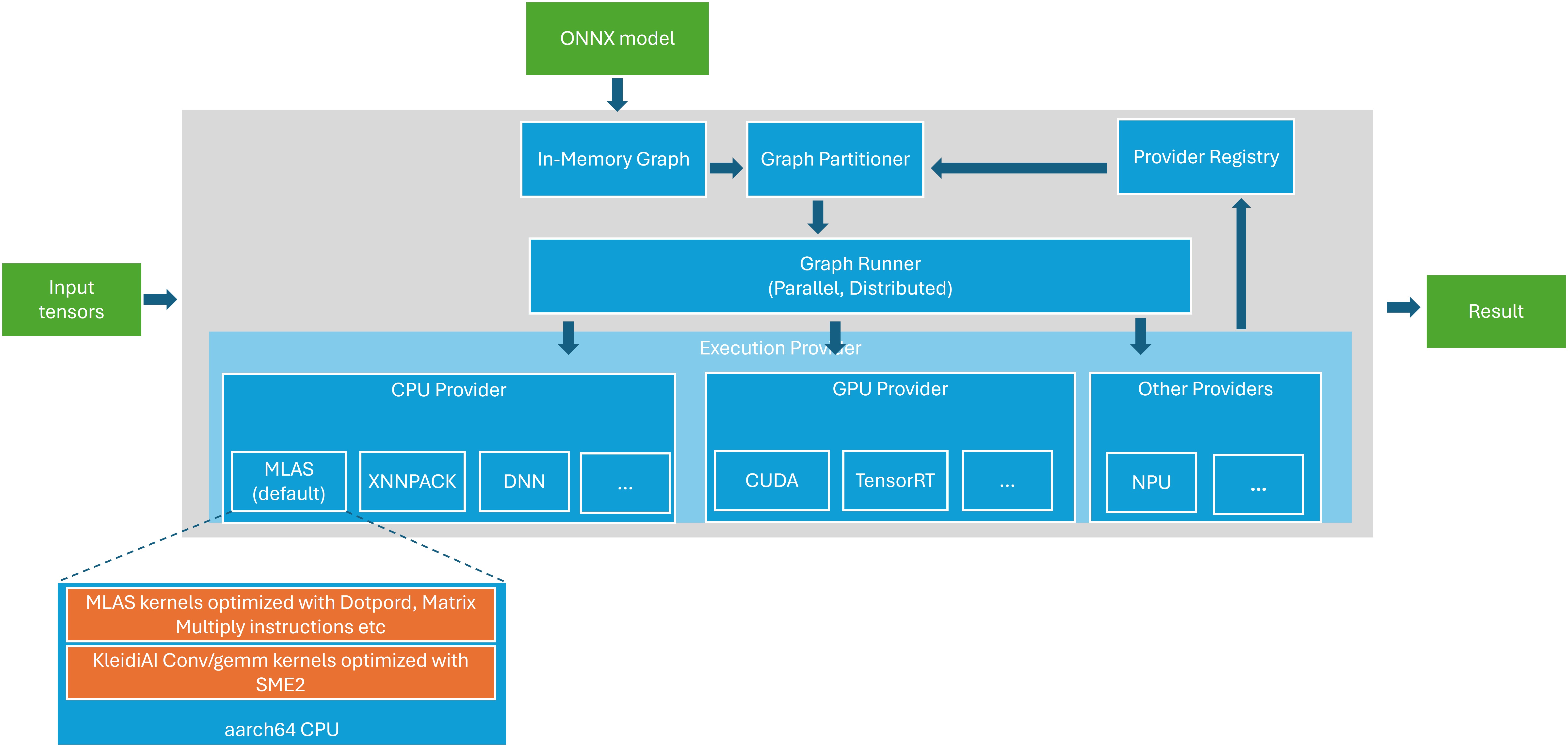
The thing to take from that diagram: the split is partial. If a provider cannot run some operation in the graph, ONNX Runtime does not give up, it hands that operation to another provider, usually the central processor. The model still runs. That is robust, but it is also a performance trap: a single unsupported operator in the middle of the graph forces a round trip between card and processor on every pass, and can cost more than everything else combined.
NPUs, ARM, and why this is getting interesting
NPU stands for neural processing unit: a chip specialized in matrix multiplication, built for the past few years into laptop and phone processors. ARM is the processor architecture in phones and recent Macs. Neither runs code written for NVIDIA. A pivot format is the only sane way to target that whole set of devices without rewriting the deployment each time.
Converting a model to ONNX
The Optimum library, published by Hugging Face, bridges models on the Hugging Face Hub and ONNX. In practice one command-line call exports a model to the format:
optimum-cli export onnx --model mistralai/Mistral-7B-v0.1 ./mistral-onnx
The tool traces the model (it runs it once on dummy data to observe which operations get called and in what order) then writes the corresponding graph to a .onnx file. That tracing mechanism explains the main limitation of the export, described below.
Optimum converts the graph, applies the hardware-independent graph optimizations along the way, and can also quantize the weights on request. It performs no miracles: it converts correctly only the architectures it already knows about.
Reducing precision with ONNX Runtime
How quantization works and what it costs in quality are covered in Quantization: the concepts. What is specific to ONNX Runtime is that there are two paths of very different difficulty.
Dynamic quantization. Weights are converted to 8-bit integers (one byte per weight, against two in FP16, so a file half the size) and the engine works out the scale of the intermediate values at run time, request by request. No preparation is needed: hand over the file, get a quantized file back. It is the simplest path and the least effective.
Static quantization. First a small, representative dataset is pushed through the model to measure the typical magnitude of intermediate values (the calibration step) then those scales are frozen into the file. You have to supply that dataset, which presupposes knowing what real inputs look like. In exchange the engine has nothing left to compute on the fly and the result is better.
Down to 4 bits. ONNX Runtime supports 4-bit weights (half a byte per weight) through a dedicated operator named MatMulNBits, which unpacks the weights at compute time. It can read models produced by the methods described in AWQ and GPTQ.
Where ONNX Runtime is the right call
The same model on heterogeneous hardware. One file deployed on a server with an NVIDIA card, on an Intel workstation, on an ARM phone. This is the use case the format exists for.
Embedded applications rather than servers. When the model is a component inside software installed on the user's machine, rather than a service behind a network interface, ONNX Runtime integrates more simply than a serving engine: it is a library the application calls, not a server to administer.
Windows and DirectML. On Windows, the DirectML provider goes through DirectX 12, the operating system's graphics interface, and therefore works on any graphics card (NVIDIA, AMD or Intel) with no vendor-specific code. Microsoft presents this stack as the one serving its own AI features built into Windows.
The limits, and they are structural
What resists export
The ONNX format describes a fixed graph of operations. But export works by tracing: you observe one execution and infer the graph. Anything in the model code that depends on the data at run time (a loop whose number of iterations varies, a conditional branch, a hand-written operation with no counterpart in the ONNX catalogue) traces badly or not at all. Recent or unconventional architectures are therefore the hardest to convert, and this is a permanent condition: the format runs behind the research.
The lag on text-serving features
ONNX Runtime is a general-purpose engine: it runs a vision model, a classifier or a language model equally well. Engines specialized in text generation (vLLM, TensorRT-LLM) have only one model family to serve, and implement the tricks specific to that case first: paged attention cache (see PagedAttention), continuous batching (see Continuous batching), speculative decoding (see Speculative decoding).
This is a scheduling gap rather than an impossibility: the ONNX Runtime GenAI extension is progressively bringing key-value cache management, token sampling strategies and batching to the format. But the invariant holds, and it is worth remembering in place of any current feature list: a new language-model serving technique appears first in a specialized engine, then reaches the general-purpose one.
Measurements of the form "engine X is twice as fast as engine Y" are everywhere. They mean nothing outside their conditions: card model, model size, sequence lengths, how many requests are processed together, what precision, and above all against which baseline. The same speedup claim can be measured against an already-optimized system or against a naive loop, and the two numbers are not comparable. There is no reliable, durable table of speeds in this field; there are only measurements taken on your own deployment.
The real selection criterion
What durably separates these tools is not their speed at some point in time, it is what they are tied to.
| What the result is tied to | What you get | |
|---|---|---|
| TensorRT-LLM | one NVIDIA card model, one version, one frozen configuration | maximum speed on that hardware |
| vLLM | the graphics-card ecosystem, flexible at run time | the most advanced text-serving features |
| ONNX Runtime | nothing in particular: the file is portable | deployment on heterogeneous hardware |
The detailed comparison of serving engines is in Serving frameworks; the file formats themselves are covered in Model conversions.
What to take away
ONNX is a pivot format; ONNX Runtime is the engine that reads it and optimizes it for whatever hardware is present. It is the exact opposite of TensorRT-LLM's bet: where that one sacrifices portability for speed, ONNX Runtime sacrifices some speed to depend on no vendor at all. The choice does not turn on a performance number but on a simple question: is the target hardware known and stable, or do you need to be able to change it?
1. What is the difference between ONNX and ONNX Runtime?
2. Why does a pivot format like ONNX simplify multi-hardware deployment?
3. A single operator in the graph is not supported by the GPU provider. What does ONNX Runtime do, and with what consequence?
4. Why are recent or unconventional architectures the hardest to export to ONNX?
5. Dynamic versus static quantization with ONNX Runtime: what does switching to static change?