The problem: your cards can't talk fast enough
You have bought a thousand accelerators to train your next large language model. Congratulations. But here is the trap: if those cards cannot communicate very fast, you own a thousand bulldozers stuck on a single-lane country road. Each one waits for the others to finish manoeuvring before it can move an inch.
Distributed training is fundamentally a communication problem. Cards compute fast, very fast. But between computation steps they have to exchange gradients, synchronise parameters, share activations. If that communication is slow, your thousand cards run at the speed of your slowest network cable.
Picture a thousand people who have to solve a problem together in one room. If they communicate by shouting across the room (slow network), it is chaos. If each has an instant shared screen with their immediate neighbours (NVLink) and an efficient PA system for announcements to everyone (InfiniBand), collaboration suddenly flows. That is exactly what NVLink and InfiniBand do for accelerators.
Bits and bytes
Before any number, a note on units. This is the single most common source of error in the whole field, and it is a nasty one: it produces no visible absurdity, just a quiet factor of 8 inside an otherwise correct argument. This section is the course's reference on the subject, other lessons link here rather than redoing the conversion on their own.
A bit is a binary digit: a 0 or a 1. A byte is a bundle of eight bits. It is the smallest amount of memory a machine can address individually, and it is the unit in which everything stored is counted: a parameter in 16-bit format occupies 2 bytes, a 7-billion-parameter model occupies 14 gigabytes.
The trap comes from a divergence of tradition between two trades:
- networks have always been advertised in bits per second, an inheritance from telegraphy, where you counted pulses on the wire. An InfiniBand or Ethernet link is therefore labelled in gigabits per second, written
Gbit/sorGb/s; - memories and internal buses have always been advertised in bytes per second, because there you count memory cells, not pulses. An accelerator's onboard memory or an NVLink connection is therefore labelled in gigabytes per second, written
GB/s.
The result: two numbers of similar magnitude, placed side by side, can differ by a factor of 8. The conversion to do in your head is a division by 8 to go from bits to bytes, a multiplication by 8 the other way. A lowercase b means bit, an uppercase B means byte, a difference of case carrying a factor of 8.
The following values are enough to reframe any discussion about interconnects.
| Link | Advertised rate | Converted to bytes per second |
|---|---|---|
| NVLink 4, between cards in one machine | 900 GB/s | 900 GB/s (already in bytes) |
| InfiniBand NDR, between machines | 400 Gbit/s | 50 GB/s (400 ÷ 8) |
| PCIe 4.0 at 16 lanes, a machine's internal bus | about 32 GB/s per direction | about 32 GB/s |
The ratio between the first and the second row is roughly 18x, not 2x as a careless comparison of "900" and "400" would suggest. It is that factor of 18, and not a factor of 2, that explains everything else on this page.
Two further cautions, which account for most of the contradictory figures you will find online:
Peak versus sustained. Every number above is a peak rate: what the link can carry in the best theoretical case, with transfers large enough to amortise start-up costs and nobody else on the cable. The sustained rate, the one you actually measure during a training run, is systematically lower, protocol headers, setup latency, contention between cards and irregular send patterns eat a variable slice, commonly in the 10 to 30 percent range. A datasheet number is a ceiling, never a forecast.
One direction or both. Some vendors advertise the rate per direction, others the sum of both directions, and there is no universal convention. That is why the same PCIe 4.0 x16 bus shows up sometimes as 32 GB/s (per direction) and sometimes as 64 GB/s (both directions added). Both figures are correct; they answer different questions. When you want to know how long it takes to send a tensor from A to B, the per-direction number is the one that counts.
Every bandwidth quoted on this page comes from NVIDIA documentation and from the PCIe and InfiniBand specifications, not from measurements on a machine. They are therefore vendor-advertised maxima. They are good for comparing orders of magnitude and ranking links against each other, which is what this whole lesson does. They are not good for predicting how long a specific operation will take: for that, you measure.
The communication hierarchy: from very fast to merely fast
An AI datacentre is not a flat network where all cards are equal. It is a layered hierarchy, and each layer has a radically different bandwidth. All the values below are expressed in bytes per second so they are comparable:
- Inside one card: the compute units read the onboard memory at roughly 3,400 GB/s on an H100, and the small internal memories tens of times faster still. That pyramid is detailed in GPU architecture.
- Between cards in one machine: NVLink 4, at 900 GB/s. Around four times slower than onboard memory.
- Between machines: InfiniBand NDR, at 400 Gbit/s, that is 50 GB/s. Around eighteen times slower than NVLink.
The crucial point is the step between layer 2 and layer 3: a factor of 18. That discontinuity dictates the entire distributed training strategy. You want to maximise what stays inside a machine and minimise what crosses the network.
You will often read that a network switch "does 51 terabits per second", and be tempted to place it at the top of the hierarchy above. That is a category error. An NVIDIA Quantum-2 switch exposes 64 ports at 400 Gbit/s and advertises 51.2 Tbit/s of aggregate bidirectional throughput: that figure is the sum of all its ports in both directions (64 × 400 Gbit/s × 2 = 51,200 Gbit/s). It says nothing about how fast one card talks to another, which remains 400 Gbit/s, i.e. 50 GB/s. Aggregate capacity and point-to-point bandwidth do not belong in the same column.
Compute-communication overlap
Here is the principle that organises everything else, and it can be stated without a single formula.
An accelerator can compute and move data at the same time: those are two separate circuits on the chip. An exchange launched early, running in the background while the card keeps computing, is therefore almost free: by the time the computation ends, the data has already arrived and the wait is zero. The same exchange, launched mid-computation with the result needed before work can continue, costs full price: the card stops and waits.
The name for this is compute-communication overlap: you slide the communication underneath the computation, the way you start the washing machine before leaving for work rather than while getting dressed.
The building-site analogy is sharper still. Ordering the concrete the day before so it arrives while the crew pours the foundations is overlap: the delivery cost no time at all. Sending someone to fetch the concrete at the moment it needs pouring, with the whole crew standing idle, is a blocking exchange.
It is this principle, and not the raw volume of data exchanged, that ranks parallelism strategies. Two methods that move the same number of bytes do not cost remotely the same if one can hide its transfers and the other cannot:
- data parallelism is the star pupil: gradients for the early layers are ready before the backward pass has finished, so you can start exchanging them immediately. The transfer runs underneath the remaining computation;
- tensor parallelism is the poor pupil: it cuts a matrix multiplication into halves, and the halves must be glued back together before anything else can proceed. The exchange is blocking by construction. That is precisely why it is confined inside a single machine, where the link is eighteen times faster;
- pipeline parallelism sits between the two: it sends little, and it can usually send it while working on another micro-batch.
Combining all three along these lines is described in Megatron-LM, and the mechanics of gradient overlap in Data parallelism.
When an exchange refuses to hide, there are two fixes. Make the link faster, which costs money. Or increase the amount of computation done between two exchanges, which is free: that is exactly what gradient accumulation does, stacking several micro-batches before triggering synchronisation. The communication volume per step does not change; the computation available to hide it under does.
NVLink: the private link between NVIDIA cards
NVLink is NVIDIA's proprietary technology that lets cards in the same machine talk directly to each other, bypassing both the PCIe bus (Peripheral Component Interconnect Express, the standard bus wiring a computer's components together) and the host processor's memory. It is a dedicated point-to-point link.
The count happens in two stages, and this is where many tables contradict each other: each card has several links, each link carries a certain rate per direction, and the marketing figure is the sum of all links in both directions.
| Generation | Rate per link, per direction | Links per card | Advertised total (both directions) |
|---|---|---|---|
| NVLink 3 (A100) | 25 GB/s | 12 | 600 GB/s |
| NVLink 4 (H100) | 25 GB/s | 18 | 900 GB/s |
| NVLink 5 (B200) | 50 GB/s | 18 | 1,800 GB/s |
The arithmetic of the second row, done in full: 25 GB/s per direction × 2 directions = 50 GB/s per link; 50 × 18 links = 900 GB/s. That is the famous "900 GB/s" of an H100. If you want to know how fast one card sends to its neighbours, halve it: 450 GB/s.
NVSwitch is the companion component: a specialised switch that wires all the cards in a machine into a full mesh, so each card can talk directly to any other at the same rate. A DGX H100 machine contains four NVSwitches for its eight cards.
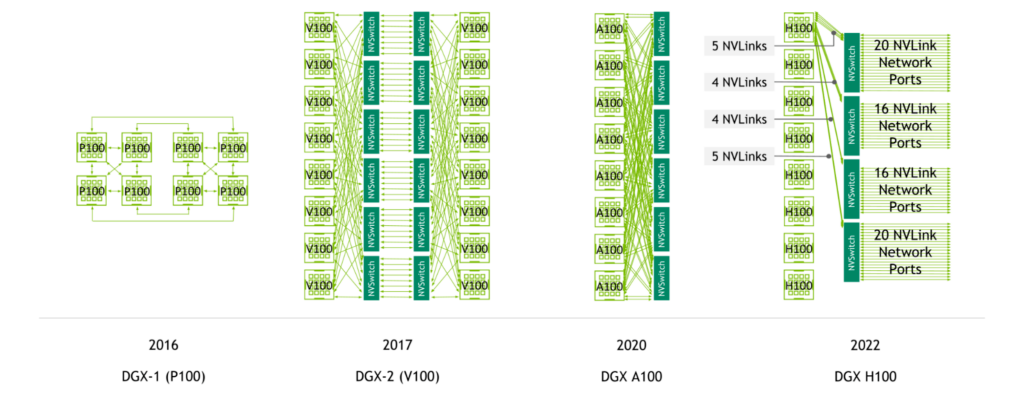
The recent development is the NVLink Network, introduced with the Hopper architecture. Previously NVLink stopped at the machine's physical boundary. Now the NVSwitches expose ports facing outwards, which allows cards in different machines to be wired together over NVLink.
NVIDIA launched the GB200 NVL72: 72 Blackwell cards interconnected over NVLink in a single communication domain. No more boundary between machines, all 72 cards behave as if they sat in the same rack. This changes training strategy directly: tensor parallelism, which demands a very fast link precisely because its exchanges are blocking, can then extend beyond a single machine. It is the overlap principle from the previous section that makes the announcement interesting: this is not "more bandwidth", it is "the poor pupil of parallelism gets more room".
InfiniBand: the highway between machines
If NVLink is the very fast link inside a machine, InfiniBand is the highway between machines. It is the dominant standard for large AI datacentres, developed by Mellanox, a company NVIDIA announced it would acquire in 2019 and finished acquiring in 2020.
The generations carry three-letter labels naming bandwidth tiers: HDR for High Data Rate, NDR for Next Data Rate, XDR for eXtreme Data Rate.
| Generation | Advertised rate (per direction) | In bytes per second | Typical use |
|---|---|---|---|
| HDR (200 Gbit/s) | 200 Gbit/s | 25 GB/s | A100 machines |
| NDR (400 Gbit/s) | 400 Gbit/s | 50 GB/s | H100 machines |
| XDR (800 Gbit/s) | 800 Gbit/s | 100 GB/s | Blackwell generation |
Note that these rates are advertised in bits: that is the network convention described above. The right-hand column is simply the left-hand column divided by 8.
The feature that makes the difference is RDMA, Remote Direct Memory Access. Normally, copying data from a card on machine A to a card on machine B means going through A's host processor, then the network, then B's host processor, then the card: four stages, with two pointless copies through host memory along the way. With GPU Direct RDMA, the network card reads straight out of the source accelerator's memory and writes straight into the destination's. Two stages. It is like installing a direct lift between two floors instead of forcing everyone down to the lobby, across the hall, and back up.
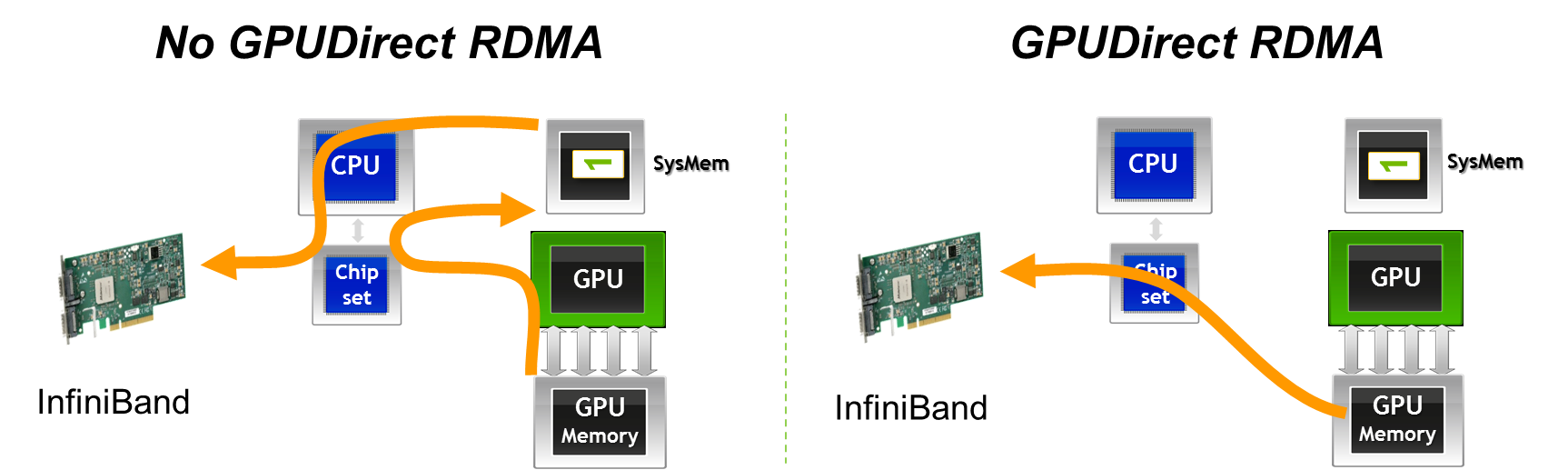
The most visible gain is latency: two stages instead of four, and two memory copies removed. But the more important effect lies elsewhere. Because the transfer no longer occupies the host processor, it can proceed entirely in the background while the accelerator keeps computing. In other words, RDMA is what makes compute-communication overlap possible between machines. Without it, every exchange commandeers the host processor and becomes far harder to hide.
How large the end gain is depends entirely on the workload, on message sizes, how regular they are, and what the card has to do meanwhile. There is no universal percentage to memorise here.
High-performance Ethernet: the challenger
InfiniBand dominates, but Ethernet is fighting back.
RoCE v2 (RDMA over Converged Ethernet) brings RDMA capabilities to standard Ethernet hardware. Cheaper than InfiniBand, available from more vendors, but with slightly higher latency and less mature congestion handling.
The Ultra Ethernet Consortium (UEC) is an initiative launched in 2023 bringing together AMD, Broadcom, Cisco, HPE, Intel, Meta and Microsoft among others, with the aim of defining an Ethernet genuinely fitted to AI workloads. The stated goal is InfiniBand-level performance while staying inside an open, competitive ecosystem.
For the largest installations, InfiniBand keeps a reputation for an edge in latency and above all in congestion handling, which matters for runs lasting months. Ethernet is improving quickly, and several very large operators have announced Ethernet-based installations. The topic is in flux and largely commercial: nearly all published comparisons come from interested parties, and should be read as such.
Topologies: how to architect the network
Fat-tree: the classic topology. Switches arranged in a hierarchical tree, with bandwidth that does not shrink as you climb. No theoretical bottleneck. Expensive in switches, optimal in performance.
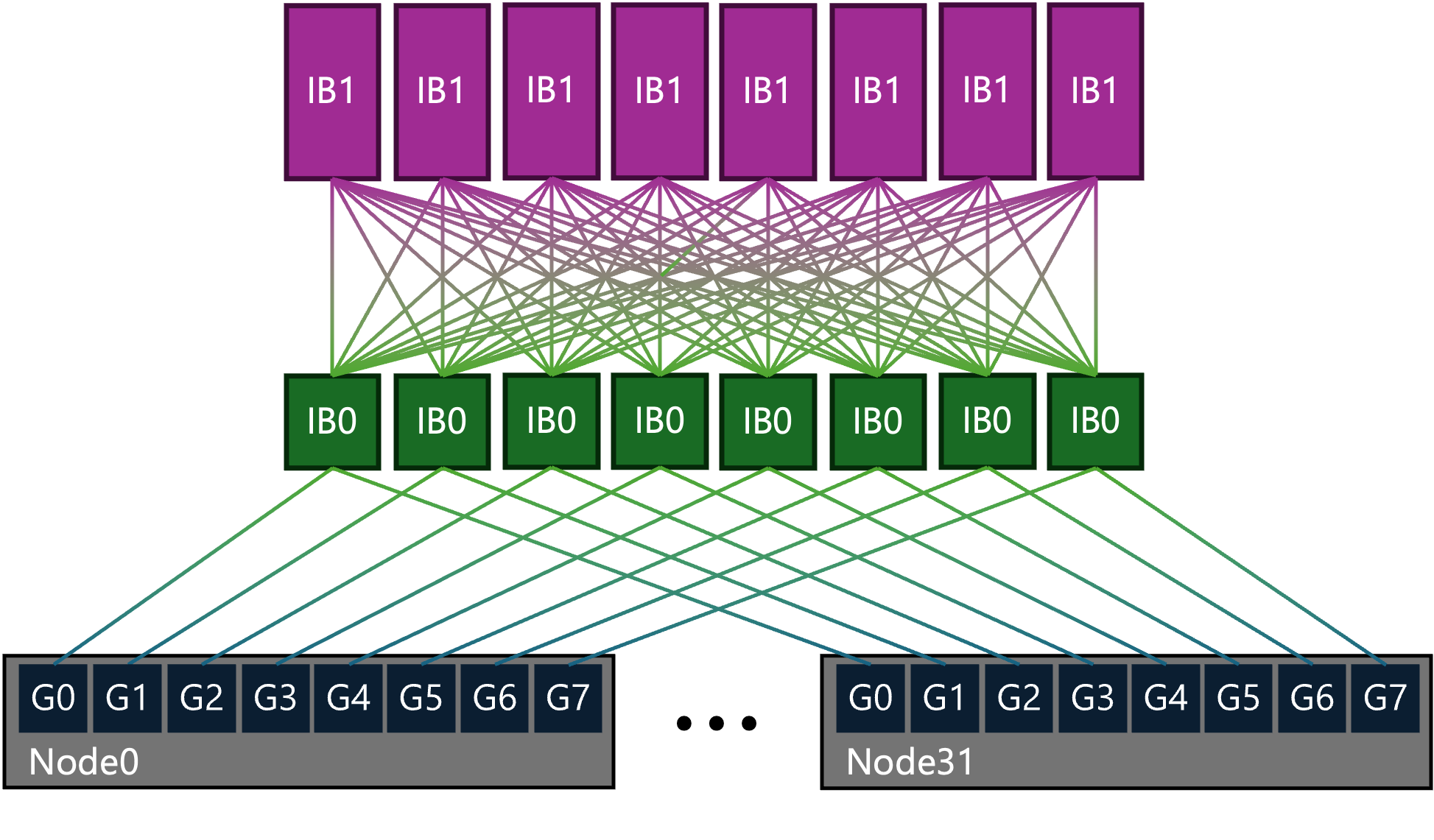
Rail-optimized: cheaper. Cards of the same rank across different machines share a dedicated switch. It is cut for the communication pattern of data parallelism, where same-rank cards have to average their gradients with each other.
Dragonfly: for very large installations. Groups of densely interconnected machines, linked to each other by long-distance links. A good cost/performance compromise at very large scale, at the price of a variable distance between two machines depending on whether they sit in the same group.
Failures: daily life in a large installation
At the scale of several thousand cards, the law of large numbers is merciless. A multi-month training run will hit failures; the question is not whether, but how many, and how they get absorbed.
This is one of the few precise public tallies. Meta reports, over a 54-day window of training Llama 3 405B on 16,384 cards, a total of 466 interruptions: 47 planned (maintenance, firmware upgrades) and 419 unexpected. Roughly 78% of the unexpected ones were hardware in origin, with accelerator-related problems the largest single category.
Two numbers to take away from the same report. First the frequency: 419 failures in 54 days is almost eight a day. Second, and more instructive, despite that the team reports over 90% effective training time and needed manual intervention only three times across the whole period, everything else being absorbed by automation. The lesson is not that hardware is fragile, it is that reliability, at this scale, is an operations-software problem.
The Llama 3 Herd of ModelsResilience strategies:
- Frequent checkpointing: periodically writing the full training state to disk (weights, optimiser state, position in the data) so you can resume from that point instead of starting over.
- Asynchronous checkpointing: copying the state into host memory first, then writing it to disk in the background while training continues. This is overlap again: you hide the write underneath the computation.
- Hot swap: isolating a failed card and replacing it without stopping the whole installation.
- Elastic training: adjusting the number of cards in use mid-run as some drop out.
- Preventive monitoring: spotting components about to fail through temperatures, corrected memory errors and abnormal latencies, and retiring them before they cause an interruption.
Take a thousand H100 cards. The unit price commonly reported at the height of the shortage was $30,000 to $40,000 a card (see NVIDIA ecosystem): that is $30 to $40 million of silicon, and silicon is only part of the bill, you also need the machines that host it, the switches, the cabling, the power and the cooling.
At that scale, each percentage point of lost utilisation time runs into hundreds of thousands of dollars a year. The exact figure depends entirely on the price paid and the contract, so it carries no general meaning. What is general is the reasoning: it is the ratio between hardware price and hardware lifetime that justifies putting whole teams on reliability and on the last percent of network throughput.
The future: bigger, more integrated, smarter
Extended NVLink domains: the machine boundary is blurring. The GB200 NVL72 is a first step towards assemblies where dozens of cards share one very high bandwidth communication space.
Computing inside the network: components such as SHARP (Scalable Hierarchical Aggregation and Reduction Protocol) perform averaging and summing operations directly inside the switches, while the data is in transit. Instead of every card receiving all contributions and adding them itself, the switch adds them on the way through and forwards only the result. The network no longer merely transports: it computes, and the volume to transport shrinks.
Rent or buy: the major cloud providers all offer pre-configured clusters with InfiniBand. For most organisations renting makes more sense than buying, unless you have a continuous need for thousands of cards over years, at which point amortisation tips the other way.
The bottom line: NVLink and InfiniBand are not just cables, they are the arteries of the installation. Three things to carry away. One, always check the unit: networks are advertised in bits, memories in bytes, and the factor of 8 creeps in everywhere. Two, the step between the inside of a machine and the network is a factor of 18, and it is what decides how the parallelisms are laid out. Three, what costs you is not communication as such but the communication you failed to hide underneath computation.
1. NVLink 4 is advertised at 900 GB/s, InfiniBand NDR at 400 Gbit/s. What is the real ratio between the two?
2. Why is tensor parallelism confined to the inside of a single machine?
3. A network switch advertises 51.2 Tbit/s. Can one card talk to another at that speed?
4. What is the most important effect of RDMA, beyond the latency gain?
5. Meta reports 419 unplanned interruptions in 54 days while training Llama 3, nearly eight per day. What lesson does the report draw?