Why annotate? (spoiler: it's expensive but indispensable)
Annotation is the unglamorous but fundamental work of ML: taking raw data and slapping a label on it. "This is a cat," "this sentiment is positive," "this image contains a car." Without these labels, your supervised model can't learn anything.
It's often the most expensive and tedious step of an ML project. But it's also the most important: a model can only be as good as its training data. Bad labels = bad model, period. Think of it as a house's foundation: invisible once built, but if it's shaky, everything collapses.
Annotating 2 seconds per example (simple binary classification) vs 5 minutes per example (medical image segmentation with expertise). At 10 dollars an hour, that ranges from $0.05 per example to $1 per example. For 100,000 examples, the bill climbs from $5,000 to $100,000. And that's not counting quality control, annotator training, and guideline iterations. Yes, really.
Choosing the right annotation tool is therefore strategic. A good tool doesn't magically make data good, but it makes the process faster, more reliable, and less painful. Let's look at the three major players.
Label Studio: the Swiss Army knife
Label Studio is the most popular open-source annotation tool. It does just about everything: text, images, video, audio, time series. You configure the interface in XML (or via a visual editor), and your annotators are ready to work.
What it does well
- All data types: annotate images (bounding boxes, polygons, segmentation), text (NER, classification, entity relations), audio (transcription, segmentation), video
- Configurable interface: you specify exactly what the annotator sees and can do. Need a confidence slider in addition to labels? It's possible.
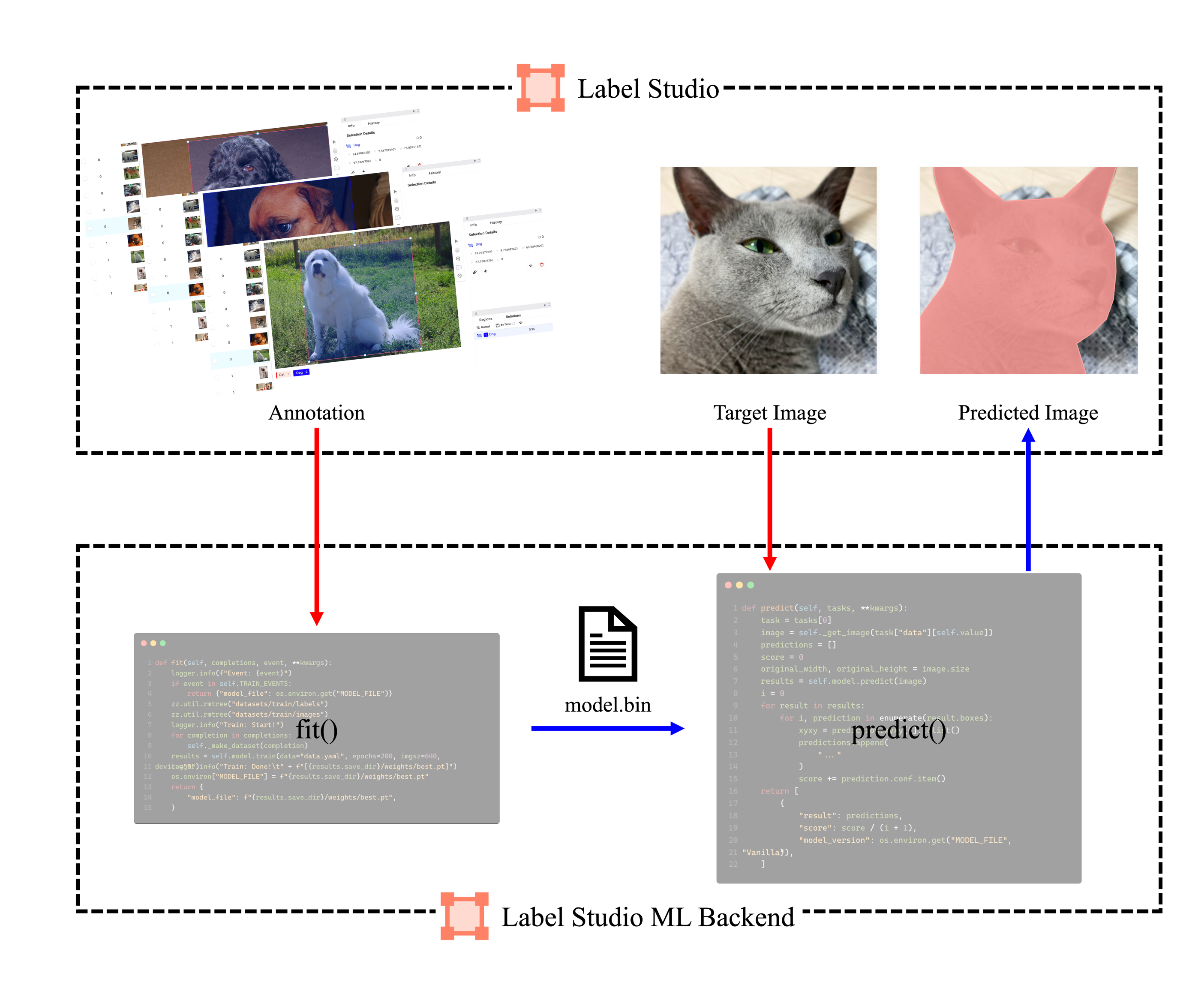
- ML backend: connect a model for automatic pre-annotation, the human only corrects. This speeds up work 2 to 5 times.
- Review workflows: assign tasks, manage reviews by a senior, measure inter-annotator agreement
- Flexible import/export: COCO, VOC, CoNLL, JSON, CSV... it speaks all formats
How it works in practice
A Python server, a database (PostgreSQL or SQLite), storage for files (S3, GCS, or local). It's simple to deploy, even locally for a small project. For a team project, you put it on a server and each annotator connects via their browser.
Take even a mediocre model, have it generate annotations, and ask humans to correct: it's 2 to 5 times faster than starting from scratch. Label Studio has a built-in ML backend system for this. Even a so-so model helps enormously, because correcting is always faster than creating from scratch. It's the difference between proofreading a text and writing it.
Strengths and limitations
Good for: varied projects, all data types, teams that want free open source, deep interface customization
Less good for: the interface can lag on very large projects (100K+ examples), workflow management is basic compared to enterprise solutions, no native active learning (you have to build it yourself)
Prodigy: sprint-style annotation
Prodigy is made for people in a hurry. It's oriented toward fast, minimalist annotation. The interface is stripped down: often, the annotator just "accepts" or "rejects" a model suggestion. No unnecessary clicks, no complicated dropdown menus. Just you, the example, and a decision.
The clever trick: active learning
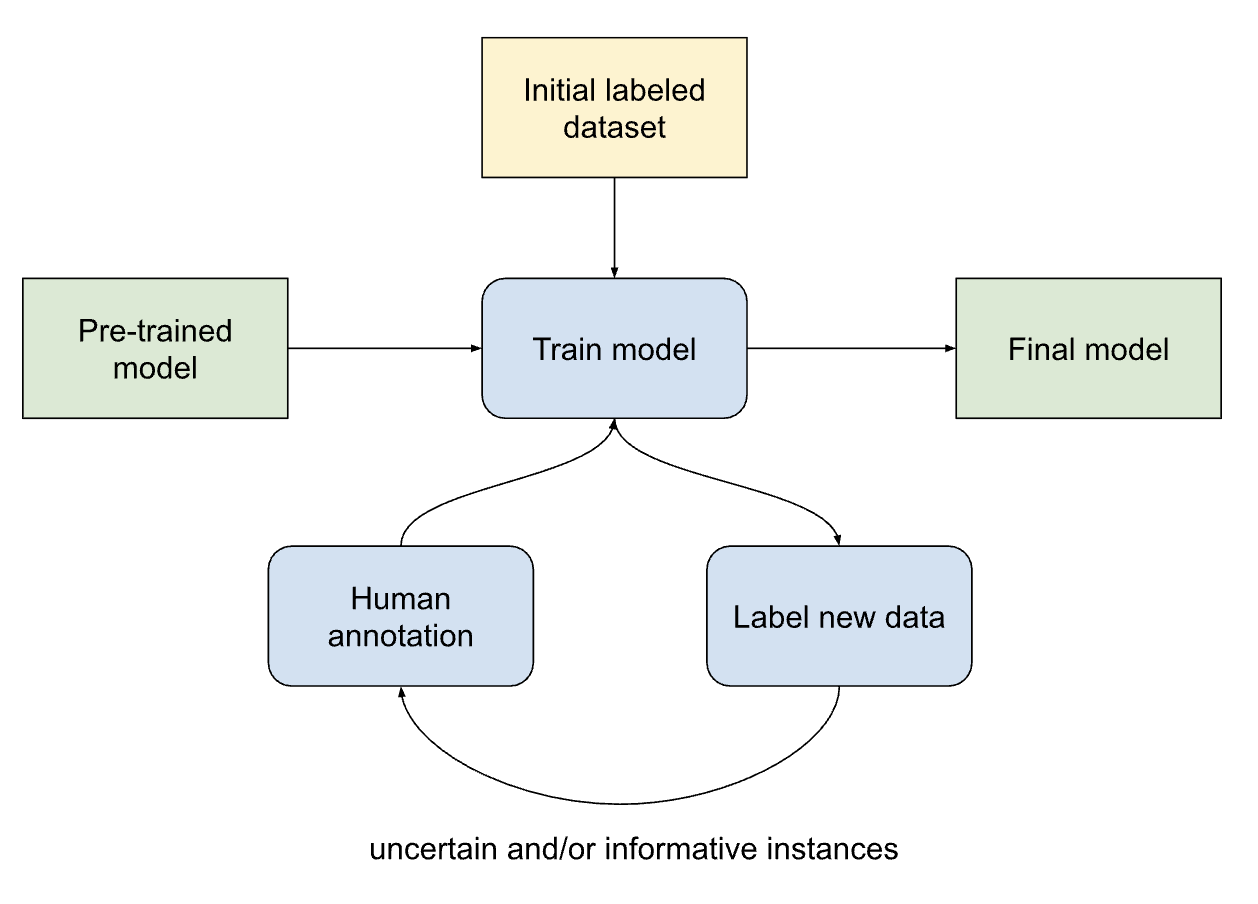
This is Prodigy's killer feature. Instead of making you annotate 10,000 random examples (many of which are trivial and add nothing), Prodigy selects the cases where the model hesitates the most. It's like a smart student who asks questions about what they don't understand, instead of making you repeat what they already know.
The cycle: Prodigy trains a model, uses it to identify the most informative examples (those near the decision boundary), shows them to the annotator, retrains with new annotations, and repeats. Result: you annotate 2,000 strategically chosen examples and it's worth as much as 10,000 random ones.
How it's organized
Everything happens on the command line. You define "recipes" (pre-configured templates for NER, classification, etc.), launch them with a command, and the web interface appears. Results go into an SQLite database. It's designed for a single data scientist or a small team, not for coordinating 50 annotators.
Active learning can reduce your annotation needs by 50 to 80%. Instead of 10,000 examples, you annotate 2,000 to 5,000 for equivalent results. On a $50,000 annotation budget, that can save you $25,000 to $40,000. It's not just a time savings, it's a concrete financial gain.
Strengths and limitations
Good for: NLP, unbeatable annotation speed, small/medium projects, data scientists who want to iterate fast
Less good for: paid (starting at ~$390 per license), primarily single-user, no rich collaborative web version, text-oriented (images and audio are supported but it's not its strong suit)
Argilla: the LLM era
Argilla is the newcomer, designed for the LLM era. You have an LLM and want human feedback on it? Argilla makes that easy. It's the tool that bridges automatic generation and human validation.
What it does
- LLM evaluation: thumbs up/down, multi-criteria rating, free-form correction of generated responses
- HuggingFace integration: direct connection with the Hub for importing/exporting datasets
- Semantic search: find similar examples in your dataset via vector similarity
- ML suggestions: pre-annotate with zero-shot or few-shot models
- Multi-annotator: multiple people annotate the same examples, and you measure inter-annotator agreement
The modern workflow: distilabel + Argilla
This is where Argilla truly shines. The typical 2025 workflow: you use distilabel (from HuggingFace) to generate synthetic data with a powerful LLM, then Argilla lets humans validate, correct, and enrich that data. The result: a quality dataset for fine-tuning, produced in a fraction of the time and cost of traditional annotation.
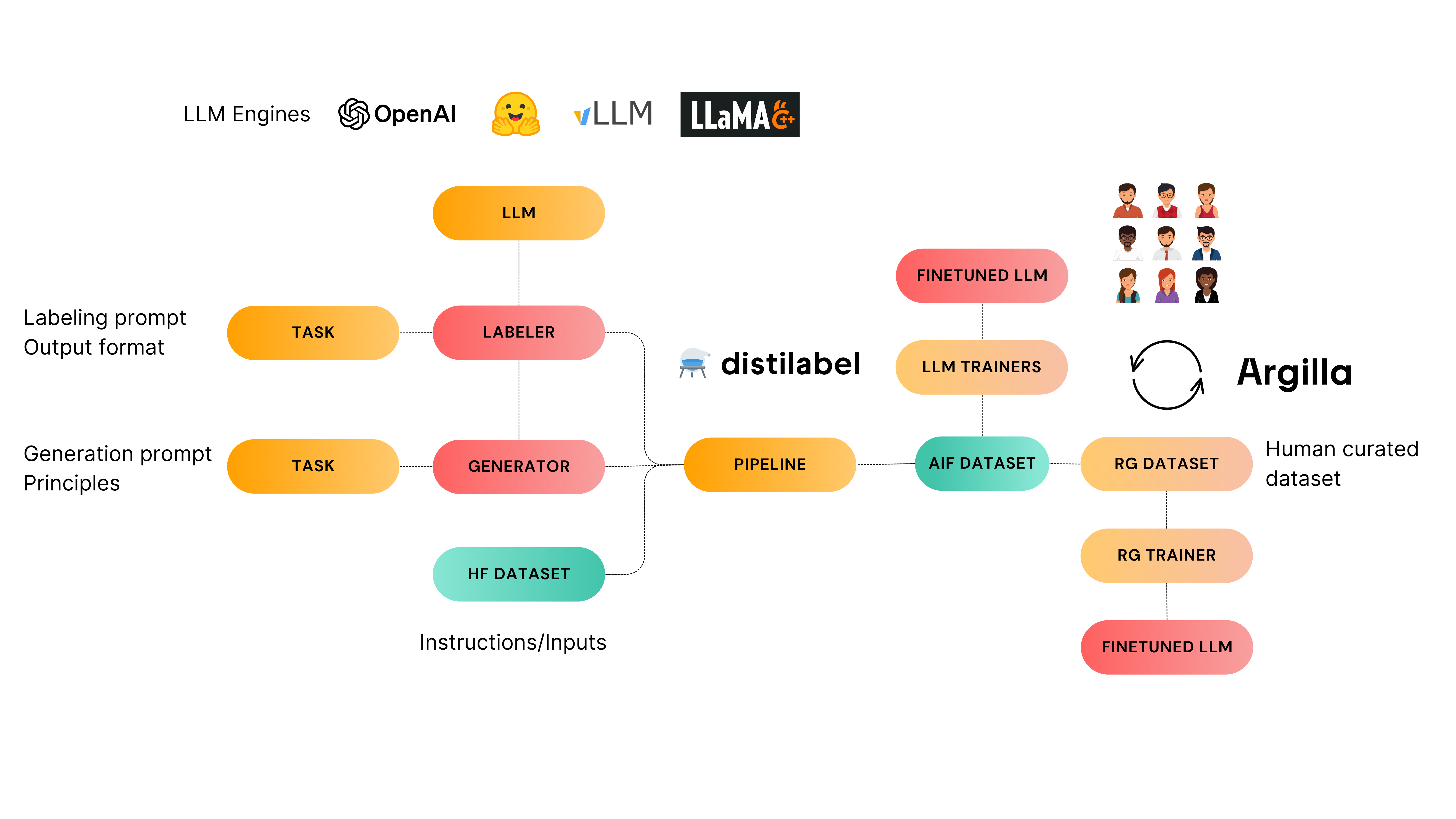
The complete workflow: distilabel generates thousands of examples with an LLM, Argilla presents them to humans for validation, validated examples go directly to the HuggingFace Hub. It's the modern training data factory, and it's what most teams fine-tuning models in 2025 are doing.
Strengths and limitations
Good for: LLM feedback, data curation for fine-tuning, open source and free, native integration with the HuggingFace ecosystem
Less good for: no image segmentation or advanced video annotation, text/NLP oriented, smaller community than Label Studio
Quick comparison
| Tool | Best for | Active Learning | Cost | Ideal for |
|---|---|---|---|---|
| Label Studio | All data types | Not native | Free (OSS) | Versatile teams |
| Prodigy | Fast NLP | Yes, built-in | ~$390 (license) | Solo data scientists |
| Argilla | LLM feedback, fine-tuning | Not native | Free (OSS) | LLM/HuggingFace teams |
You can have the best tool in the world and terrible annotations. What really matters: clear guidelines (what does "positive" mean exactly? Give concrete examples), annotator training (a calibration session before starting), measuring inter-annotator agreement (Cohen's Kappa > 0.8 is good; < 0.6 means your guidelines are vague), and regularly auditing a sample. A bad process with a good tool = useless data.
How to succeed at annotation
- Written and detailed guidelines: with concrete examples for each label, and especially for edge cases (the borderline cases nobody knows how to classify)
- Calibration session: before launching large-scale annotation, have all annotators annotate 100 examples and discuss disagreements. It's the best possible time investment.
- Inter-annotator agreement: if two annotators disagree on 20% of cases, your guidelines are vague. Clarify before continuing, otherwise you're producing noise.
- Small pilot: annotate 200-500 examples to validate the complete process (interface, guidelines, workflow) before scaling to 10,000+
- Systematic pre-annotation: even a mediocre model speeds everything up. Humans correct faster than they create.
- Iterate on guidelines: after 500 annotations, you'll inevitably discover unanticipated ambiguous cases. Update the guidelines continuously.
- Document decisions: every resolved edge case should be documented. In 6 months, someone will have the same question.
Annotation is a profession in its own right. The best ML teams have people dedicated to data quality, because they know that's where the model's real performance is determined.
1. How does Prodigy manage to get from 2,000 annotations a result equivalent to 10,000 randomly annotated examples?
2. Your pre-annotation model is frankly mediocre. Should you still use it to assist the annotators?
3. A team buys the best annotation tool on the market. What, according to the page, can still produce useless data?
4. What is the modern workflow the page describes for producing a fine-tuning dataset?