The challenge: data that doesn't fit anywhere
LLaMA was trained on 15 trillion tokens. LAION-5B contains 5 billion images. Even a "small" fine-tuning dataset can weigh tens of GB. Your RAM, however generous, can't hold all of that. You need to distribute processing across multiple machines.
A typical ML data pipeline looks like this: raw data ingestion, cleaning, quality filtering, transformations (normalization, augmentation), tokenization, and finally training batch creation. Each step must be able to handle hundreds of GB, or even TB of data, without crashing.
Preprocessing an LLM dataset can take days, even weeks of compute. Every day saved on the pipeline = one more day to iterate on training. Optimizing the data pipeline isn't a luxury, it's a direct investment in research velocity.
Apache Spark: the proven big data giant
Apache Spark has been around since 2009 and remains the undisputed standard for massive data processing. Databricks (the commercial version), used by the world's largest companies, is built on top of it.
Architecture: lazy evaluation and automatic optimization
Spark partitions your data across the cluster's nodes. When you chain transformations (filtering, joins, aggregations), Spark doesn't execute them immediately. It builds a logical execution plan. Only when you request the result (write, collect) does the Catalyst optimizer analyze the complete plan, reorder it, merge steps, and execute it in the most efficient way possible.
It's like a chef who reads the entire recipe before starting, rather than doing each step one at a time.
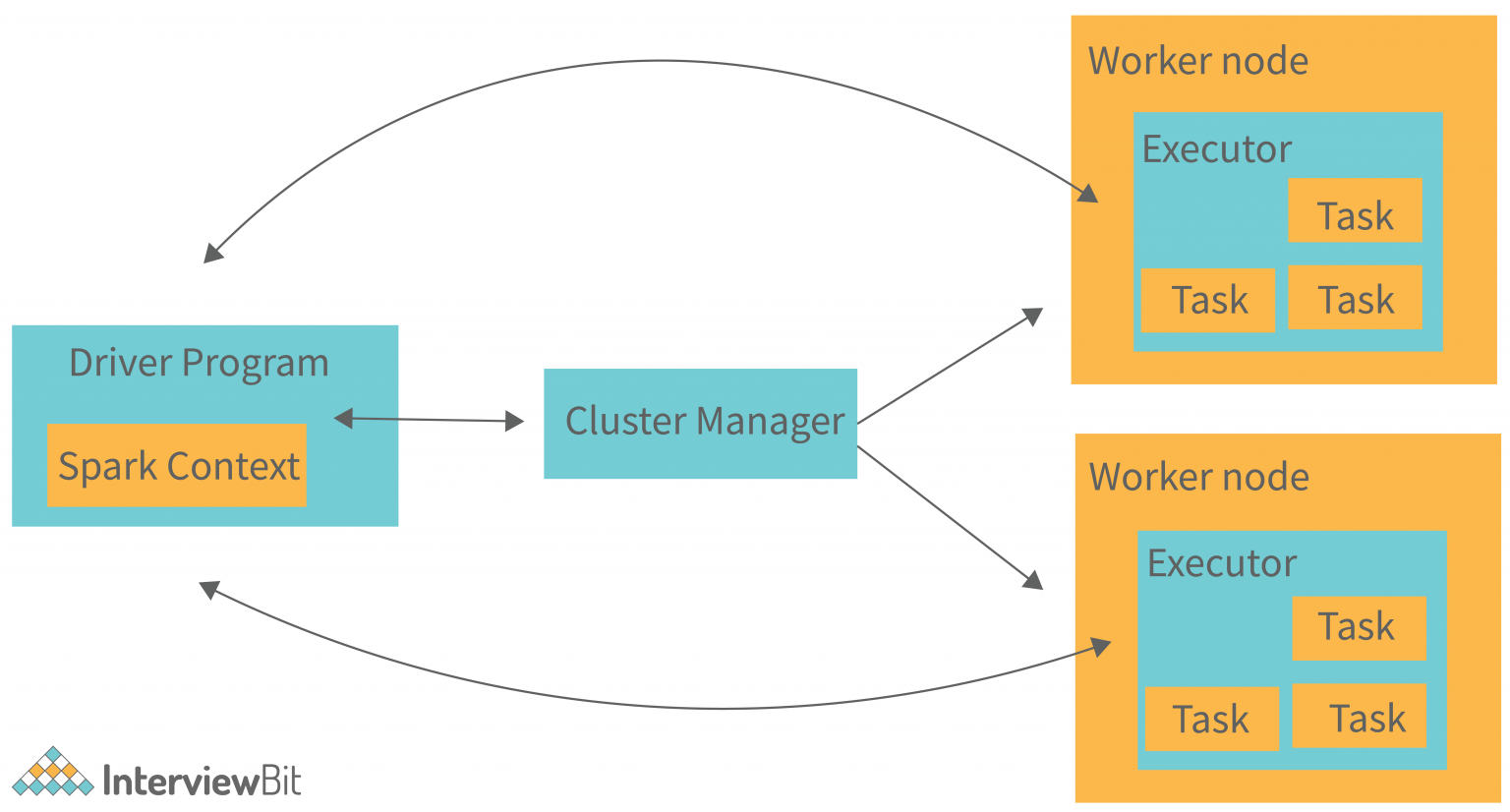
Spark for ML in practice
# Read from the cloud, automatically distributed
data = spark.read.parquet("s3://bucket/huge-dataset/")

# Chain of transformations (lazy, not yet executed)
data = data.filter(...).repartition(...).groupBy(...).agg(...)

# Execution triggers here
data.write.parquet("output/")
PySpark natively reads Parquet, CSV, JSON, ORC from S3, GCS, Azure Blob, or HDFS. Deduplication, tokenization, feature engineering, massive joins: everything is done with the familiar DataFrame API.
RedPajama, FineWeb, and most large open LLM datasets were prepared with Spark. It's the only tool that comfortably scales from 100 GB to 5 TB and beyond without exotic configuration. When you're processing trillions of tokens, Spark is your ally.
MLlib: ML built into Spark
MLlib offers classic algorithms (regression, clustering, classification, collaborative filtering) directly on distributed DataFrames. It's convenient for feature engineering and classic models. But for deep learning, the typical pattern is: Spark for massive preprocessing, then PyTorch/JAX for training on GPUs.
Strengths and limitations
Good for: massive batch processing (TB to PB), SQL analytics on data lakes, mature ecosystem with hundreds of connectors
Not good for: real-time streaming (Spark Streaming exists but isn't its strong suit), no native GPU acceleration, JVM overhead for small jobs
Dask: Python-native distributed computing
Dask offers distributed computing with an API that mimics Pandas and NumPy. If you know Pandas, you know Dask.
The idea: distribute what you already know how to do
If your Pandas DataFrame is 100 GB and doesn't fit in memory, Dask splits it into partitions that each fit in memory, distributes them across cluster workers, and executes your Pandas operations partition by partition. Your code stays nearly identical.
Dask collections
- DataFrame: distributed Pandas API, the most commonly used
- Array: distributed NumPy API, for massive numerical arrays
- Bag: for unstructured data (raw text, nested JSON)
- ML: wrappers for distributed scikit-learn (e.g., GridSearchCV on a cluster)
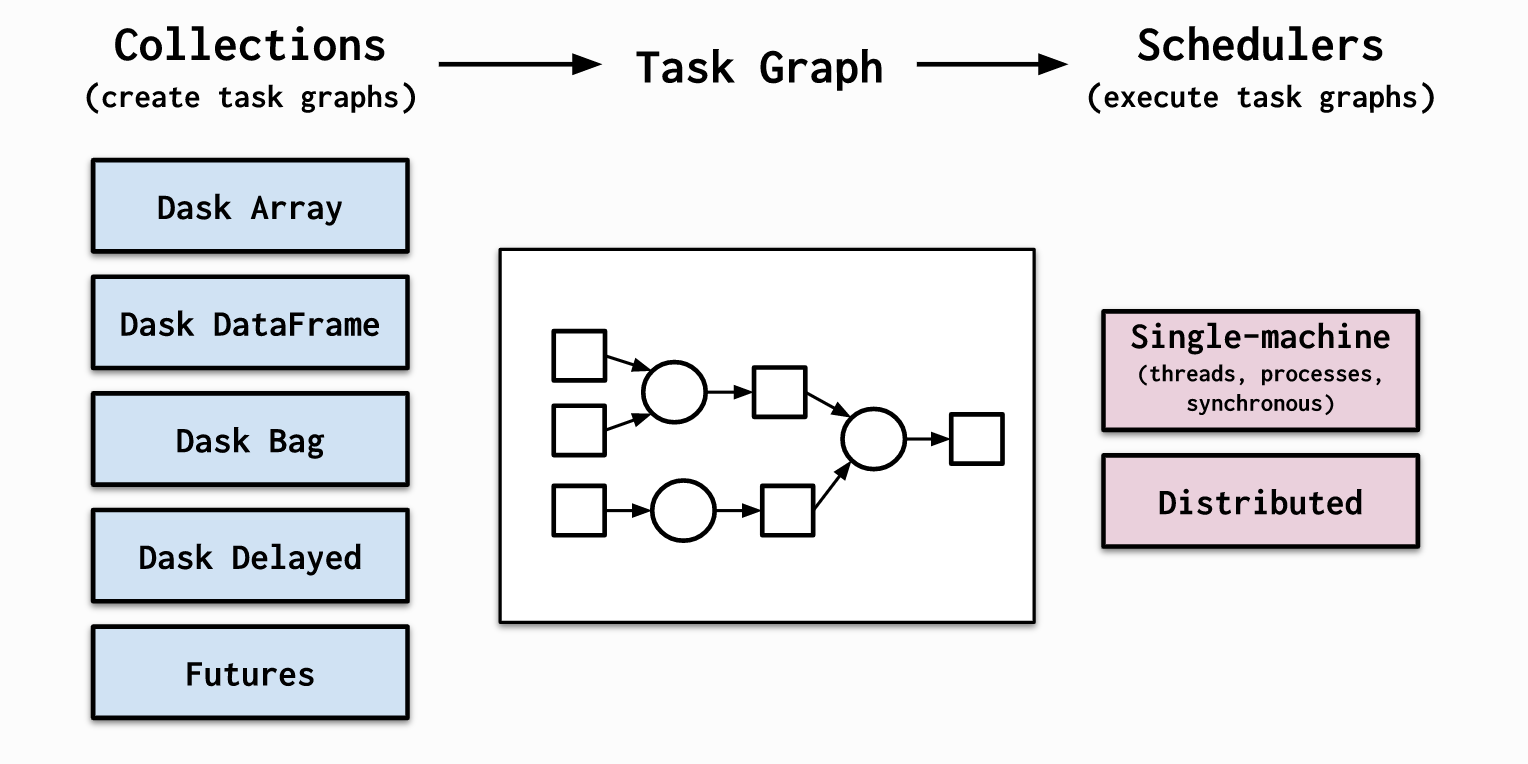
Dask excels when your data fits on a large machine or a small cluster (up to ~1 TB). The API is more Pythonic, deployment is simpler, and overhead is lower. Beyond 1 TB, or if you need advanced SQL and the Catalyst optimizer, Spark takes the lead.
Strengths and limitations
Good for: data scientists familiar with Pandas/NumPy, medium datasets (100 GB - 1 TB), rapid prototyping before moving to Spark
Not good for: complex SQL queries, petabyte-scale datasets, no native GPU support
Ray Data: streaming for ML pipelines
Ray Data is the data processing module of the Ray framework. Unlike Spark and Dask which materialize intermediate data, Ray Data is designed for streaming to training.
Streaming: the fundamental difference
With a classic pipeline (Spark), you preprocess all 5 TB of data, write it to Parquet on disk, then read it for training. Two complete passes over the data, and TBs of intermediate storage.
With Ray Data, streaming works differently:
- Read a block of raw data
- Transform it (cleaning, tokenization)
- Send it directly to the training GPUs
- Move to the next block, in parallel
Zero intermediate materialization. Preprocessing and training run simultaneously. It's like a continuous assembly line rather than a two-step batch process.
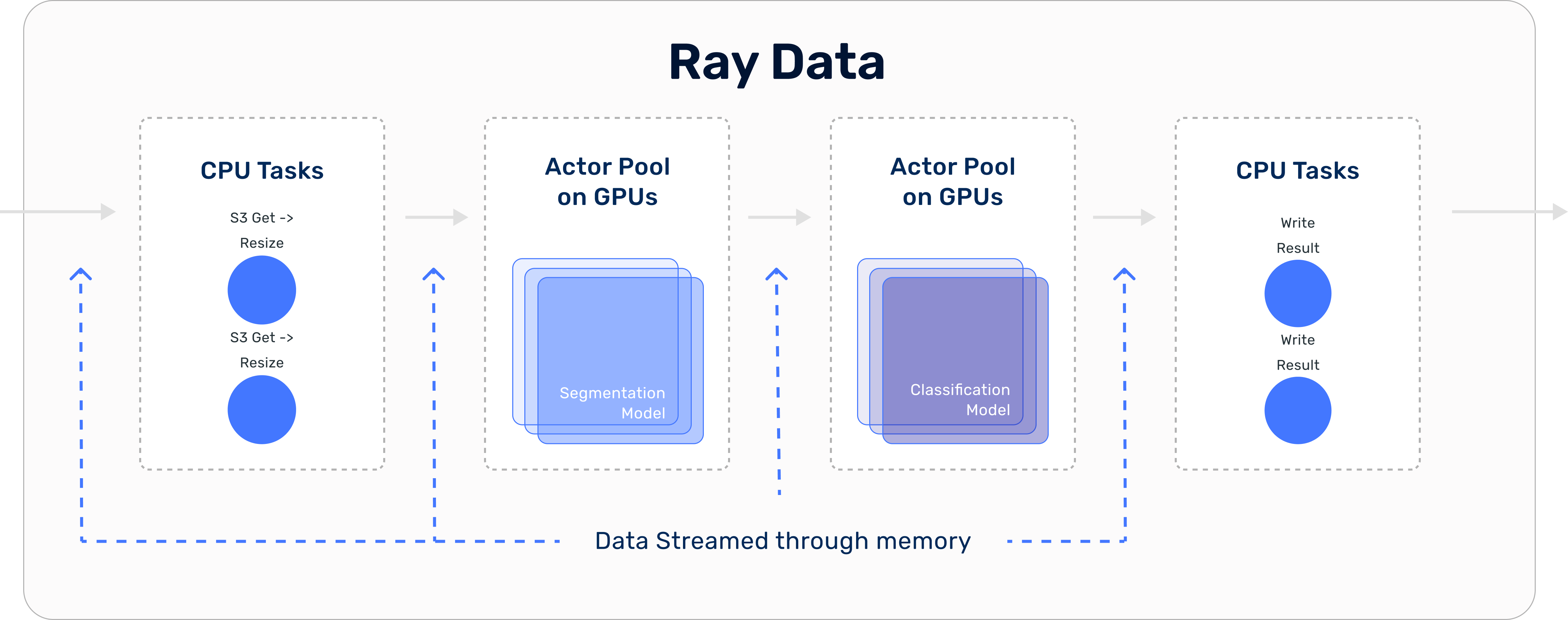
For LLM training on trillions of tokens, materializing the entire tokenized dataset in Parquet first can cost TBs of storage and days of preprocessing. Ray Data eliminates this step by streaming directly to training. Less infrastructure, faster.
ML-specific features
- GPU preprocessing: image augmentation and tokenization directly on GPU, not just CPU
- Training integration: data is consumed directly by Ray Train, with no intermediate step
- Heterogeneous workers: CPU workers for preprocessing, GPU workers for training, in the same Ray cluster
Strengths and limitations
Good for: LLM data pipelines, GPU preprocessing, streaming to training, integration with the Ray ecosystem
Not good for: SQL analytics (Spark does that much better), less mature community and documentation than Spark
Summary comparison
| Criteria | Spark | Dask | Ray Data |
|---|---|---|---|
| Maturity | Very mature (15+ years) | High | Medium |
| Language | Scala/Python/Java | Native Python | Native Python |
| GPU | Limited (RAPIDS) | Limited | Native |
| Streaming | Spark Streaming | Dask Streams | Native, streaming-first |
| Max scale | PB+ | TB+ | TB+ |
| SQL | Excellent (Catalyst) | Basic | Not supported |
| LLM focus | Batch preprocessing | General purpose | Excellent (streaming) |
If your data fits in a single machine's memory (< 100 GB), Pandas or Polars is more than enough. You save on infrastructure complexity, distributed debugging time, and cluster costs. Distributed computing is only justified when it's truly necessary.
Honorable mention: Polars
Polars deserves a mention. Written in Rust, it's 5-10x faster than Pandas on a single machine. It supports lazy evaluation (like Spark) and streaming (chunk processing).
For datasets that fit on a beefy server (up to ~1 TB with modern machines), Polars is often the best option: near-distributed performance without the complexity of a cluster.
The decision scale for choosing your tool:
- < 10 GB: Pandas, the tool everyone knows
- 10-100 GB: Polars, speed without complexity
- 100 GB - 1 TB: Dask or Polars depending on the case
- 1-100 TB: Spark, the proven standard
- 100 TB+: Spark with custom optimizations
The right tool is the one that solves your problem at your scale, without adding unnecessary complexity.
1. In Spark, you chain a filter, a join and an aggregation on a DataFrame, and nothing seems to run. What is going on?
2. What is the fundamental difference between Ray Data and a classic Spark pipeline when feeding an LLM training run?
3. Your fine-tuning dataset is 40 GB. What does the lesson recommend?
4. What is the main appeal of Dask for a data scientist?