Multi-agent Systems: AutoGen and Microsoft Agent Framework
The Idea: Agents That Talk to Each Other
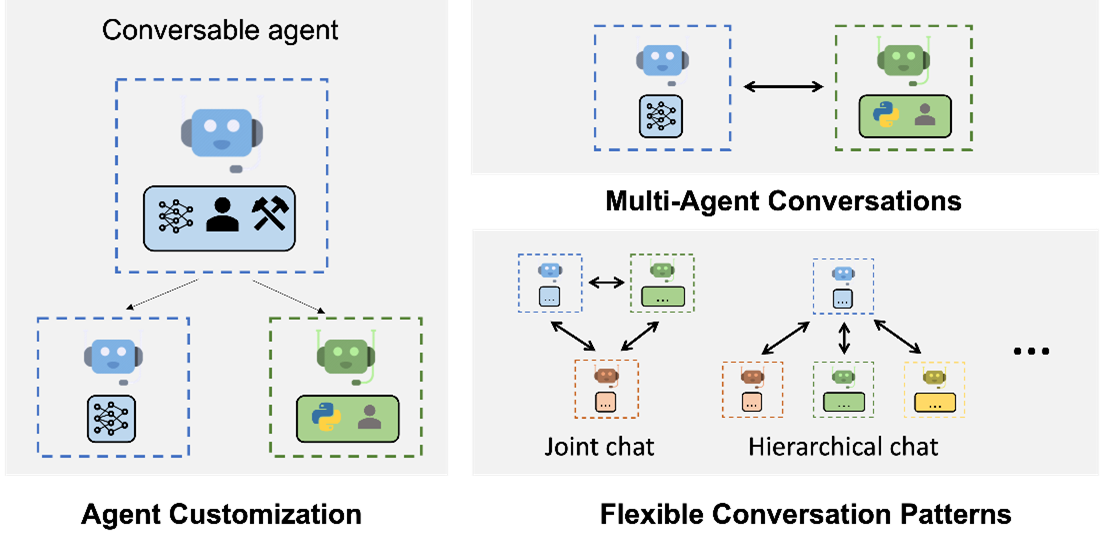
Instead of a single large language model (LLM) doing everything, you assemble a team of specialized agents that talk to each other like colleagues. A developer who writes the code, a reviewer who critiques it, a tester who checks that it works.
First a word on what "specialized" means here, because it is the most common misunderstanding. There is only one model, the same one for every agent. None has been retrained, none holds any skill of its own. What separates them is a different standing instruction ("you are a Python developer", "you are a demanding reviewer") and possibly access to different tools. An AutoGen agent is therefore: a shared model, plus a role written in English, plus a toolbox.
The project's intuition is simple: humans solve hard problems by talking. A developer alone makes mistakes; add a reviewer and quality rises; add a tester and defects surface earlier. AutoGen replays that dynamic.
Why conversation rather than a rigid pipeline? Because it is flexible and self-correcting. If the developer writes broken code, the tester sees the failure and sends it back; the developer fixes it. That back-and-forth is impossible in a sequential pipeline where each stage only talks to the next, in one direction.
But note the flip side straight away, developed at the end of this page: making agents converse means making each of them reread everything the others have said. The context grows with every turn, and the bill with it.
AutoGen as described on this page is no longer developed by Microsoft. In October 2025 it was merged with Semantic Kernel into a new framework, Microsoft Agent Framework, whose version 1.0 shipped in April 2026; the AutoGen repository is archived. The original interface lives on at AG2, the fork by the original authors, under the name AG2 Classic. The mechanisms explained here (agents that talk, an executor that acts, a chair that hands out turns, a cost that grows fast) remain valid: you find them under other names in every current framework. The section "What Became of AutoGen and Its Heirs" brings you up to date.
An AutoGen agent comes down to three things: the model, a role written in ordinary language (the system prompt) and tools.
The project's bet is that agents communicate in natural language rather than through a structured exchange format. That is a technical choice with two faces. Upside: everything is readable, you follow the exchange as you would a human conversation, and you can add an agent without redefining any protocol. Downside: nothing guarantees that one agent understood what another meant, because no form is ever validated. The messages are text, with the ambiguity of text.
Types of Agents
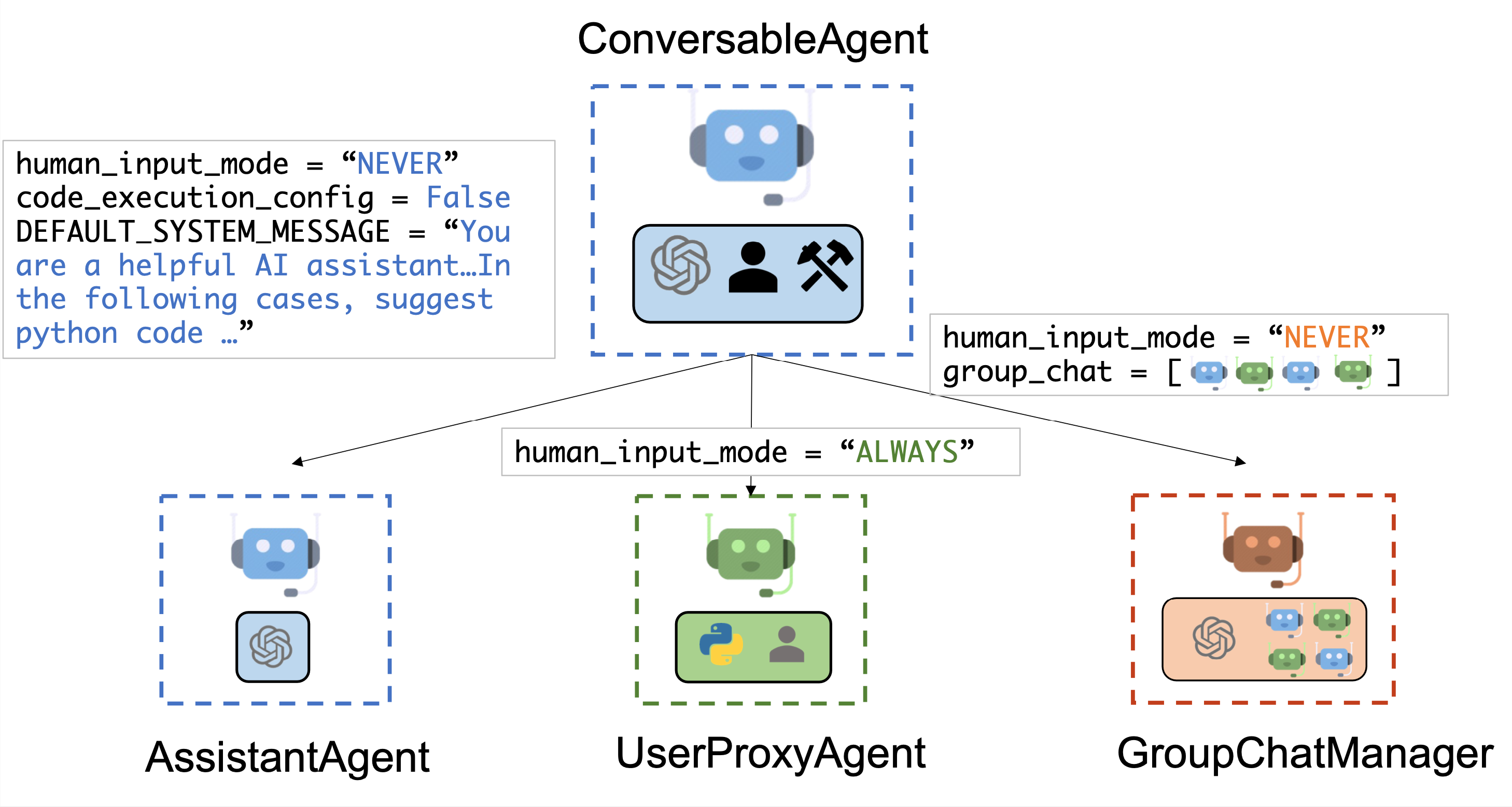
The library provides three main classes. What matters is not the names but what they stand for.
ConversableAgent, the base class. It can send and receive messages, produce a reply (from the model or from hand-written code), execute code, and use tools. The two below are only particular settings of it.
AssistantAgent: the variant wired to the model. This is what reasons, plans and writes code. Its behaviour lives entirely in its system prompt, for instance "you are a Python developer specializing in data analysis". It is configured never to interrupt for human input.
UserProxyAgent, the reverse. It stands in for the human in the conversation, and it is the one that acts: running code, touching the file system, the terminal. It can ask for approval before acting, or proceed without ever asking.
That last class is the sensitive point of the whole arrangement. It is the bridge between a system that writes text and a real machine: whatever the developer agent imagines, this is what actually does it.
Concrete Example: Collaborative Development
Here is how two agents work together to produce a script. The code follows the AutoGen 0.2 interface, the one AG2 Classic preserves today (package autogen), see the section on versions below.
from autogen import AssistantAgent, UserProxyAgent

# Developer agent: reasons and writes code
developer = AssistantAgent(
    name="developer",
    system_message="You are an expert Python developer.",
    # llm_config expects a LIST of model configurations,
    # under the config_list key, not a model name directly.
    llm_config={"config_list": [{"model": "gpt-4"}]},
)

# Executor agent: executes code and reports results
executor = UserProxyAgent(
    name="executor",
    human_input_mode="NEVER",       # never pauses to ask a human
    code_execution_config={"work_dir": "workspace"},
)

# Launch the conversation
executor.initiate_chat(
    developer,
    message="Create a script that analyzes a CSV and generates a chart.",
)
Three settings deserve a close read, because they decide how the system actually behaves:
system_messageis the standing instruction that defines the agent's role. That is where its "specialization" lives, and nowhere else: nothing has been retrained.human_input_mode="NEVER"means the agent never waits for human approval. Set to"ALWAYS", it asks for confirmation every turn.code_execution_configwith a working directory: the agent genuinely executes code produced by a model. By default that execution happens on the local machine. In practice you confine it to an isolated container.
These three lines are the step from a system that produces text to a system that acts. An agent that writes a script is an assistant; an agent that runs it with the user's permissions is something else. Combined with human_input_mode="NEVER", you get a loop that writes and executes code with no human looking in between.
There is a further risk that the team metaphor makes vanish entirely: if one of the agents reads content from outside (a file, a web page, a third-party repository) an instruction hidden in that content is, to the agent, indistinguishable from an instruction from its user. That is indirect prompt injection, covered in tool use and orchestration.
How the Conversation Unfolds
The most fascinating part is watching the conversation unfold naturally:
- Executor sends the request to Developer: "Create a script..."
- Developer reasons and proposes Python code (pandas + matplotlib)
- Executor executes the code locally and replies: "FileNotFoundError: sample.csv not found"
- Developer understands the error, adapts: "I'll first create a test CSV file..."
- Executor executes: "Success! Chart saved."
- Conversation ended (stopping criterion reached)
This is the write-run-fix cycle human developers follow, obtained here through conversation. The developer agent need not anticipate errors: it corrects them as the executor reports them back.
Multi-Agent Patterns
Group Chat
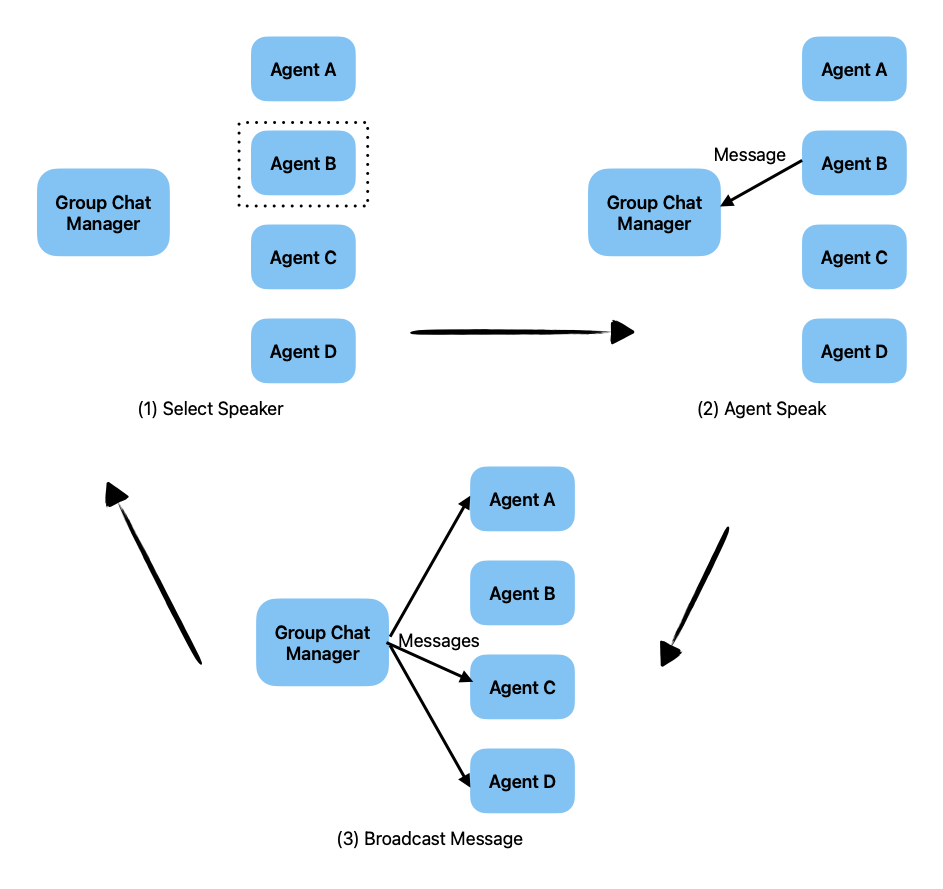
For heavier tasks, three or more agents with a manager distributing the floor:
from autogen import GroupChat, GroupChatManager

agents = [planner, developer, reviewer, tester]

group_chat = GroupChat(
    agents=agents,
    messages=[],
    max_round=20,
    speaker_selection_method="auto",  # The manager chooses who speaks
)

manager = GroupChatManager(groupchat=group_chat,
                           llm_config=config)
The manager picks, at every turn, who speaks. The developer proposes code, the manager gives the floor to the reviewer; after the review it hands back to the developer to fix, then to the tester to validate.
One detail explains the cost of this arrangement: speaker_selection_method="auto" means a model decides who speaks. Every turn therefore carries an extra call devoted solely to that routing decision. And max_round=20 is not an optional precaution: it is the guard rail that stops the conversation running forever.
Sequential Chat
Agents pass the baton in a fixed order: the analyst examines the requirement, the developer writes, the reviewer critiques, the tester validates. Each agent receives the whole of the preceding exchange, which is convenient and expensive for the same reason.
Nested Chat
An agent can open a separate conversation to settle one particular point, then report only the conclusion back to the main thread. For instance, the developer hits a performance problem and goes to consult a specialist agent.
The value is not only in organising the work: it is also a way of containing context. The twenty messages of the technical discussion stay inside the sub-conversation; the main thread receives only the outcome. This is the one pattern on this page that saves tokens rather than spending them.
Difficulty does not grow in proportion to the number of agents. Start with the assistant-and-executor pair, check that it works, then add a reviewer. A five-way conversation is much harder to understand than a two-way exchange: discussions wander off, agents contradict each other, and the number of messages exchanged (hence the cost) climbs fast.
What Became of AutoGen and Its Heirs
This confusion is widespread, and it has immediate practical consequences: a tutorial's code will not run if you picked the wrong project. The story has three acts.
November 2024: the split. The project breaks in two. AutoGen 0.4, at Microsoft, is a complete rewrite built on an event-driven actor model: agents no longer call each other directly, they emit and receive messages asynchronously, which allows genuine parallelism and execution spread across machines. Its interface is not compatible with code written for 0.2. Meanwhile AG2 is the fork launched by AutoGen's original authors, under the ag2ai organisation, to preserve the 0.2 interface and keep it alive independently.
October 2025: the merger at Microsoft. Microsoft announces Microsoft Agent Framework, which brings together the AutoGen and Semantic Kernel teams (Semantic Kernel being its other, enterprise-oriented agent library). AutoGen moves to maintenance mode (bug and security fixes only), then its repository is archived: its front page now tells new users to start with Agent Framework. Agent Framework 1.0, with interfaces declared stable, ships on April 3, 2026 for Python and .NET.
2026: AG2 changes in turn. AG2 releases a version 1.0 that replaces group chat, nested chats and the other patterns on this page with a new architecture, in which a "network" coordinates agents over typed channels. The old interface, the one in this page's examples, is set aside as AG2 Classic: it can still be installed (the package is still called autogen) but only receives security and critical bug fixes.
| Lineage | Status in November 2026 | What you write there |
|---|---|---|
| AutoGen 0.2 / AG2 Classic | Maintenance, fixes only | This page's code, unchanged |
| AutoGen 0.4 (Microsoft) | Archived, replaced by Agent Framework | Agents exchanging asynchronous messages |
| Microsoft Agent Framework | Version 1.0 since April 2026 | Agents and explicit execution graphs |
| AG2 1.0 | Active, community-driven | Agent network and typed channels |
An AutoGen code sample is meaningless without its version. The snippets on this page follow the 0.2 interface, the one you meet in the great majority of tutorials and articles published between 2023 and 2025; today they run on AG2 Classic. On Microsoft Agent Framework, AutoGen 0.4 or AG2 1.0, the class names and the way a conversation is started differ.
The lesson is more general: agent libraries change their interfaces every few months, and sometimes their names. A process described only through one library's function calls becomes unreadable in two years. What survives is the description of the mechanism.
Microsoft Agent Framework: Conversation Inside a Graph
Agent Framework keeps AutoGen's ideas (agents that are simple to define and can converse) and adds what production needed, inherited from Semantic Kernel: session state kept between calls, checked types, middleware (code that slots in before or after each agent action, for instance to filter or log) and full telemetry.
Its main novelty is a distinction between two objects:
- an agent: a model, instructions, tools, and the usual loop. It is the right choice when the task is open-ended and you want the model to chain calls on its own;
- a workflow: a graph connecting agents and ordinary functions through execution paths written in advance. It is the right choice when the steps are known and you want to control their order.
The documentation sums up the rule with advice this page endorses: if an ordinary function can do the job, write the function rather than an agent.
The multi-agent patterns described above still exist, but as ready-made orchestrations: sequential (agents pass the baton in a fixed order), concurrent (they work in parallel), handoff (one agent passes control to another depending on context), group chat (the direct heir of AutoGen's group chat) and Magentic (a lead agent that plans and dynamically spreads the work among specialists, a pattern that came out of Microsoft's research). Two additions answer weaknesses noted above: checkpoints, which let an interrupted workflow resume, and tools marked "approval required," which pause execution until a human signs off. The framework also speaks the two protocols of the moment, MCP for tools and A2A for talking to outside agents (see agents: the landscape).
The change of philosophy is clear. AutoGen bet on free conversation, surprises included; its successor keeps conversation as one option among several and steers toward explicit paths. It is the same movement that made LangGraph's graphs win out, described in CrewAI and LangGraph.
How It Compares With Other Multi-Agent Frameworks
| Framework | Core idea | Strength | Weakness |
|---|---|---|---|
| Microsoft Agent Framework | Agents plus graph workflows | Enterprise tooling, resume after interruption, Azure integration | Young ecosystem, Microsoft-centred |
| LangGraph (1.0 in October 2025) | Hand-written state graph | Fine control of the path, checkpoints | More code to write |
| CrewAI (1.0 in October 2025) | Team of role-based agents, plus event-driven flows | Quick to pick up | Less control over execution details |
| OpenAI Agents SDK | Agents handing off to one another | Simplicity, built-in tracing | Designed first for OpenAI's models and tools |
| AG2 1.0 | Agent network and typed channels | Direct heir of the AutoGen spirit | Smaller community, recent interface |
These frameworks do not change the nature of the thing: one model, called several times with different instructions, and a program that decides who speaks when. What sets them apart is how that decision is written: as a conversation, a graph or a series of handoffs.
The 2025 Debate: Do You Need Several Agents?
In June 2025, two essays published a day apart summed up the debate. Cognition, the company behind the coding agent Devin, argued against building multi-agent systems: subagents working in parallel make independent decisions that end up contradicting each other. Anthropic, on the contrary, described its subagent-based research system, markedly better than a single agent on its internal evaluation, but roughly fifteen times hungrier in tokens than a chat. The two observations reconcile fairly well: splitting work across agents pays off for tasks that break into independent threads and only read (looking up sources), much less for tasks that write to a shared object (editing the same code).
A 2025 study examined more than 1,600 execution traces from seven multi-agent frameworks and sorted their failures into fourteen modes grouped in three families: design flaws (badly defined roles or instructions), misalignment between agents (one ignores what another said, or works from a different assumption) and verification failures (nobody really checks the result, or the conversation stops too early). Its starting observation is sobering: on common benchmarks, the gain of multi-agent systems over a single agent is often minimal.
Why Do Multi-Agent LLM Systems Fail?What This Is Actually Used For
Software development: the flagship case. A planner splits the task, a developer writes, a tester probes, a reviewer critiques. The write-test-review-fix cycle happens by itself. It works best on scripts, data analyses and prototypes.
Data analysis: one agent writes the queries, an executor runs them, a third interprets the results, a last one produces the charts.
Research and writing: one agent scans sources, another distils a synthesis, a writer produces the text, a proofreader checks consistency.
The Difficulties Specific to Multi-Agent Systems
Poorly bounded, agents chatter endlessly, revisit a settled problem, or wander onto side questions. max_round and an explicit stopping criterion are not optional. Always set a maximum number of rounds and a clear success condition, the most widespread convention is to have the agent write an agreed word, TERMINATE, once it judges the task done.
Cost, and where it comes from. It is not just that there are several calls: it is that every agent rereads the whole conversation before speaking. At turn 10 the previous ten messages are sent back to the model; at turn 20, all twenty. The billed context therefore grows roughly as the square of the number of turns, not in proportion to it.
Let us do the order of magnitude with the assumptions in the open. If a message runs about 250 tokens, a 20-turn conversation in which each contribution rereads the whole history handles something like 20 × 20 × 250 ÷ 2, that is around 50,000 tokens. At a hypothetical rate of $10 per million tokens, that comes to $0.50 for one task. Both inputs (message size and rate) are assumptions for the calculation, not measurements: rates vary between providers and fall year on year. What to retain is not the amount but the shape of the growth: doubling the number of turns does not double the bill, it quadruples it.
Non-determinism. The same opening request can produce very different conversations, because generation involves a random draw. That is both useful (exploration sometimes finds unexpected solutions) and painful: you cannot reproduce a failure in order to study it. Setting temperature to zero and, where the provider supports it, fixing a random seed, improve reproducibility without guaranteeing it.
Attributing fault. When the result is bad, who is responsible? The developer who wrote wrong code, the reviewer who let it through, or the tester who probed the wrong case? The only answer is complete logging: every message, its author, its timestamp, its full content. That is the entry price for understanding after the fact, and, where responsibility matters, the only usable record.
When to Make Agents Converse
The criterion is simple: a conversation between agents suits situations where splitting by role is natural and where you accept a degree of unpredictability. If you can picture a human team solving the problem by talking, the transposition will probably work.
If the workflow is known in advance and must be reproducible, an explicit graph fits better: Microsoft Agent Framework's workflows, or LangGraph, see CrewAI and LangGraph. And before assembling a team, ask the awkward question: would one well-equipped agent not do? More often than not, yes, see LLM agents: definition and taxonomy and tool use and orchestration.
For a new project in the Microsoft ecosystem, the starting point is Agent Framework, not AutoGen. AutoGen's strength and its weakness, which its successors inherited, are one and the same property: the flexibility of conversation permits rich exchanges, and makes behaviour less predictable than a hand-written pipeline.
1. In an AutoGen team, what technically distinguishes the « Python developer » agent from the « demanding reviewer » agent?
2. In the classic AutoGen duo, where is the « tipping point » that turns a text producer into a system that acts?
3. In a group chat, what does setting speaker_selection_method to « auto » mean?
4. A multi-agent conversation of 10 turns costs X. Roughly what will the same conversation cost if extended to 20 turns?
5. You copy the code of a 2023 AutoGen tutorial, written for the 0.2 interface. What will it run on in November 2026?
6. In Microsoft Agent Framework, when should you prefer a workflow over an agent?