What Is It, Concretely?
A language model can only do one thing: produce text. But we expect concrete actions from it: search a database, run a calculation, send an email, book a flight. How do you get from text to action?
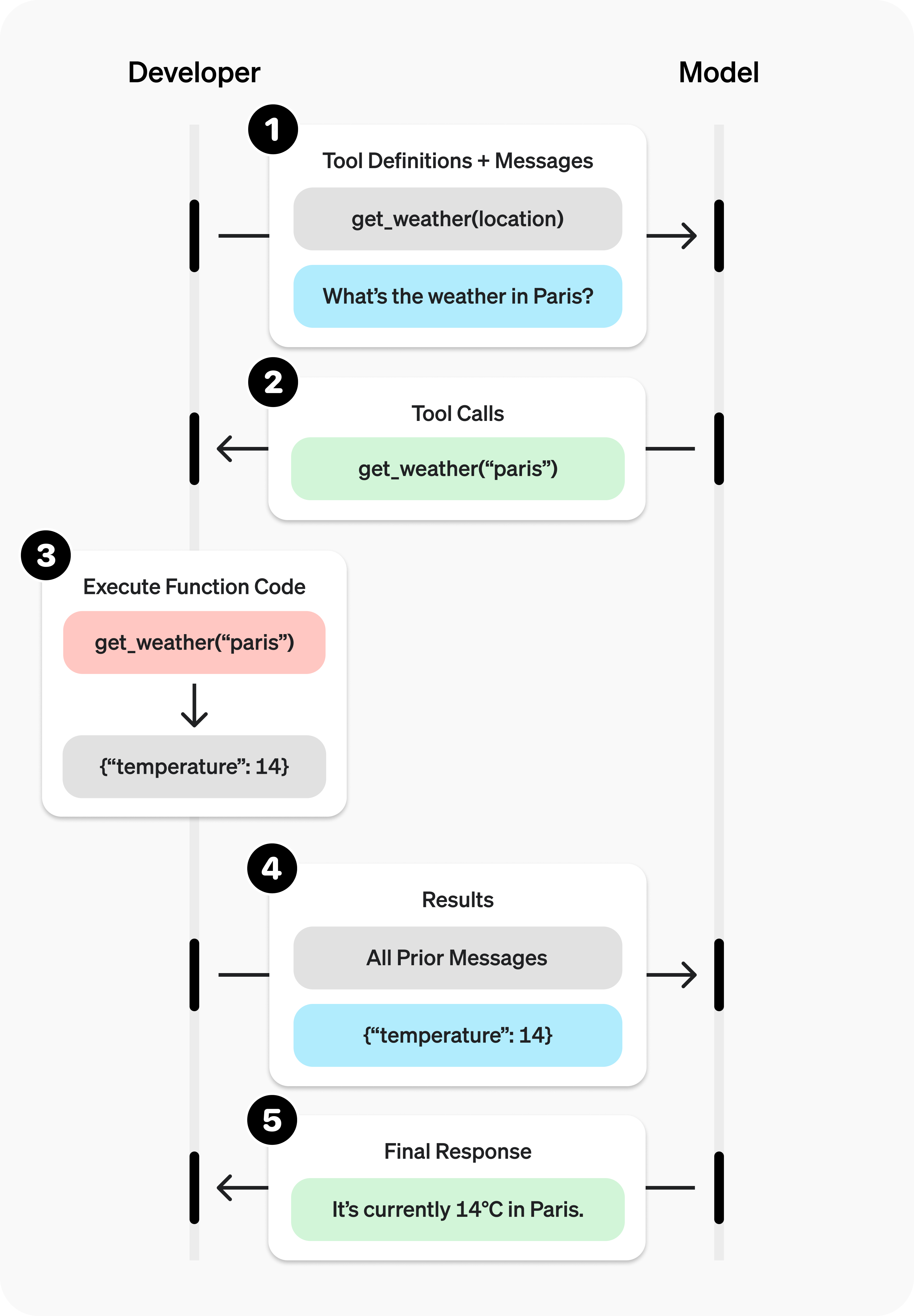
That is what function calling does. The principle: you describe the available functions to the model (name, description, expected parameters) and the model, when the context calls for it, produces a fragment of JSON (JavaScript Object Notation, a standard text format for structured data) naming a function and its arguments. The application receives that fragment, executes the corresponding function, appends the result to the model's input text, and runs it again.
The model never executes anything. It produces a call description, as text: {"name": "get_weather", "arguments": {"city": "Paris"}}. That text has no effect of its own, the application reads it, executes the function, retrieves the result and hands it back to the model.
This boundary is where responsibility sits. A model that produces {"name": "delete_all", ...} has deleted nothing: it has produced a string of characters. The deletion is the act of the code that chose to execute that call without checking it. That side of the boundary is almost always where a system's real engineering lives, and where the fault lies after an incident.
Anatomy of a Function Call
Describing a Function to the Model
The description is the only thing the model will choose from: it does not see the function's code, its documentation, or its past behaviour. It sees this text, inserted into its input. Write it like public API documentation: clear, precise, with parameter names that speak for themselves.
{
  "name": "get_weather",
  "description": "Get the current weather for a city. Returns temperature and conditions.",
  "parameters": {
    "type": "object",
    "properties": {
      "city": {
        "type": "string",
        "description": "City name (e.g., Paris, Tokyo)"
      },
      "unit": {
        "type": "string",
        "enum": ["celsius", "fahrenheit"],
        "description": "Desired temperature unit"
      }
    },
    "required": ["city"]
  }
}
The Complete Flow in 4 Steps
- User: "What's the weather like in Paris?"
- The model produces:
{"name": "get_weather", "arguments": {"city": "Paris", "unit": "celsius"}} - The application executes the function and gets:
{"temp": 18, "condition": "cloudy"} - The model, run again with that result in its input, produces: "It's 18 degrees in Paris, cloudy."
The model never touched the internet. It produced two fragments of text: a call description, then a sentence. Everything else (the network request, the formatting, the error handling) is code written by the application.
The Golden Rules of Design
Explicit names: search_company_database is infinitely better than query or tool1. The name is the first thing the model leans on.
Detailed descriptions: this is the only chance to state what the function does, when to use it, and what it returns. Don't skimp.
Constrained parameters: string, number, boolean, or a closed list of values (enum, for enumeration). The narrower the value domain, the less room for an invalid value. An enum: ["celsius", "fahrenheit"] beats a type: string with "temperature unit."
Informative returns: the returned result is text appended to the model's input. It has to carry, by itself, whatever the next turn needs.
// Good: empty and failed are distinguishable
{"status": "success", "results": [], "count": 0}

// Bad: no way to tell an empty search from a failed one
{"data": null}
The common rule of thumb is one sentence long: start with a handful of tools, not fifty. The reason is mechanical, not mysterious, every tool description takes up room in the model's input, and two neighbouring descriptions make the choice ambiguous. The figures that circulate ("no more than 5," "no more than 10") are conventions, not measured thresholds; don't mistake them for study results. When the tool count genuinely gets large, the documented remedy is hierarchical organisation: see tool use patterns.
Advanced Patterns
Parallel Calls
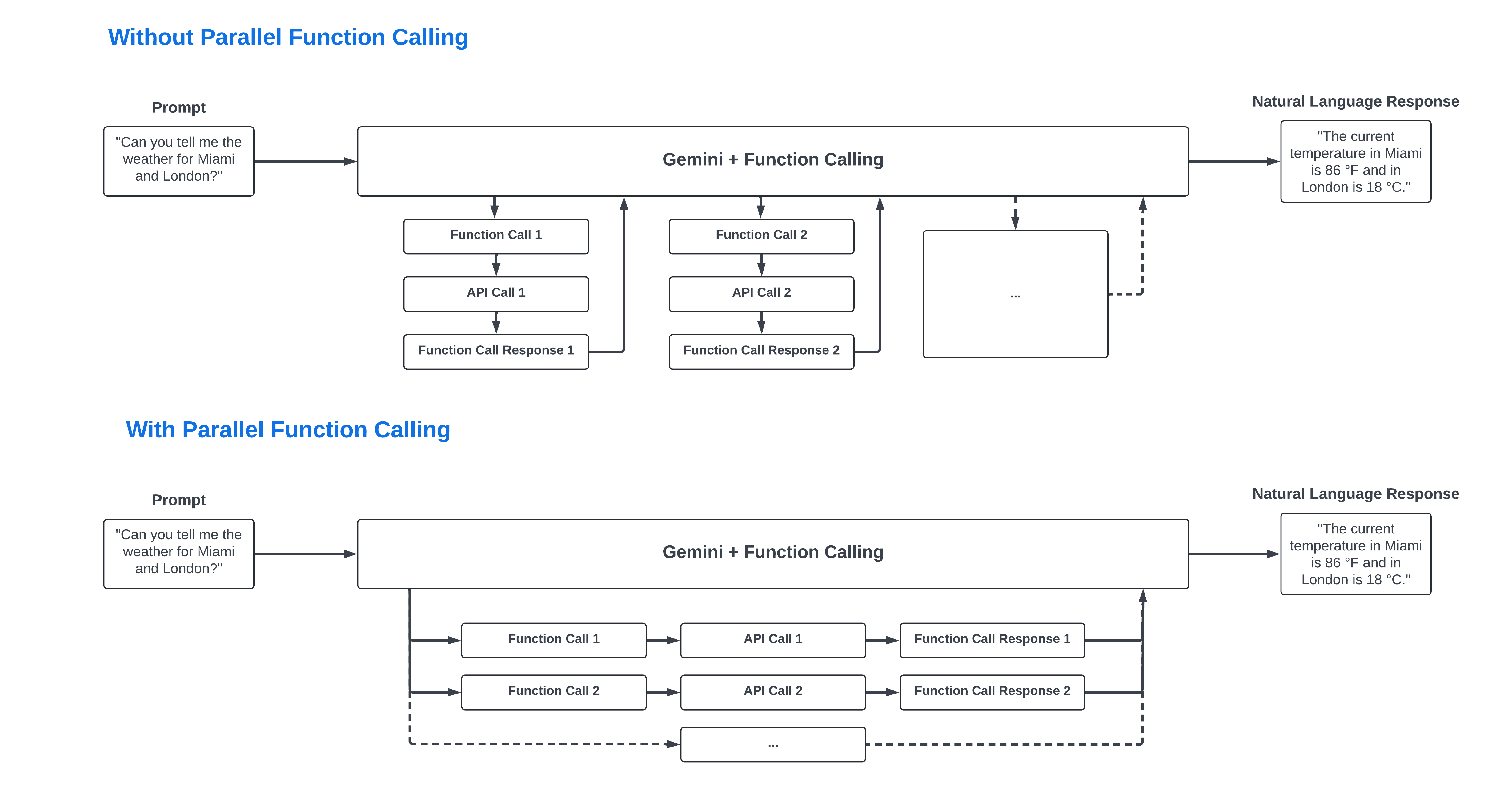
A model can produce several call descriptions in a single response when nothing links them:
User: "Weather in Paris and Tokyo?" The model →
[get_weather("Paris"), get_weather("Tokyo")], two calls in one response
The application runs them at the same time, returns both results, and the model composes a single answer. What you save is a round trip to the model, not just network time.
One caveat: "in parallel" describes how the application chooses to execute the calls. The model merely emits several at once. At Mistral this behaviour is set by a documented API parameter, with a precise reason to switch it off when tools have side effects: see Mistral function calling.
Sequential Calls (chained)
Sometimes the result of one call is needed for the next:
search_user("John")→{id: 123}get_orders(user_id=123)→[...]
Here the dependency is resolved by the structure of the loop, not by any intent on the model's part: the second call can only be produced on the next turn, once 123 is present in the input. A call that depends on a result therefore necessarily costs one extra turn.
Structured Output via Function Calling
A useful subversion: using function calling to obtain structured output, even when the "function" executes nothing. You declare a fictitious function whose parameters describe the structure to extract:
{
  "name": "extract_entities",
  "parameters": {
    "properties": {
      "persons": {"type": "array", "items": {"type": "string"}},
      "organizations": {"type": "array"}
    }
  }
}
The model fills in the parameters and you get JSON conforming to the declared schema. That is markedly more reliable than asking in prose for "some JSON." The topic has its own lesson: structured output.
Model Support
Every recent frontier model supports function calling, and most can emit several calls in one response. Two points matter more than the list:
- "Native support" means something specific. The model has been trained to produce this call format, and the provider exposes a dedicated API field for declaring tools and retrieving calls. The alternative (asking in prose for "JSON in this shape") sometimes works, but nothing guarantees the output's shape, and you have to write the parser and the malformed-case recovery yourself.
- Published error rates are not comparable across providers. Each measures on its own test sets, with its own tools. Be wary of any table ranking models on function-calling "quality" without saying what was measured, or on what.
For the list of Mistral models concerned and the actual API parameters (tool_choice, parallel_tool_calls), see Mistral function calling, this lesson covers the mechanism, not any one provider's interface.
Common Errors (and How to Recover)
- Wrong parameter type: a string where a number is expected
- Non-existent function: the model produces a function name absent from the declared list
- Wrong tool: a real tool, but unsuited to the request
- Missing required parameter: a field marked mandatory is absent
Recovery:
- Send the error back to the model: in most cases the error message is enough for the next call to be correct, provided that message says what was wrong
- Validate server-side: check types and constraints before executing, never trusting the received fragment
- Provide a fallback tool: if a tool keeps failing, offer another or hand control back
Function calling does not give power to the model: it gives power to your code, on the basis of text the model produced. And that text depends on everything in the input, including content you do not control, a document being analysed, a web page being read, the result of an earlier tool. A third party who writes into any of those can therefore influence which calls get produced. This is indirect prompt injection, and it is the underlying reason parameter validation and least privilege are not optional niceties. See tool use patterns and prompt injection.
Best Practices Summary
- Start with few tools, add more as a need is actually observed
- Test each tool with varied inputs, both valid and malformed
- Document tools like a public API: clear names, complete descriptions
- Log every call, it is the only usable trace in a dispute as much as in an outage
- Set a timeout on each execution
- Cap the number of calls per conversation, to avoid endless loops
Function calling is the base building block of agents. Well designed, the mechanism is simple: the model produces a name and arguments, your code decides whether to honour them. All the difficulty, and all the technical interest, is in that "decides."
1. An agent deleted data after the model produced a fragment naming the delete_all function. Where does the fault lie, according to the page?
2. At the moment of choosing which function to call, what does the model actually see?
3. What should you make of the « no more than 5 or 10 tools per agent » rule that circulates in the trade?
4. Why does a tool call that depends on the result of a previous call necessarily cost one extra turn?
5. Declaring a fictitious extract_entities function whose code will never be executed: what is that for?