Two Philosophies: Team vs Graph
To make several agents work together, two approaches dominate, and one analogy separates them.
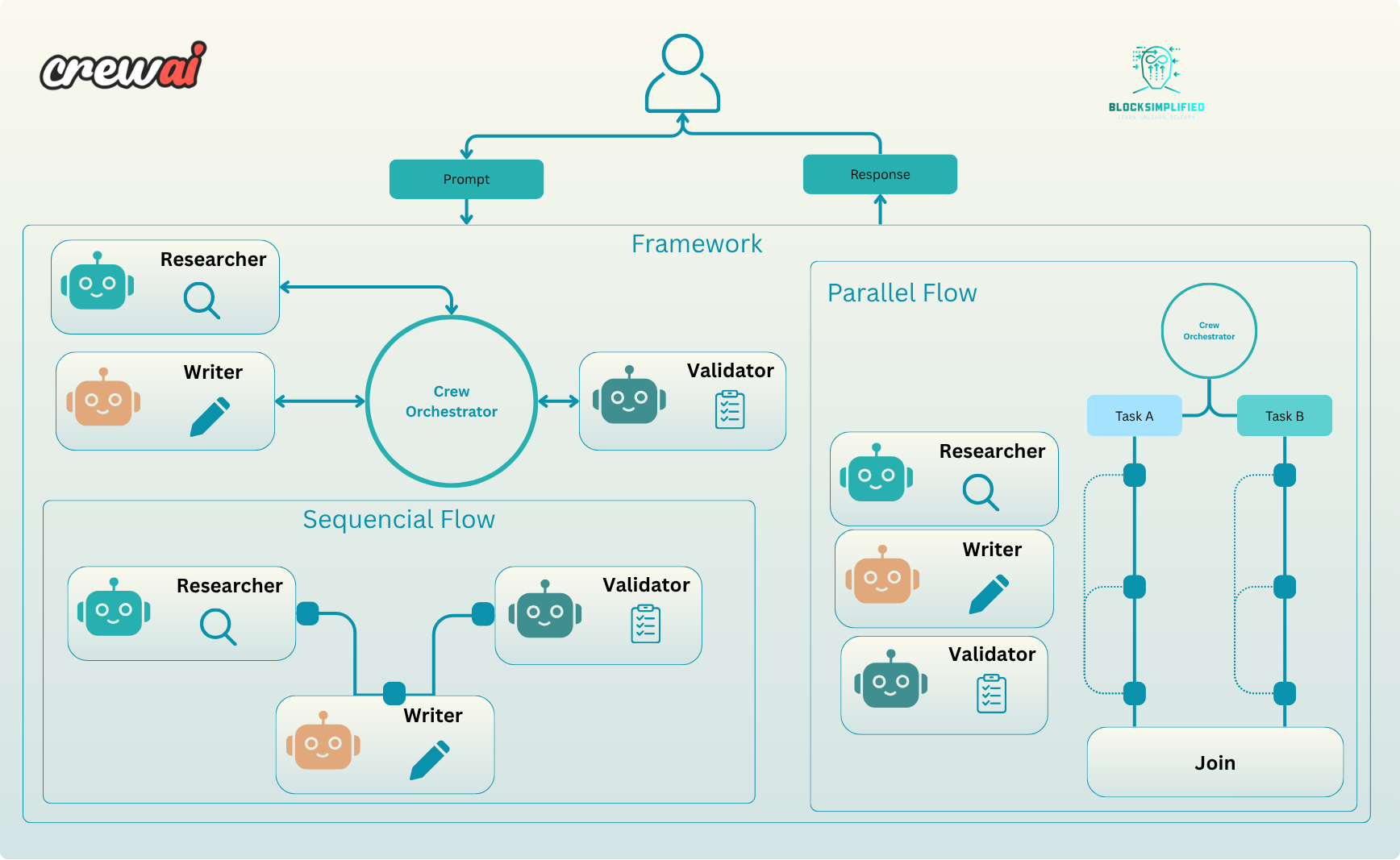
CrewAI is assembling a project team. You define roles (researcher, writer, analyst) hand them missions, and a team lead coordinates. You think in terms of "who does what."
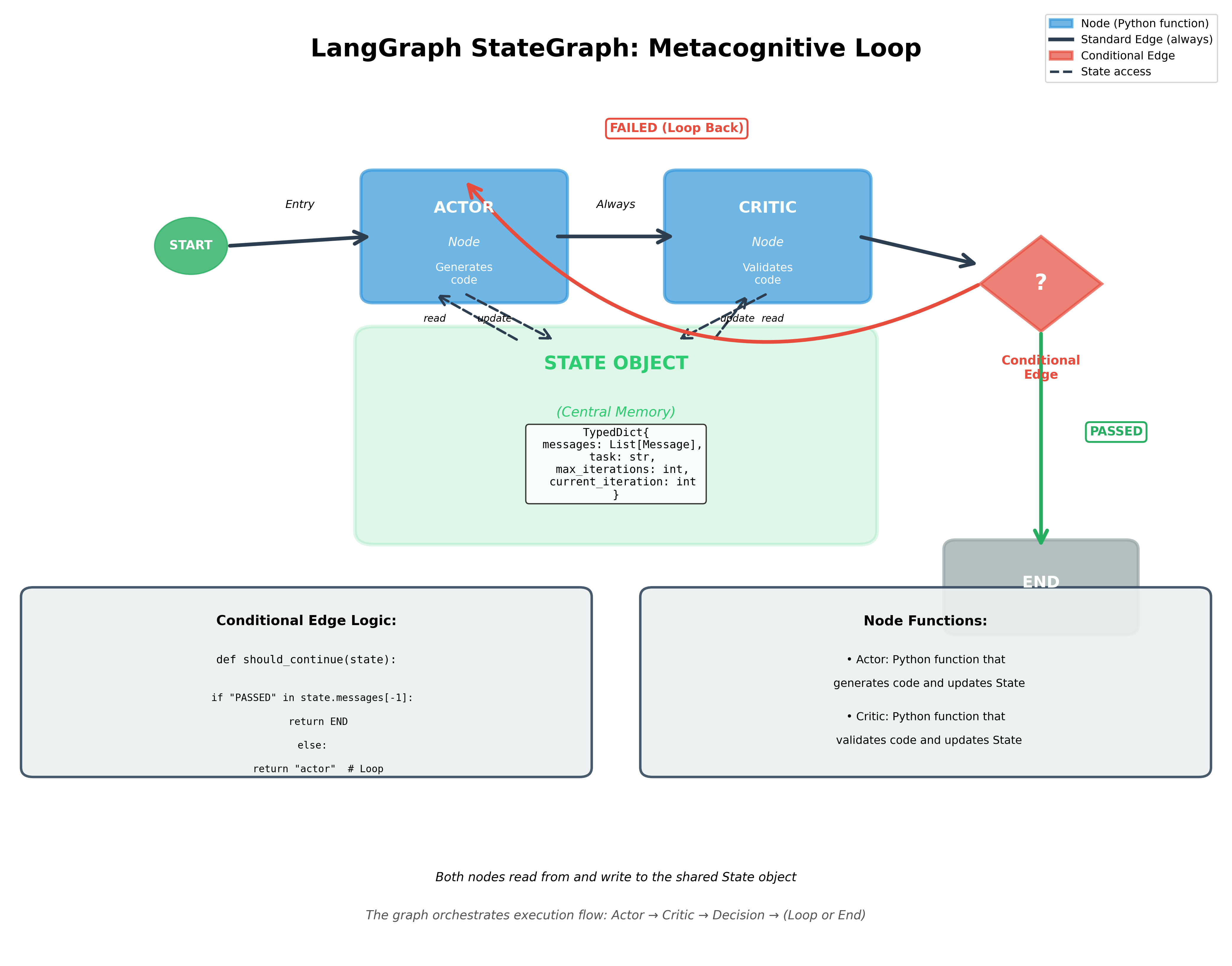
LangGraph is drawing a decision flowchart. Each step is a node, each arrow a transition, and the system's state travels from node to node. You think in terms of "when do we do what, and what happens if this condition holds."
State up front what the two have in common, or the comparison misleads: in both cases there is only one language model, called several times with different instructions. No "agent" is a separate entity holding skills of its own. What these libraries supply is not extra intelligence but organisation: who gets called, in what order, with what context, and what is done with the result.
CrewAI to prototype fast with clear roles and a simple sequence. LangGraph when the flow must be controlled in detail: conditional branching, loops, and an explicit state you can inspect.
CrewAI: The Intuitive Team
CrewAI rests on three notions:
Agent: a role, an objective, abackstory(a paragraph fleshing out the instruction, along the lines of "journalist with ten years in the trade"), and toolsTask: a piece of work handed to an agent, with a description of what it must produceCrew: the team, which moves work between the agents
Agent and Task are therefore distinct, and that is the right way to see the arrangement: the role on one side, the work to be done on the other. The same team can be given different tasks without being redefined.
from crewai import Agent, Task, Crew

researcher = Agent(
    role="Researcher",
    goal="Find precise information",
    backstory="Expert in document research",
    tools=[search_tool, scrape_tool],
)

writer = Agent(
    role="Writer",
    goal="Clear and engaging articles",
    backstory="Journalist with 10 years experience",
)

research_task = Task(
    description="Research advances in generative AI",
    agent=researcher,
    expected_output="Structured summary of advances",
)

writing_task = Task(
    description="Write article",
    agent=writer,
    context=[research_task],  # Depends on research_task
    expected_output="Blog article, 800 words",
)

crew = Crew(
    agents=[researcher, writer],
    tasks=[research_task, writing_task]
)
result = crew.kickoff()
Two execution modes:
- Sequential (
Process.sequential): tasks run in the order declared, each receiving the previous one's result. This is the default, simple and predictable, it is what the code above uses, since nothing was specified. - Hierarchical (
Process.hierarchical): a project-manager agent receives the tasks and decides whom to call on. One useful precision, because quick write-ups suggest this mode switches itself on: you must ask for it explicitly by passingprocess=Process.hierarchicalto theCrew, and supply something to run that manager with, either a model, viamanager_llm, or an agent you wrote yourself, viamanager_agent. Without that, nothing gets created.
What CrewAI does well:
- An interface that reads like a description of the work to be done
- The team metaphor, which makes design accessible without technical background
- Attaching tools without ceremony: web search, page extraction, calls to external services
- Delegation between agents, one agent being able to hand a point to another
LangGraph: Total Control via State Graph
LangGraph takes the problem from the other end. Instead of people and tasks, you describe the workflow as a directed graph, with three building blocks:
- The state (
State): a structured record holding everything the system knows at a given moment, the question asked, the documents found, the answer under construction. One thing travels through the graph, and this is it. - The nodes: plain functions. Each node reads part of the state, does its work (often a call to the model, though not necessarily) and returns the updated state.
- The edges: the transitions. An ordinary edge always goes to the same place; a conditional edge picks its destination from the state, for instance "if the documents found are relevant, go and write the answer; otherwise, go and search the web".
It is that last block that separates this from a simple chain of steps: it permits branching and, above all, going back.
from langgraph.graph import StateGraph, END
from typing import TypedDict, List

# The state: everything the system knows at a given moment.
# TypedDict means each field has a declared type,
# so a misspelled name shows up before you run anything.
class RAGState(TypedDict):
    question: str              # the user's question
    documents: List[str]       # documents retrieved so far
    answer: str                # the answer under construction
    needs_web_search: bool     # should we go out to the web?

graph = StateGraph(RAGState)

# Nodes
graph.add_node("retrieve", retrieve_from_vectordb)
graph.add_node("grade", grade_relevance)
graph.add_node("web_search", search_web)
graph.add_node("generate", generate_answer)

# Edges
graph.set_entry_point("retrieve")
graph.add_edge("retrieve", "grade")
graph.add_conditional_edges("grade", decide_route, {
    "relevant": "generate",
    "not_relevant": "web_search",
})
graph.add_edge("web_search", "generate")
graph.add_edge("generate", END)

app = graph.compile()
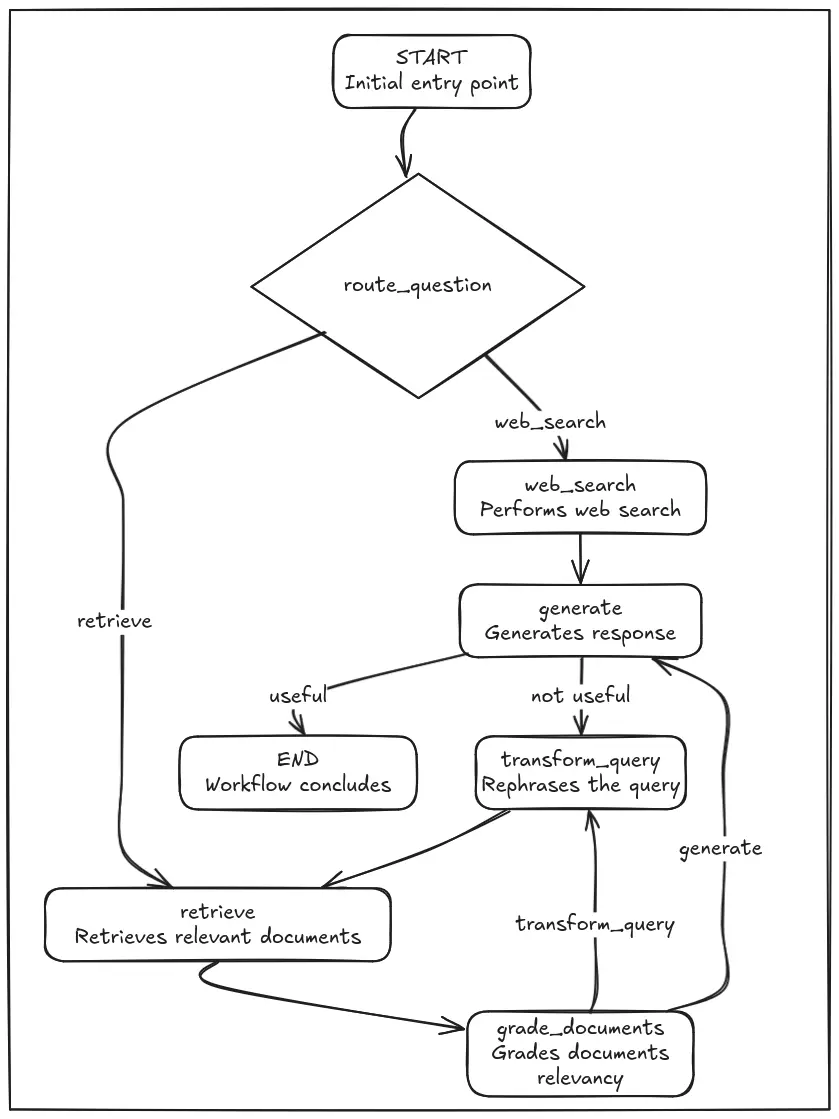
This code sets up what is called adaptive RAG. Spell the acronym out, since it is everywhere: RAG, for retrieval-augmented generation, means fetching relevant documents from a store before letting the model answer, so that it leans on real texts rather than on its memory. The topic is covered in agentic RAG.
"Adaptive" names exactly what the graph above does: you search the store, you judge how relevant the haul is, and if it is poor you go out to the web before writing. Without a conditional edge you would have to answer from bad documents or fail. That logic takes three lines in LangGraph; it is painful to obtain in CrewAI, whose sequence is fixed in advance.
LangGraph's strengths:
- Control over every transition and every condition
- The graph can be drawn, so it can be read: when things go wrong, you see which way they went
- Resumption after interruption: the system records the state at each step (checkpoints), which lets you restart an interrupted run exactly where it stopped, without redoing (or repaying for) the steps already done
- The answer displayed as it is produced, token by token
- Human intervention at chosen points: you can suspend the graph at any node to ask for approval, then resume. This is the mechanism that keeps a human in the loop on consequential actions.
You often read that a LangGraph graph is "deterministic and testable". That is false, and the distinction matters enough to state plainly.
What is fixed in advance is the map: the list of nodes, the possible edges, the permitted branches. No path can leave that map, and that is already a great deal, it bounds what the system can do.
But the path actually taken depends on what the nodes return, and most nodes call a language model. The same question put twice to the same model can yield two different answers. The decide_route function in the example above reads a relevance judgement produced by a model: nothing guarantees it will be identical from one call to the next.
The correct formulation is therefore: the space of possible paths is determined; the path travelled is not. That is markedly stronger than an open conversation, where even the space of possibilities is unbounded. It is not the same thing as an ordinary program.
This distinction has very concrete consequences. A guarantee of the form "the system will never take action X" holds only if the prohibition is written into the structure of the graph (the edge does not exist) and not entrusted to the model's judgement at a routing node. The same principle as the stopping point in code, set out in tool use and orchestration.
Direct Comparison
The table below covers observable properties. It deliberately avoids judgements such as "production-ready", which depend on each reader's standards and go stale within months.
| Aspect | CrewAI | LangGraph |
|---|---|---|
| Way of thinking | A team, roles | A graph, a state travelling |
| Level of description | You describe the intent | You describe the mechanism |
| Flow shapes available | Sequential or hierarchical | Any graph, loops included |
| Cost of entry | Low | Medium |
| Understanding a failure | You read the exchange | You read the path through the graph |
| Resumption after interruption | Limited | Built in, via checkpoints |
| Human intervention | Rudimentary | At any node |
When to Choose What
CrewAI suits: fast prototyping; cases where the roles are clear, research, analyse, write; teams who want readable code without technical background; linear sequences where A hands to B who hands to C.
LangGraph suits: flows with branching and loops; uses where you must be able to explain afterwards what happened; document-retrieval arrangements that choose their source according to the question; cases where a human must step in at a precise moment.
Whatever the tool, a multi-agent system is less reliable and slower than a single well-equipped agent. Each additional agent adds messages to reread, opportunities to contradict one another, and one more point of failure.
So before assembling a team: would one agent with the right tools not do? More often than not, yes. See LLM agents: definition and taxonomy and tool use and orchestration.
It is also the right question to put to any multi-agent architecture announcement: what does the multiplicity buy, beyond the staging?
The Evolving Ecosystem
The two approaches are converging: tools are appearing that try to join CrewAI's design simplicity to LangGraph's execution control. Smolagents, at Hugging Face, takes a more radical route: the agent writes Python code directly rather than descriptions of tool calls, see code agents. And no-code platforms let you compose agent graphs with a mouse.
Two remarks are worth more than a recommendation. First, these libraries change interfaces fast: what a tutorial wrote last year often no longer runs. Second, none of them adds any capability to the model; they organise calls. What separates one system from another lives in that organisation, not in the choice of library. Since August 2026, that organising layer has itself become an open product: see DeepSeek Harness.
The choice, at bottom, comes to this: CrewAI if the flow is simple and speed matters; LangGraph if you must control the path and be able to account for what happened.
1. A CrewAI team lines up a researcher, a writer and a validator. How many distinct « intelligences » are actually at work?
2. One often reads that a LangGraph graph is « deterministic and testable ». What does the page say about that?
3. A filing claims: « the system will never take such-and-such an action ». Under what condition is that guarantee tenable, according to the page?
4. In CrewAI, what does it take for the hierarchical mode (a project manager who dispatches the work) to function?
5. Before building a multi-agent architecture, what question does the page recommend asking?