The Integration Nightmare
To understand why MCP exists, you first need to understand the problem it solves.
Imagine computing before USB (Universal Serial Bus). The mouse used a serial connector, the keyboard PS/2, the printer a parallel port, the scanner SCSI. Every peripheral had its own connector, its own driver, its own protocol. Plugging in a new device was an adventure.
That is the situation with agents. Wiring an agent to PostgreSQL takes a connector; to Slack, another; to Google Drive, a third. With fifty tools, fifty integrations to write, fix and maintain. And if you change model or framework, you start over.
MCP is the "USB standard" of AI agents: a single open protocol, so any compatible agent can plug into any compatible tool without integration code specific to each.
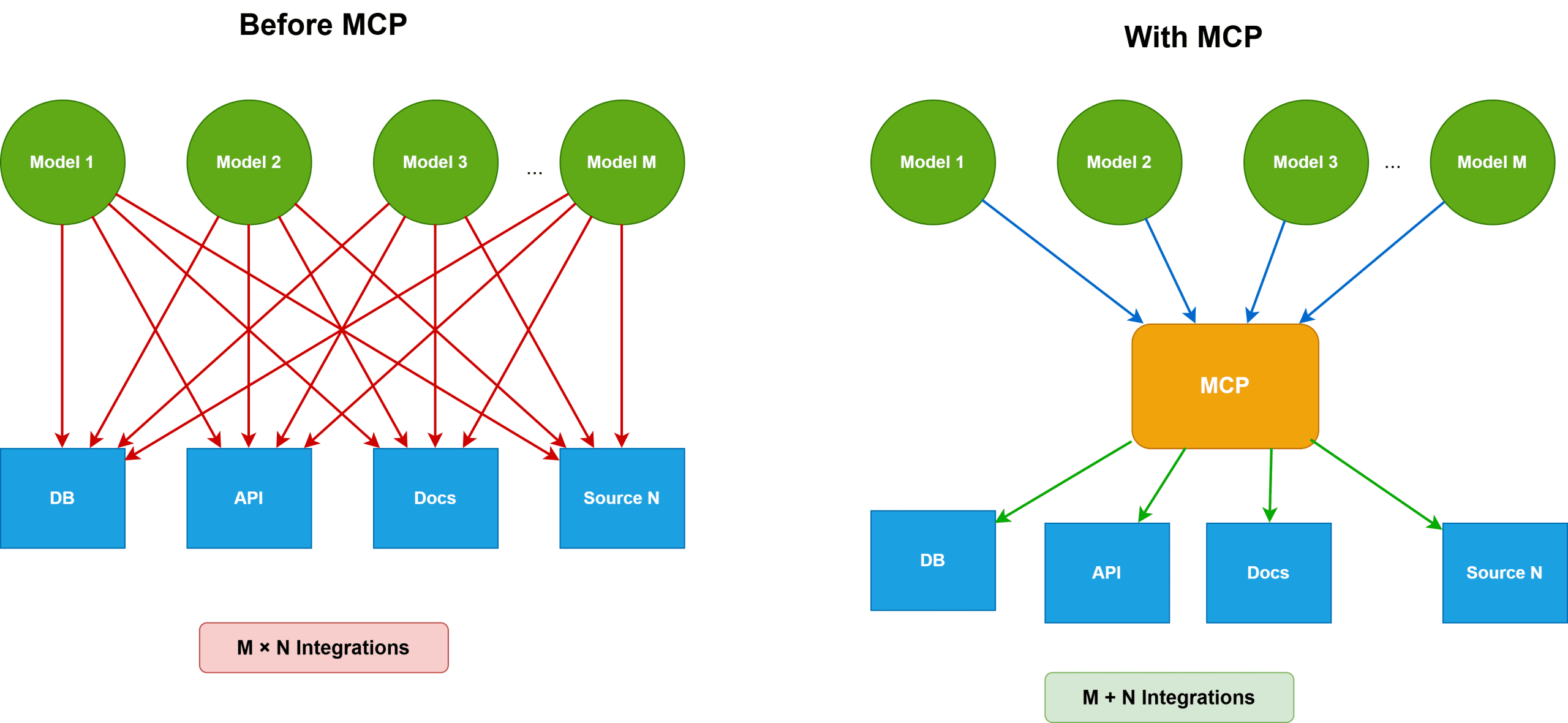
USB standardised both the physical part (the connector) and the logical part (the exchange protocol). MCP standardises the logical equivalent: the message format, and the semantics of the interactions, how a tool announces itself, how data is read, how a call proceeds.
Where the analogy breaks down: plugging in a USB stick does not give the stick the right to command the computer. Plugging in an MCP server does, the server supplies text that will enter the model's input, tool descriptions included. That is the subject of the last part of this page, and the part that matters most when assessing a deployment.
Architecture: The Three Pieces of the Puzzle
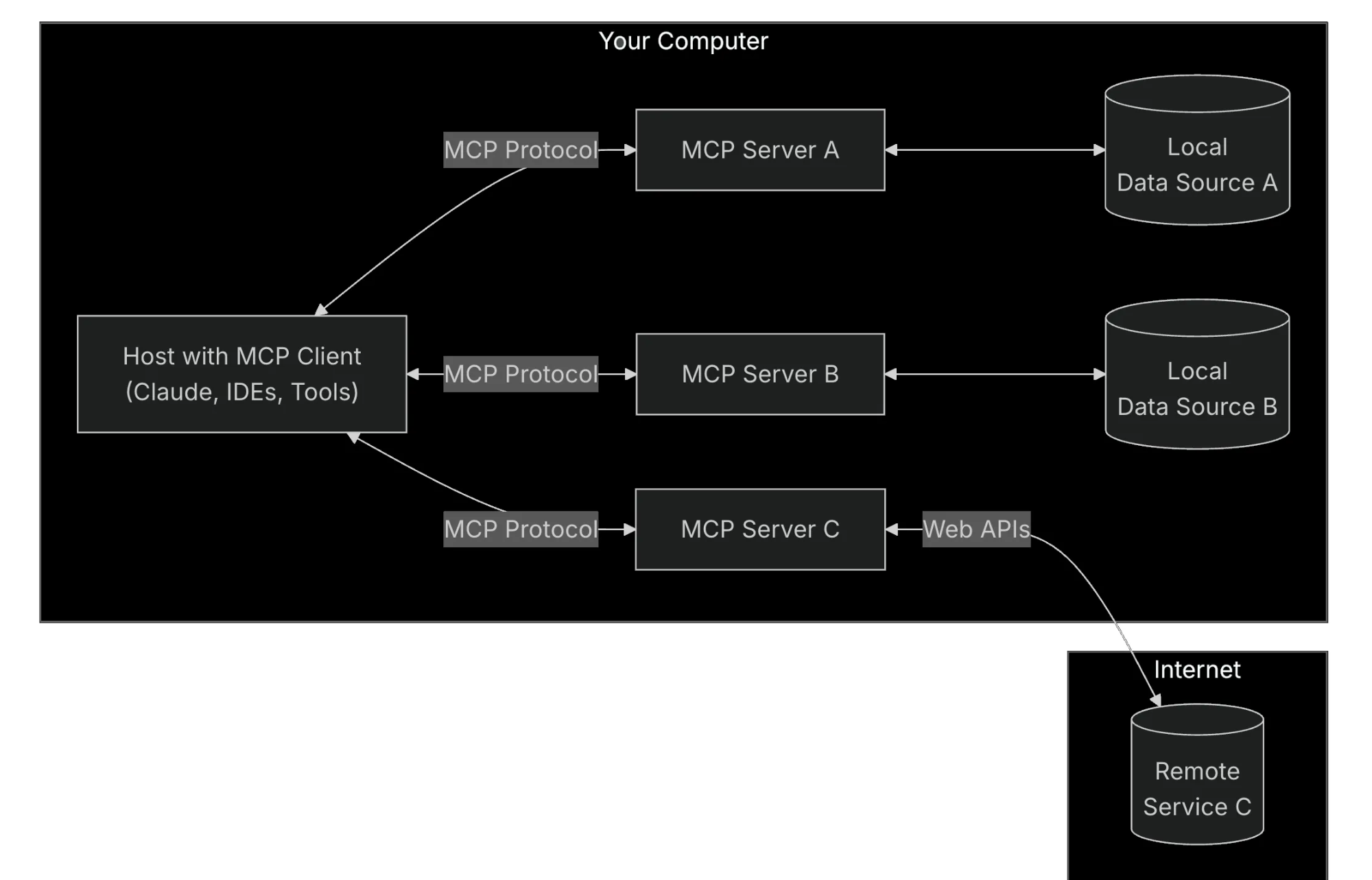
MCP follows a simple but well-thought-out client-server architecture:
- The host: the application that holds the agentic loop, Claude Desktop, a development environment like Cursor, or a bespoke agent. It calls the model and decides whether or not to honour a tool call
- The client: the technical component, on the host side, that handles the conversation with a server, opening, sending requests, receiving responses. You don't touch it directly; it comes with the library
- The server: the program that exposes data and tools. A PostgreSQL server knows how to query a database, a GitHub server how to walk repositories. Each server is a separate process wired to a single source
The Underlying Protocol
Messages are encoded in JSON-RPC (JSON Remote Procedure Call), an old and unremarkable format for having a remote program run a function. Two standard transports:
- stdio: the client launches the server as a subprocess and talks to it over its standard input and output. This is how local servers work.
- Streamable HTTP: each message is an HTTP request to a single endpoint, and the reply arrives either in one piece or as a stream. This is how remote servers work. Earlier revisions defined a separate transport based on Server-Sent Events (SSE); it has been folded into the HTTP transport.
One detail worth knowing when reading any documentation: the protocol is versioned by dated revisions (the revision in force as this page was written is dated 28 July 2026). Connection-establishment mechanics and transports have changed between revisions. Always check which revision a text refers to.
A server exposes three primitives, and for each one the specification states who controls it, which is more instructive than the list itself:
| Primitive | Controlled by | What it is | Example |
|---|---|---|---|
| Prompts | the user | Pre-written instructions, triggered by an explicit choice | A slash command |
| Resources | the application | Data the host attaches to the context | File contents, Git history |
| Tools | the model | Functions whose call is produced by the model | Writing a file, calling an API |
The third row is the one that needs attention. A server exposing only resources is read when the application decides to; a server exposing tools makes available actions whose triggering depends on text the model produced.
The Communication Flow in Action
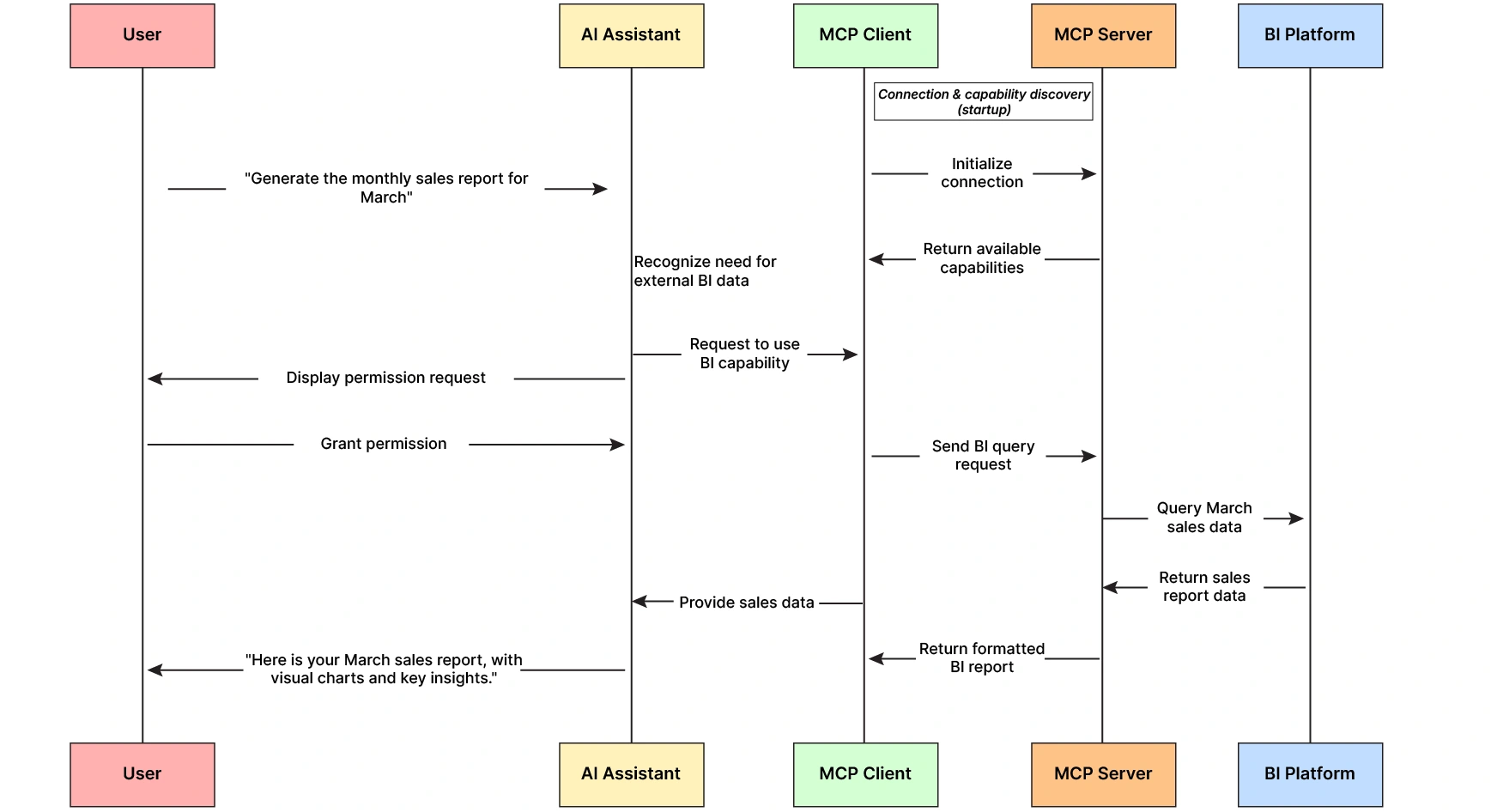
Here's what concretely happens when you ask Claude to analyze your data:
- You → Claude: "Analyze last quarter's sales in my database"
- The model produces a tool call aimed at one of the tools the server announced
- The client forwards that call to the PostgreSQL server, in JSON-RPC
- The server runs the query and returns the result
- The result is appended to the model's input, and the model runs again
- The model produces the analysis, which the host displays to you
Note what MCP changes and what it does not. It standardises steps 3 and 4, how a tool announces itself and gets called. It changes nothing about steps 2 and 5: that is still the loop described in ReAct, and it is still the host that decides to honour the call.
The MCP Server Ecosystem
Data Servers
- Filesystem: read and walk local files
- PostgreSQL / SQLite / MySQL: access your databases
- Google Drive: read your cloud documents
- GitHub: access repositories, issues and pull requests
Tool Servers
- Brave Search: perform real-time web searches
- Puppeteer: drive a browser (page extraction, tests)
- Memory: memory persisted across sessions (with the caveat set out in agent memory: whatever is written there will be read back)
- Sequential Thinking: structured reasoning tools for complex problems
Custom Servers
Anyone can write their own MCP server to expose internal data and tools. Official software development kits (SDKs) exist notably for Python and TypeScript.
With the official kits, a server exposing one or two tools fits on a page of code, declaring a tool often comes down to a function and its documentation string. A community registry lists a large number of servers already written; for the most common tools, the work has generally been done.
Concrete Example: A Minimalist MCP Server in Python
from mcp.server.fastmcp import FastMCP

mcp = FastMCP("my-server")

@mcp.tool()
def query_database(query: str) -> str:
    """Run a read-only query against the database."""
    return str(db.execute(query))

@mcp.tool()
def get_weather(city: str) -> str:
    """Give the current weather for a city."""
    weather = weather_api.get(city)
    return f"{city}: {weather.temp} degrees"

if __name__ == "__main__":
    mcp.run()          # stdio transport by default
Two things in this code deserve more attention than its brevity.
First, the documentation string becomes the tool description. The text between triple quotes is what the model will read in order to choose. Sloppy documentation produces a badly called tool, and misleading documentation produces exactly what its author intended.
Second, the @mcp.tool() annotation only announces the function. Nothing here restricts what query_database accepts: the comment says "read-only," the code does not check it. Enforcing that limit is the server's job, not the comment's, see parameter validation in tool use patterns.
Security: Who Can Do What?
A point of vocabulary first, since it usually gets glossed over. MCP is a protocol: it defines how messages travel, it enforces no protection by itself. The guardrails listed below are implemented by hosts and servers, and the specification recommends them, it cannot impose them. A careless host stays a careless host, protocol or no protocol.
The guardrails, and who implements them
- User confirmation: before a call with irreversible effect, the host asks for explicit approval. That is the host's business, in its own code, not the protocol's.
- Scoping: each server exposes only what it is allowed to expose. A filesystem server can be limited to a single folder. It is the server that enforces the limit.
- Process isolation: each server is a separate process. If one crashes or is compromised, the others carry on. That limits spread, not the compromised server's access to its own source.
- Logging: every exchange can be recorded, which is what lets you establish after the fact what was called, with which parameters, and following what.
The point that matters: an MCP server is a trust boundary
Two things arrive from a server into the model's input, and attention almost always goes to the first only.
Call results. A server that reads a web page, an email or a document returns text written by third parties. That text ends up in the same input as your instructions, with no marker setting it apart. This is indirect prompt injection, described in detail in tool use patterns.
Tool descriptions. These too are supplied by the server, and these too enter the model's input, before a single call has taken place. So a malicious server, or a legitimate server whose update has been hijacked, can plant instructions in a tool description and steer the agent's behaviour without ever being called. Installing a third-party MCP server therefore extends trust of the same order as installing a browser extension: the question is not only "what does this tool do?" but "who controls the text it sends me, and at every update?"
Three questions, in this order. Who publishes the server, and how are its updates obtained? A server pulled automatically from a public repository is a dependency whose content can change without your knowing. What does the server have access to, at the source? An unrestricted filesystem server exposes everything its process can read. Which irreversible tools does the host agree to execute with no stopping point? The answer to that last one bounds the damage from everything above.
Adoption: Who Uses MCP Today?
Compatible Hosts
The list has grown a great deal since 2024, when only a handful of developer tools spoke MCP. Among the most widely used hosts:
- Consumer assistants: Claude (web, desktop and Claude Code), ChatGPT (connectors and apps built on MCP since autumn 2025), Mistral's Le Chat (custom MCP connectors)
- Integrated development environments (IDEs) and coding agents: Cursor, Visual Studio Code with GitHub Copilot, Zed, Cline, Gemini CLI
- Operating systems: in 2025 Microsoft announced MCP support in Windows, so that agents can call system functions and installed applications
On the model-provider side, Mistral lets you register an MCP server as a managed connector, reusable across conversations and agents, with a flag that pauses execution before a tool runs. The registration parameters and that pause mechanism are described in Agents API, Workflows and Vibe's Work mode, this lesson covers the protocol, not any one provider's interface.
The Community Ecosystem
A large number of servers now cover the common needs:
- Databases: PostgreSQL, MySQL, MongoDB, Supabase, Redis
- Cloud: AWS, GCP, Azure
- Development tools: GitHub, GitLab, Jira, Linear
- Communication: Slack, Discord, Email
- Productivity: Notion, Google Workspace, Todoist
Why MCP Matters for the Future of AI
MCP isn't just a handy tool, it's an attempt to standardize the AI agent ecosystem before fragmentation becomes irreversible. The advantages of a widely adopted standard are considerable:
- End of redundant code: no more writing fifty different integrations. If a server exists for your tool, you use it as-is
- Massive reuse: a PostgreSQL MCP server created by one team is usable by thousands of others
- Vendor independence: the protocol is open and no single actor controls access to it, no proprietary lock-in
MCP is an open protocol with a public specification. Anyone can implement a compatible client or server, without a license or permission from Anthropic. This openness is deliberate and crucial: for a standard to become universal, it cannot be controlled by a single company.
Where does adoption stand? That was an open question in 2024, when Anthropic published the protocol; it is much less open now. OpenAI announced MCP support in March 2025, across its products and development kits; Google DeepMind announced it would follow in April 2025 for its Gemini models. Add to that the developer-tool vendors and, as seen above, European providers. The last step was governance: in December 2025, Anthropic handed MCP to the Agentic AI Foundation (AAIF), a foundation set up under the Linux Foundation together with other open agent projects (AGENTS.md, contributed by OpenAI, and Block's goose agent). The protocol therefore no longer belongs, even formally, to the company that launched it. For the neighbouring protocol that lets agents talk to each other, see MCP for tools, A2A between agents.
In other words, MCP has stopped being one company's proposal and become the default connection point between an agent and a tool. That has two consequences. The connection itself no longer carries distinctive weight: "the system uses MCP" describes a system no better than "the system uses HTTP." And a deployment's exposure surface is now read off the list of its servers: that is where to look to understand what an agent can actually touch.
1. The page compares MCP to USB. What exactly does it standardize in how an agent works?
2. Among the three primitives an MCP server exposes, why is the Tools line the one that deserves the most attention?
3. A third-party MCP server is installed, but none of its tools is ever called. Can it still influence the agent?
4. In the Python example, the docstring of the database tool says « read-only ». What guarantees that the function will refuse a write?
5. How much is the sentence « the system uses MCP » worth as a description of what makes a system special?