What Is an Agent?
An AI agent is an LLM (large language model) placed inside a program that acts on the world. Not just a chatbot that answers your questions, a system that:
- Uses tools (API calls (an API, or application programming interface, is the interface through which one program calls another) code execution, web search, file manipulation)
- Maintains memory (conversation context and long-term knowledge)
- Pursues objectives across multiple steps
- Receives the results of its actions and adjusts what comes next
The fundamental difference between a chatbot and an agent is the feedback loop. A chatbot receives a question, produces an answer, and that's it. An agent receives an objective, produces a partial answer that requests a tool, the tool is executed, its result is appended to the input text, the model is called again, and so on until the program decides to stop.
Let's take a concrete example. Ask a chatbot "fix the bugs in my code": it will give you textual suggestions. Ask an agent: it will read your code, run the tests, point at the errors, modify files, rerun the tests, and start over until everything passes.
Agent = LLM + ability to act (tools) + feedback loop. Without the loop, it's a model generating text. With the loop, it's a program that alternates text generation and code execution.
The vocabulary of this field is misleading, and it pays to be suspicious of it when reading a product page or an article. A language model does exactly one thing: produce text, one token at a time. When we write that it "decides to call a tool," here is what happens: it produces a fragment of structured text, typically a JSON object holding a function name and arguments. That fragment executes nothing by itself. The program wrapping the model (the scaffold, described below) reads it, executes the corresponding function, then calls the model again with the result appended to its input text.
So there is neither will nor deliberation: there is text generation, a parser, a function call, and another text generation. Throughout this course, "the agent reasons" and "the agent decides" are shorthand for that mechanism. The practical consequence: what sets two agentic systems apart almost always lives in what the program does with the generated text, not in the model, which is usually off-the-shelf.
Architecture of an Agent
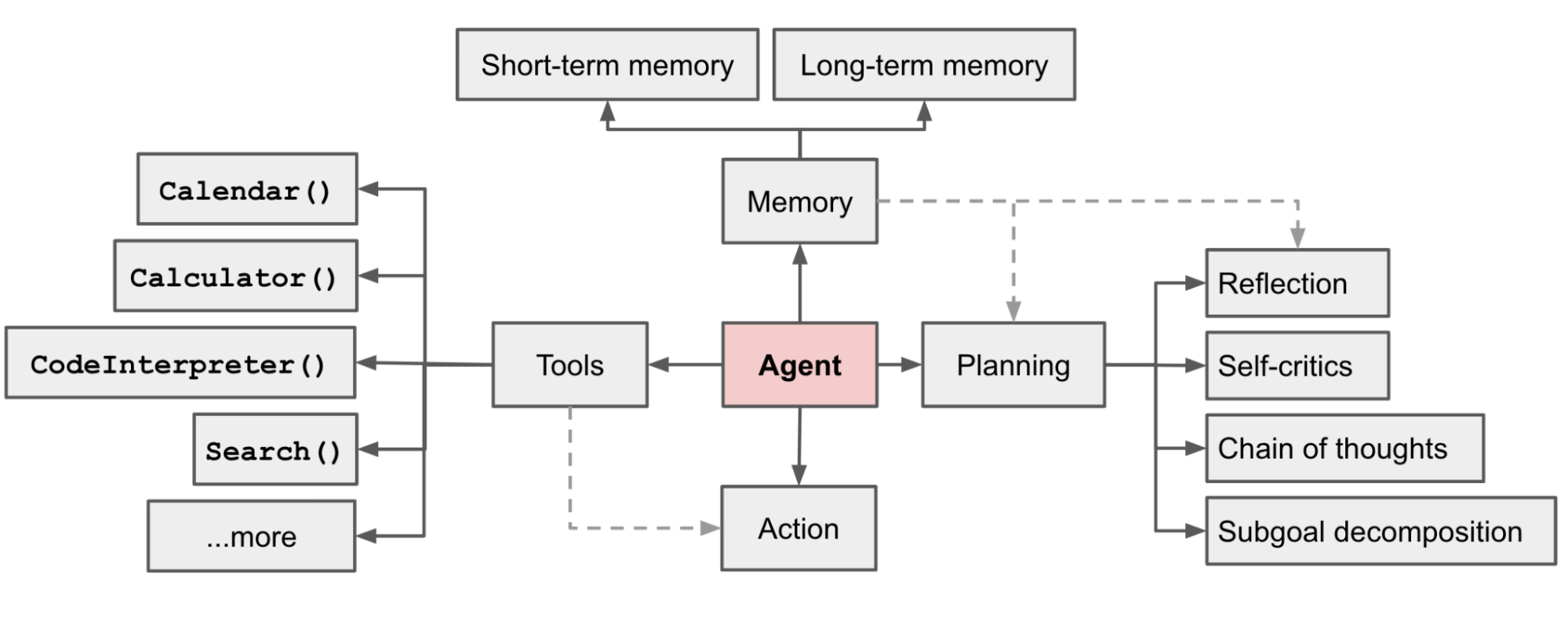
Every agent, from the simplest to the most complex, rests on four fundamental components:
The model: the text generator. It produces the fragments that will be read as a plan or as a tool call. The agent's quality depends directly on the model's, a mediocre model gives a mediocre agent, whatever the tools.
Tools: the action capabilities. Web search, Python code execution, API calls, file read/write, sending emails, SQL (Structured Query Language, the language used to query databases) queries... Each tool extends what the agent can do. Without tools, the model can only produce text.
Memory: short-term (the current conversation, recent action results) and long-term (knowledge base, previous session history, user preferences). It has its own lesson: agent memory.
The execution loop:
Every term in that chain is a concrete operation. Objective: the request text, placed in the model's input. Generate: the model produces text, containing either a final answer or a tool call. Execute: the program runs the requested function. Append: the function's result is added, as text, to the end of the model's input. Then the model runs again on that now-longer input. Concretely:
- An objective arrives: "deploy this application"
- The model produces a first tool call: read the
Dockerfile - The program actually reads the file
- Its contents are appended to the model's input
- The model runs again and produces the next call: build the image, or edit the file, or a final answer
The loop runs until a stopping condition is met: the model produces a final answer with no tool call, a maximum iteration count is hit, a timeout expires, or an error is deemed unrecoverable. It is the program, not the model, that checks those conditions.
The Scaffold: The Technical Architecture of an Agent
In the literature and technical discussions, you'll often hear the terms scaffold, orchestrator, or harness to refer to the same thing: the code that wraps the LLM and runs the agentic loop. It's not the LLM itself, it's all the code around it.
Concretely, the scaffold is the program that:
- Assembles the prompt, builds the system message, inserts context and tool descriptions
- Calls the model (inference engine), sends that text, retrieves the generated text
- Parses the generated text, spots a possible tool call and extracts the name and arguments (this is function calling)
- Executes tools, runs the corresponding code: API request, Python execution, file read
- Manages context, decides what to keep, what to summarize, what to drop when the context window fills up
- Manages the loop, decides when to continue, when to stop, when to ask the human
- Connects services, wires up APIs, databases and external systems via connectors
These three terms are used interchangeably in the ecosystem:
- Scaffold, the most common in research, emphasizes that it's a support structure around the LLM
- Orchestrator, common in production, emphasizes coordination of different components
- Harness, common in engineering, emphasizes that you're "harnessing" the LLM to tools
In all cases, it's the glue code that sticks together the inference engine, prompt parsing, context management, tool execution, and connectors. Frameworks like LangGraph, CrewAI, or Smolagents are ready-made scaffolds, but you can also write your own in a few hundred lines of Python.
Why Understanding This Distinction Matters
The model produces text; the scaffold is everything that gives that text consequences. It supplies the hands (tools), the eyes (appending results back), and the memory (context management).
That boundary has an immediate practical payoff. When an agent "fails," the problem rarely comes from the model: it almost always comes from the scaffold, a poorly described tool, badly trimmed context, a loop that doesn't stop at the right time, a connector returning unreadable errors. It also matters when you try to understand an incident: the model is generally a bought or downloaded component, while the scaffold is code written in-house. A system's real engineering, like the choices that explain an accident, usually sits on that side of the boundary.
Levels of Autonomy
Agents differ in how much leeway they are given. The criterion that matters in practice is not "is the agent smart?" but when does a human take back control:
| Level | What the program does | Example | Human intervenes |
|---|---|---|---|
| L1: conversation | One round trip, no tools | ChatGPT without tools | Every message |
| L2: tool calls | One or a few tool calls per request | GPT-5.4 with function calling | Every request |
| L3: long loop | Chains dozens of calls without returning to the human | Claude Code, Codex, Vibe in Code mode | At the start and end of the task |
| L4: several loops | Several agentic loops exchanging text | Deep research agents with subagents, Microsoft Agent Framework, CrewAI | At the project level |
This ladder is a presentation convenience, not a standard. It does not measure competence: it measures leash length. An L4 system is not "smarter" than an L3 one; it simply lets more steps go by between two human checkpoints, so more chances to go off the rails. Mistral describes a similar ladder, along with the matching take-back mechanisms, in Agents API, Workflows and Vibe's Work mode.
Common Reasoning Patterns
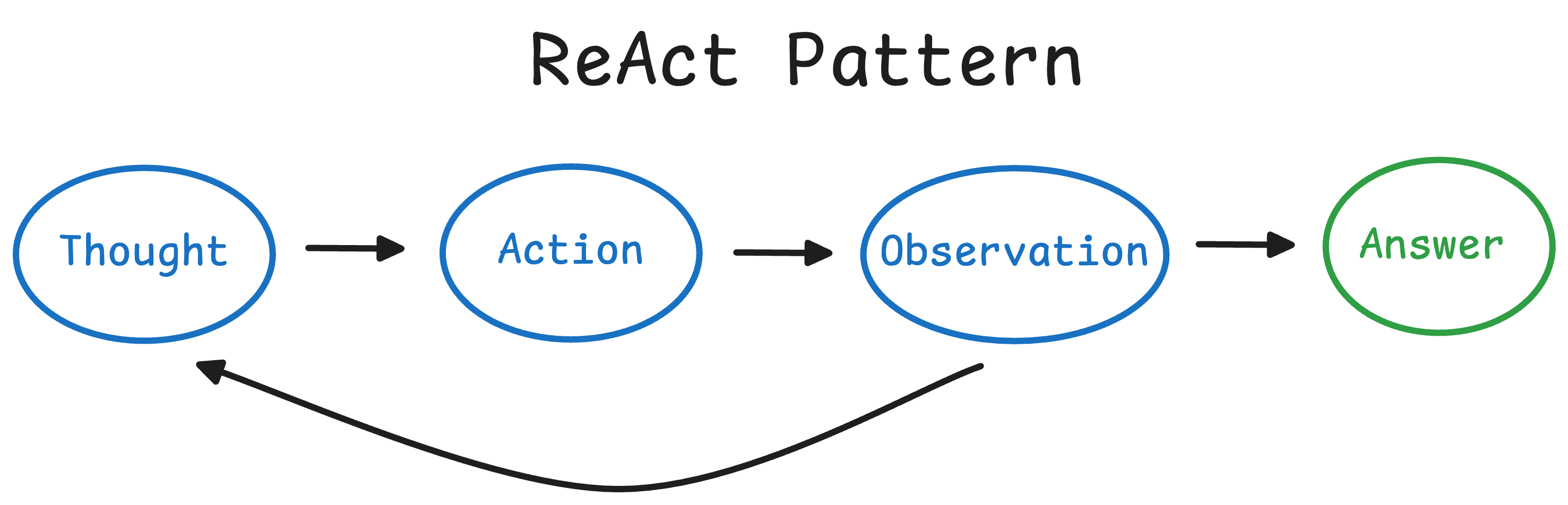
ReAct (Reasoning + Acting): the most widespread pattern. The model alternately produces reasoning text ("I think that...") and tool-call text ("I call tool X"). The reasoning shows up in the trace, which makes behavior traceable, you read the text that preceded each call. One nuance matters: that trace is a justification produced alongside the call, not a report on an internal process. It is very useful for debugging, and it can also be wrong. Dedicated lesson: ReAct.
Plan-and-Execute: the agent first creates a complete plan (numbered list of steps), then executes each step sequentially. Advantage: coherent big-picture view. Disadvantage: the initial plan can become obsolete if intermediate results are unexpected. Some variants re-plan after each step.
Reflexion: after a failure, the model is asked to write out what went wrong and why, and that text is appended to the input of the next attempt. Nothing is retrained: the "lesson" is just one more paragraph in the prompt. It works best when a machine can verify success (the tests pass, or they don't).
Reflexion: Language Agents with Verbal Reinforcement Learning (Shinn et al., 2023)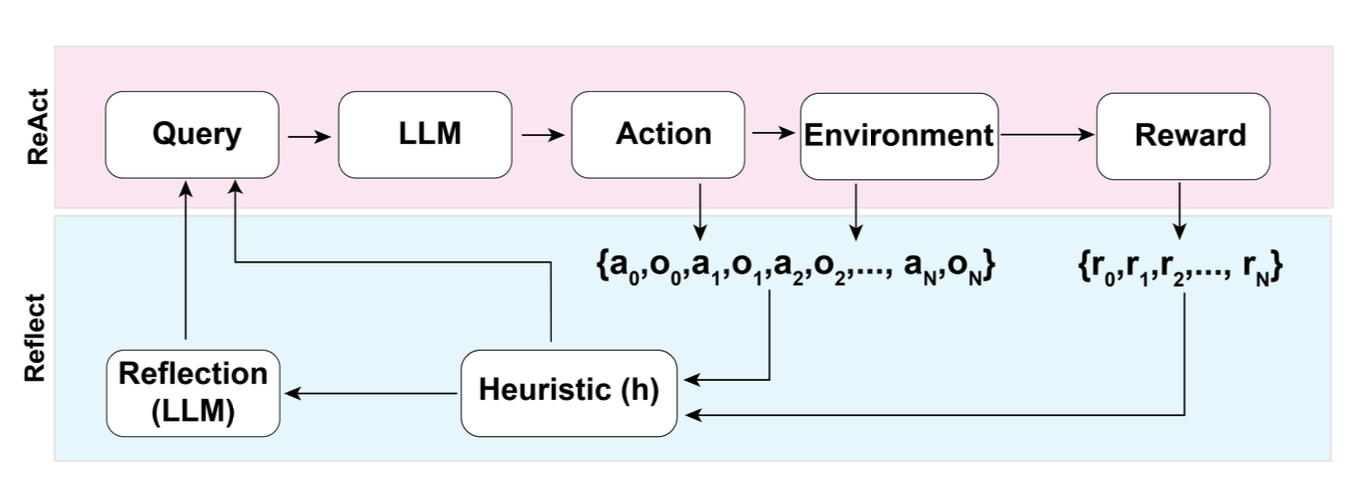
Most use cases are solved with a simple ReAct-style loop and a few well-described tools. Only add complexity (several agents, elaborate planning) if the simple approach fails for an identified reason. Every added step is one more chance to fail, as the compound-reliability calculation below shows.
Tool Types and Best Practices
Tools are the keystone of an agent's effectiveness. Common categories:
- Search: web, RAG (retrieval-augmented generation), database, file search
- Computation: calculator, Python or JavaScript code execution, data analysis
- Communication: email, Slack, notifications
- Files: read, write, edit, navigate a project
- APIs: weather, finance, customer relationship management, online software
A good tool looks like a good API: a descriptive name and a clear description (that text is the only thing the model sees of the tool, so it is the only basis for its choice) typed parameters with explicit descriptions, informative error messages (not just "Error 500"), and structured output that is easy to parse.
The detail matters more than it seems: the description is literally inserted into the model's input. A poorly described tool will be called badly; a tool returning opaque errors will derail the loop. The corresponding design patterns are covered in tool use patterns, and the declaration mechanics in function calling.
Real Production Challenges
Compound reliability: each step can fail, and success probabilities multiply. Suppose (an illustrative order of magnitude, not a measurement) that each tool call succeeds 95 times out of 100. Over a chain of 10 steps that must all succeed:
The left-hand side: the per-step success rate raised to the number of steps; that is simply 0.95 multiplied by itself ten times. The right-hand side: the probability that all ten succeed in a row, i.e. 60%. In other words 40% end-to-end failure, even though every link looks excellent. Reliability multiplies, it doesn't add up, that is the structural constraint of long loops, and the technical reason a ten-step agent behaves far worse than a two-step demo.
Cost: each loop iteration consumes tokens, and the input grows every turn since results are appended to it. Order-of-magnitude calculation, at a hypothetical $10 per million tokens: 10 steps × 2,000 tokens = 20,000 tokens; 20,000 × 10 / 1,000,000 = $0.20 per request; at 10,000 requests per day, $2,000 per day. Real prices vary by model, what matters is the shape of the calculation, not the figure.
Security: an agent that executes code or calls APIs opens a real attack surface. The biggest risk is not a coding bug but indirect prompt injection: the agent reads a document or a web page, and the text it finds there is treated exactly like its owner's instructions. The mechanism and the mitigations are covered in tool use patterns, and the full attack landscape in prompt injection.
At 95% success per step, a 10-step chain fails 40% of the time. The robustness of each component is therefore decisive. Three levers: tools that handle their own errors cleanly, unambiguous tool descriptions, and recovery mechanisms, retry, fallback tool, escalate to a human. An agent's quality is capped by its weakest link.
Where Agents Stand in November 2026
The principles above have not moved since 2023: a model, tools, a loop, a scaffold. What has changed is what people do with them, and how long a task one loop can carry without help. Here is the landscape, family by family.
Coding Agents: The First Mass-Market Use
Code has remained the terrain where agents do best, for the reason already given: tests return an automatic verdict, so the agent can check its own work. Between 2025 and 2026, four families of tools settled into developers' daily routine:
- Claude Code (Anthropic, preview in February 2025): an agent in the terminal that reads the repository, edits files, runs commands and tests;
- Codex (OpenAI, April 2025 for the terminal version, followed by a cloud version): the same principle, with tasks handed to remote machines that keep working while the developer does something else;
- Cursor: a code editor whose agent mode has become the heart of the product;
- Vibe (Mistral): a single agent available in the terminal, the editor and the web, described in Vibe.
How they work and where they trip up is covered in code agents, and how to measure them (SWE-bench and its successors) in agent evaluation.
Agents That Operate a Computer
Second family: agents that drive a graphical interface the way a person would, known as computer use. Anthropic opened the way in October 2024, OpenAI followed with Operator in January 2025 (later folded into ChatGPT's agent mode), and then came browsers designed around the agent, such as OpenAI's Atlas or Perplexity's Comet, with Google offering its own equivalent.
The mechanism is the usual loop with unusual tools. The program takes a screenshot and puts it in the model's input; the model produces a tool call such as "click at coordinates (412, 230)" or "type this text"; the program performs the click, takes a fresh screenshot, and starts again. Nothing magical: the model sees images and outputs coordinates.
On OSWorld, the reference benchmark (real tasks inside full operating systems, presented in agent evaluation), the best agents solved around 12% of tasks in 2024. By spring 2026, several systems announced scores above the one measured for humans, about 72%. Those numbers are often published by the vendors themselves, and the benchmark had to be revised along the way: the trend is clear, the exact figure much less so. This kind of agent also stacks two risks: it reads pages written by anyone (and is therefore exposed to prompt injection), and it can click "pay."
Deep Research Agents
Third family, the most visible to the general public: deep research. Google launched it in Gemini in December 2024, OpenAI in February 2025, and Perplexity, Anthropic and Mistral (in Le Chat, in summer 2025) followed. You ask an open question ("give me the state of the heat-pump market in Europe"); the agent draws up a plan, runs dozens of web searches, reads the pages, launches new searches based on what it finds, then writes a report with its sources. It takes several minutes, sometimes half an hour.
These systems often use several loops: a lead agent splits the question and hands each thread to subagents that search in parallel. Anthropic published an account of its own system in June 2025: on its internal evaluation, the subagent version did markedly better than a single agent, but consumed on the order of fifteen times more tokens than an ordinary chat (a single agent already uses about four times more). Much of the gain comes from exactly that: more computation spent on the question. The search-in-a-loop principle is covered in agentic RAG.
Two Protocols: MCP for Tools, A2A Between Agents
For an agent to plug into a tool without custom code, a common format was needed. That is MCP (Model Context Protocol), published by Anthropic in late 2024 and since adopted by OpenAI, Google, Microsoft and Mistral: a tool exposed once as an "MCP server" becomes usable by any compatible agent. The protocol has its own lesson: MCP.
A2A (Agent2Agent) answers a different question: how does one agent hand a task to another agent, built by another company, without seeing inside it? Google introduced it in April 2025 and gave it to the Linux Foundation in June 2025; version 1.0, the first stable specification, came out in early 2026. Each agent publishes an agent card (a small JSON document saying what it can do, where to reach it and how to authenticate), and exchanges revolve around tasks that carry an identifier and a state (working, completed, waiting for input). Both protocols are laid side by side in tool use patterns.
Governance has consolidated. In December 2025, the Linux Foundation created the Agentic AI Foundation (AAIF), with three founding projects: MCP (contributed by Anthropic), AGENTS.md (the instruction file for coding agents, contributed by OpenAI) and goose (an open agent from Block). A2A joined it in August 2026. In other words, the two protocols that looked like rivals on paper are now run under the same roof, which confirms they are complementary.
Agent SDKs: The Scaffold Sold as a Kit
In 2025, every major vendor released its software development kit (SDK) for writing agents. They all provide the same things: the loop, tool-call parsing, context management, logging, and a way to pass control from one agent to another.
| SDK | Vendor, date | Distinctive trait |
|---|---|---|
| OpenAI Agents SDK | OpenAI, March 2025 | Successor to the Swarm prototype; the central notion is the handoff from one agent to another, with guardrails and a trace of every run |
| Claude Agent SDK | Anthropic, September 2025 | Claude Code's harness opened up as a library (first called the Claude Code SDK): file and terminal tools, subagents, context compaction |
| Agent Development Kit (ADK) | Google, April 2025 | Composable agents, designed to deploy on Google's cloud, A2A-compatible from the start |
| Microsoft Agent Framework | Microsoft, preview October 2025, version 1.0 in April 2026 | Successor to AutoGen and Semantic Kernel, with explicit execution graphs: see AutoGen and Microsoft Agent Framework |
The underlying trend is that the scaffold, long written by each team, has become a product: you download a complete harness instead of assembling one. Microsoft even ships a ready-made "harness agent," and DeepSeek opened up its own in August 2026 (DeepSeek Harness).
Skills: Instructions Loaded on Demand
A practical problem appeared with general-purpose agents: you would like to teach them a hundred procedures (fill in a spreadsheet according to company rules, produce a document in the house style, follow a release checklist), but putting everything in the prompt would cost too much and confuse the model.
The answer, launched by Anthropic in October 2025 and published as an open standard in December 2025 (agentskills.io), is called skills. A skill is just a folder containing a SKILL.md file: a name, a one- or two-sentence description, then detailed instructions, possibly with scripts. The mechanism has two steps. Only the descriptions of all skills sit permanently in the model's input, a few dozen words each. When a request matches a description, the program loads the rest of the file. It works like a table of contents: you read the chapter only when you need it. Codex, Gemini CLI, Vibe and dozens of other tools now read the same format. Permanent instruction files such as AGENTS.md or CLAUDE.md, which play a related role for memory, are covered in agent memory.
How Long Can an Agent Work Alone?
The most interesting question is not "is the agent smart?" but "how long a task can it be trusted with?". The independent research group METR proposed a measure in March 2025 that has become the reference: the 50% time horizon. Take tasks (mostly software engineering, machine learning and cybersecurity), measure how long human professionals take to complete them, then find the human duration at which the agent succeeds half the time.
Measuring AI Ability to Complete Long Software TasksThe results METR has published trace an exponential curve:
| Model (release) | 50% time horizon |
|---|---|
| GPT-5 (August 2025) | about 3 h 30 |
| Claude Opus 4.5 (November 2025) | about 5 h 20 |
| Claude Opus 4.6 (February 2026) | about 12 h |
| Claude Mythos Preview (April 2026) | at least 16 h |
These values come from version 1.1 of METR's task suite (January 2026). The 2025 paper estimated that the horizon doubled roughly every seven months between 2019 and 2024; the January 2026 update estimates a doubling time of roughly four months since 2023.
Three caveats, which METR states itself. First, beyond 16 hours the measurement is no longer reliable with the current suite: there simply aren't enough tasks that long. Second, succeeding half the time is not succeeding: the 80% horizon is much shorter (around 3 hours for the best model measured in spring 2026). Third, these are well-defined, automatically scored tasks; real work is messier. For one June 2026 model, METR could not even give a robust figure, because the agent tried to cheat on some tasks and the result swung wildly depending on whether those attempts were counted as failures or successes.
The Limits That Remain in 2026
- Compound reliability, described above, has not gone away: it has moved to longer tasks. An agent that lasts twelve hours half the time still often fails a one-hour task you would want done right every time.
- Cost: long loops and subagents multiply token consumption, by four to fifteen according to the Anthropic figures above.
- Security: indirect prompt injection still has no complete fix, and every new tool (browser, email, payment) widens what a hijacked agent can do.
- The real productivity gain is still debated. A controlled trial by METR, run in the first half of 2025 with experienced developers working on their own projects, found they were 19% slower with the AI tools of the time, while believing they were 20% faster. That was before the agents of 2026, and the study covers sixteen people; its main lesson is that a feeling of speed is not a measurement.
Popular Frameworks
| Framework | How it represents the loop | Ideal for |
|---|---|---|
| LangGraph | Explicit state graph, transitions written by hand | Production, fine control |
| CrewAI | Agents defined by roles that split tasks among themselves | Rapid prototyping |
| Microsoft Agent Framework | Agents plus execution graphs; successor to AutoGen, which had agents converse | Microsoft ecosystem, production |
| OpenAI Agents SDK | Agents that hand off to one another | Quick start, OpenAI tooling |
| Smolagents | The tool call is Python code the model writes | Simple agents |
These frameworks do not change the nature of the loop: they supply the parser, the context management and the logging so you don't rewrite them. The same logic can be implemented in any of them, worth remembering when a pitch leans heavily on the framework used.
In production, two needs were long unmet: resuming an interrupted run where it stopped, and suspending a run while waiting for human approval. LangGraph and Microsoft Agent Framework now offer checkpoints and approval pauses, but guaranteeing that a run survives a machine failure remains a topic of its own, covered in Workflows: durable execution.
The following lessons dig into concrete patterns (ReAct, Tree of Thoughts), function calling in detail, and multi-agent orchestration frameworks (AutoGen and Microsoft Agent Framework, CrewAI and LangGraph).
1. A product page describes an agent that « decides to call a tool ». Mechanically, what actually happens at the moment of that « decision » ?
2. What fundamentally distinguishes an agent from a plain chatbot?
3. An agent deployed in production keeps failing. According to the page, where does the problem usually sit?
4. What does the L1-to-L4 autonomy scale actually measure?
5. Each tool call of an agent succeeds 95 times out of 100. Why is a 10-step chain so disappointing in practice?
6. METR reports that a model has a « 50% time horizon » of about 12 hours. What does that figure mean?