The Real Problem: 10,000 Invoices, 10,000 Formats
A word on the acronym first. OCR stands for optical character recognition: turning the image of a page (a scan, a photo, a non-selectable PDF) into text a machine can work with.
Imagine a company that receives 10,000 invoices per month. Each vendor uses a different format: the total amount is sometimes in the bottom right, sometimes in the middle, sometimes in a table, sometimes bold, sometimes tiny. A human would spend a month extracting everything manually.
Basic OCR tools (like Tesseract, the long-standing open-source one) can extract raw text from an image. But extracting text isn't enough: once you have a list of words and numbers, how do you know which one is the total amount? Which one is the date? Which one is the invoice number?
Here is the counter-intuitive part, and the part that matters to anyone who has to work from documents. Recognising characters is a largely solved problem. Recovering the structure is not.
What breaks in practice is always the same four things:
- columns, a journal article or a statute set in two columns;
- tables, knowing which cell belongs to which row and which column;
- reading order, the sequence in which the blocks on the page should be strung together;
- footnotes, running heads, sidebars, marginal notes, text that does not belong to the main thread.
An OCR that reads every single word perfectly but interleaves two columns produces unusable text. Concretely, it reads the first line of the left column, then the first line of the right column, then the second line of the left… The result is a mush in which every word is correct and no sentence holds together. No character-accuracy figure, however high, rescues that: the error is not in the characters, it is in their arrangement.
And a footnote spliced into the middle of a body sentence does not show up in a character score either, yet it changes what the sentence says. For anyone who has to quote a document or derive an obligation from it, that is the most expensive kind of error, precisely because it is invisible to the usual measurements.
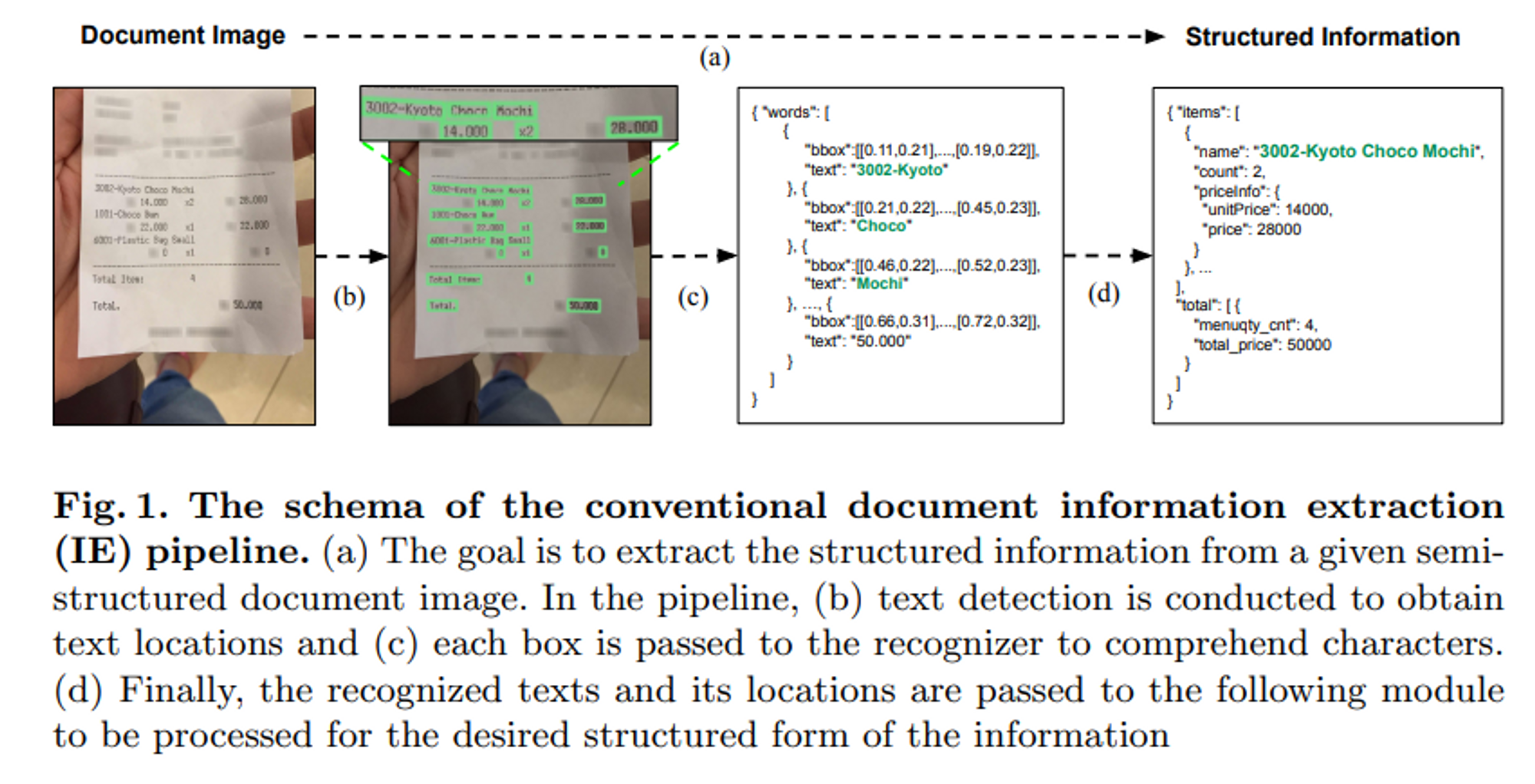
That's where document understanding comes in. It's no longer "what text do you see?" but "what's the total amount on this invoice?" or "who signed this contract?" The model understands the spatial structure and the semantic meaning of the document.
Traditional OCR tells you: "I see the characters I-N-V-O-I-C-E, 2-5-0-0, A-C-M-E." Document understanding tells you: "This is a 2,500 euro invoice issued by Acme Corp, dated March 15, payable in 30 days." One reads letters, the other understands a document.
LayoutLM: Seeing the Document Like a Human
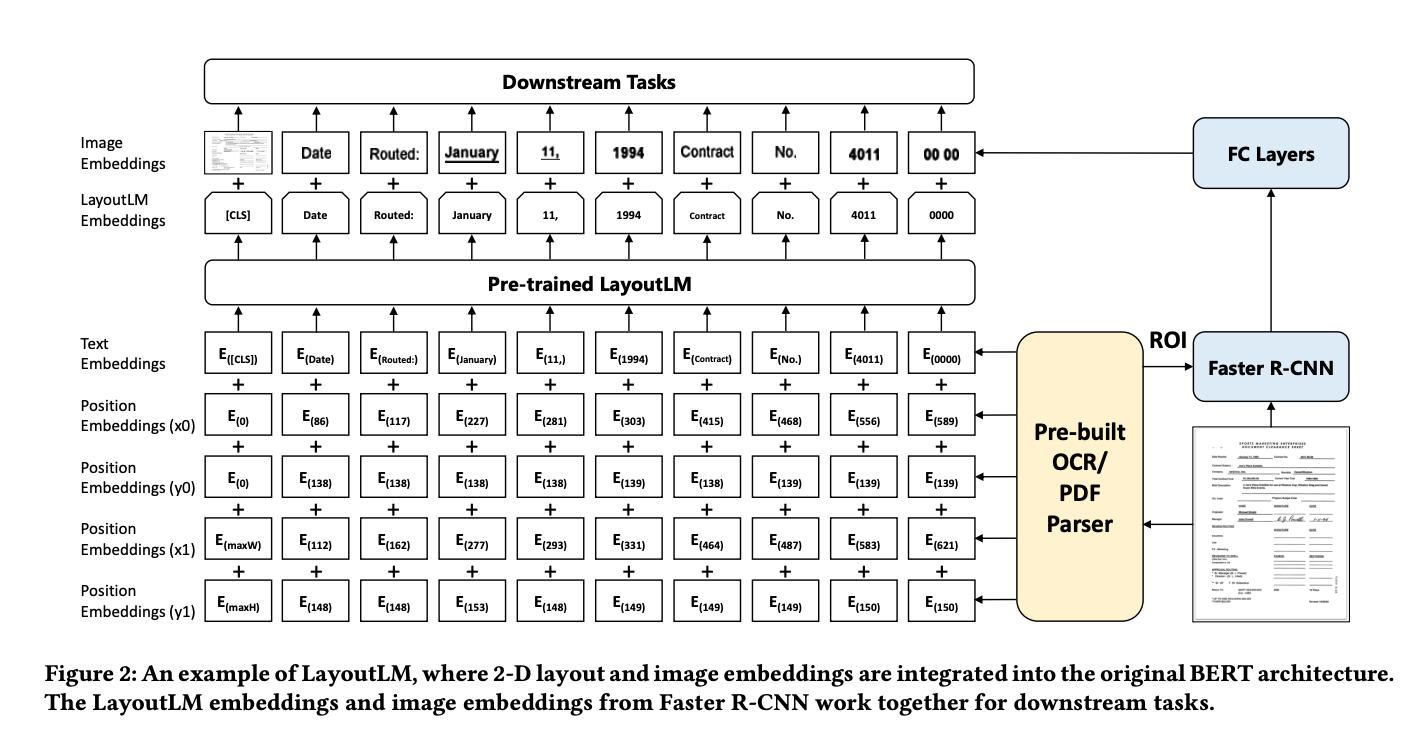
When a human reads an invoice, they don't read word by word from left to right. They scan the page, spot important zones (logo at the top, totals at the bottom, product lines in the middle), and use the position of each element to understand its role. LayoutLM reproduces this ability by fusing three sources of information:
- The text: the words themselves and their linguistic meaning
- The position: the 2D coordinates of each word on the page (at the top? at the bottom? to the right of the word "Total"?)
- The visual: the appearance of the layout (tables, borders, bold, colors)
Evolution: From v1 to v3
- v1: text + 2D position, a convincing first proof of concept
- v2: adds visual context and multimodal training, hence the paper's title, Multi-modal Pre-training for Visually-Rich Document Understanding
- v3: unified architecture trained by masking text and image jointly, hence its title, Pre-training for Document AI with Unified Text and Image Masking
- LayoutXLM: multilingual version, for documents in different languages
The evolution follows a clear logic: with each version, more context is given to the model, and it understands documents better. It's like going from reading blind (just the text) to reading with your eyes (text + visual + position).
Each of these papers reports results beating its predecessors on specific test sets (FUNSD, CORD, RVL-CDIP, DocVQA and others), each with its own protocol and its own fine-tuning. None of those numbers transfers to your documents, and a more recent version is not automatically better on your case, so this page reproduces no leaderboard. The useful habit is described in how to read a benchmark score: the only figure that concerns you is the one you measure on your own pages.
Donut: The Revolution Without OCR
Donut (Document Understanding Transformer) brings a radically different idea: what if we skip the OCR step entirely?
Donut / OCR-free Document Understanding Transformer (Kim et al., 2021)The analogy: the traditional approach (LayoutLM) is like listening to a podcast by first having it transcribed in writing, then reading the transcript to understand the content. If the transcript contains errors, your understanding suffers. Donut looks at the raw document image and understands directly, like a human reading a page.
How It Works
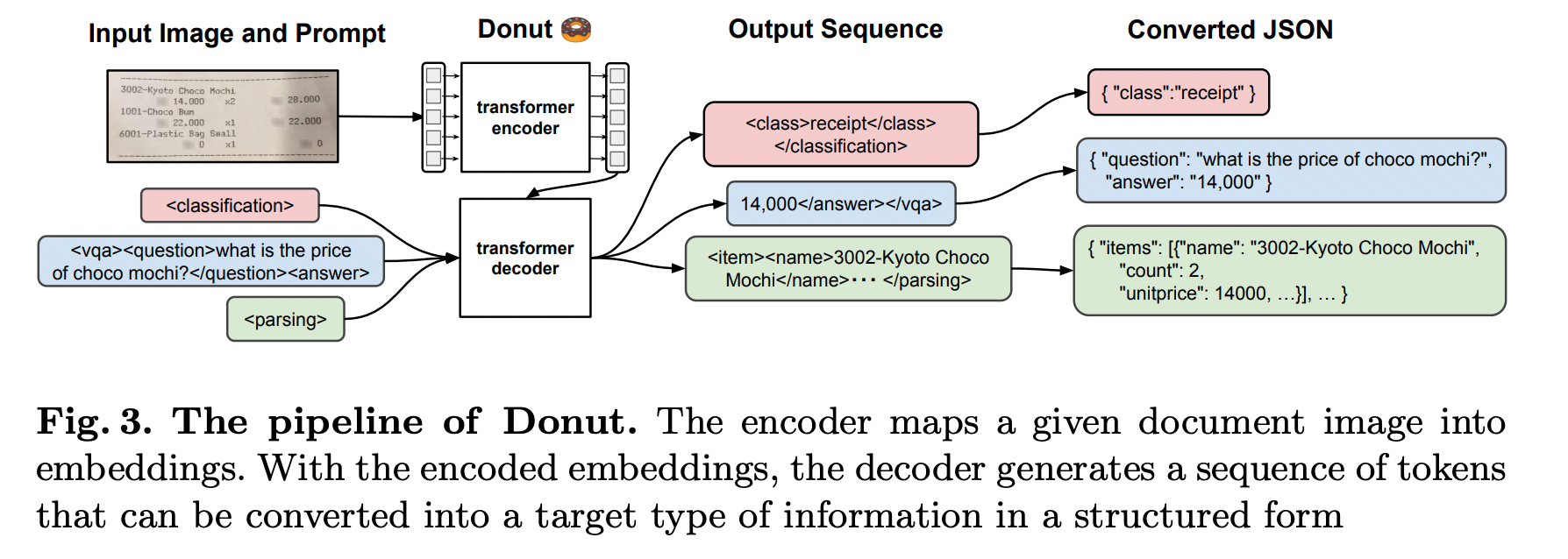
- Visual encoder: a Vision Transformer looks at the document image and converts it into a rich internal representation
- Decoder: an auto-regressive decoder directly generates the structured output (JSON, text, table)
The Result in Practice
For an invoice, instead of the "OCR -> parsing -> extraction -> structuring" pipeline, Donut directly produces:
{"vendor": "ACME Corp", "date": "2024-03-15", "total": "1250.00"}
The major advantage: no OCR error propagating downstream. With a classic OCR pipeline, if the number "1250" is misread as "1230," the extraction perpetuates that error. Donut looks at the raw source and avoids this error cascade.
Two families compete: OCR-free models (Donut), which read the image directly, and OCR-based models (LayoutLM), which first receive an OCR's output and work from it.
The first family removes a stage and with it a source of cascading errors, but nothing recovers what they cannot see: on very small type or a degraded page there is no longer a specialised module to decipher it. The second benefits from a mature OCR, very good on hard characters, but inherits its mistakes and its reading order, which is to say, this page's central problem.
In a real project the choice depends on the documents: on clean, regular scans the OCR-free route is often sufficient and simpler; on a heterogeneous, degraded archive the OCR-based route remains safer.
Mistral OCR: The Turnkey Approach
Mistral offers a solution via API, covered in detail on the dedicated Mistral OCR page. What is interesting here is that the service is built around exactly the problem stated above: it returns not just text but structure (headings, paragraphs, lists, tables) in a directly usable form.
- Extraction from images and PDFs
- Recovery of document structure (sections, headings, paragraphs, tables)
- Output as Markdown or structured JSON
- Depending on the version, the position of each block on the page in reading order, plus a structural label per block (title, table, footnote, caption…), precisely the answer to the arrangement problem
from mistralai import Mistral

client = Mistral(api_key="...")
response = client.ocr.process(
    model="mistral-ocr-latest",
    document={"type": "pdf", "url": "https://...document.pdf"}
)
The advantage: no infrastructure to manage, no GPU to provision. You call an API and receive structured content. Ideal for rapid prototyping or moderate volumes, and the Mistral OCR page details the deployment options for when documents must not leave the company, along with the published scores and the caveats Mistral itself attaches to them.
The Comparison: Choosing Your Approach
| Approach | Examples | Advantages | Disadvantages |
|---|---|---|---|
| Generic vision-language model | GPT-5.4 + image | Very flexible, takes a free-form instruction | Expensive per document, slow |
| OCR-based | LayoutLM v3 | Builds on a mature OCR, fast at inference | Multi-step pipeline, inherits the OCR's errors |
| OCR-free | Donut | Simple, end-to-end | More fragile on very small or degraded text |
| Document-specialised | Mistral OCR | Returns structure, not just text | Less flexible, API dependency |
A vision-language model (VLM) is a language model given the ability to look at an image; see the VLM lesson.
Concrete Use Cases
Invoice Extraction
Identifying the vendor, date, product lines, and total amount, even when invoices come from 50 completely different formats. The model learns the semantics of the "invoice" concept rather than memorizing fixed positions.
Form Analysis
Extracting answers from a handwritten or printed form by associating each answer with its corresponding question. The challenge: hand-filled forms are often unreadable for standard OCR.
Table Understanding
Turning a table held in an image into usable data, preserving the relationships between rows and columns. This is the textbook case of the structure problem: a number read correctly but attached to the wrong row is worse than a number that is illegible, because nothing flags the error. Especially critical for financial reports and statistical tables.
Long Report Analysis
Extracting key financial figures, conclusions and recommendations from a 100-page report without reading each page. Here reading order and the separation of body text from running heads and notes become decisive: whatever is badly arranged will be badly summarised.
Testing an idea? A generic vision-language model (GPT-5.4, Claude Opus 4.6, Pixtral) with a good instruction stands up very quickly, with no training and no infrastructure. For high-volume production, specialised models (LayoutLM, Donut, Mistral OCR) are generally far cheaper per page and faster. Both approaches have their place in the development cycle, at different moments.
Technical Corner: Capture Quality Before Model Choice
Before optimising the model, optimise the digitisation process. That is often where the easiest gains sit, because they apply to every page at once:
- Good scan: 300 dots per inch (DPI, the fineness of digitisation), well lit, sheet parallel to the sensor;
- Phone photo: skewed angle, cast shadows, motion blur, curved page.
The second case piles on difficulties the first does not have, and above all it damages the thing the model needs most: a straight page. Skewed text or a page in perspective first degrades the detection of columns and table rows, so, once again, structure rather than characters.
No comparative success rate is given here. An earlier version of this page claimed "95%+" for a good scan against "50-70%" for a photo, and "10x better results". Those values had no source and have none. The real gap depends on the document, the language and the model. The only solid advice is an order of priority: improve the capture before changing the model.
The Remaining Challenges
Handwriting
Handwriting remains markedly harder than printed text, cursive scripts, personal abbreviations and variation between writers make it a task of its own, often handled by dedicated models. The "roughly 10 times harder" factor this page previously asserted corresponded to no measurement and has been removed.
Multilingual Documents
When a document mixes French, Chinese and Arabic on the same page, models struggle to juggle writing systems and character sets. But the real trap is structural again: Arabic reads right to left, so a mixed page no longer has a single reading order at all. Recovering the correct sequence of blocks becomes a problem in itself.
If you have to evaluate an OCR system for serious use, do not measure only the rate of correct characters or words. Test it explicitly on what breaks:
- a two-column page, do the sentences still hold together?
- a table with merged cells, do the values stay in the right row?
- a page with footnotes, are they kept apart from the body, or spliced into it?
- a document with repeated running heads and footers, do they end up mid-text on every page?
Those four tests catch the failures that make an output unusable, and none of them shows up in a character-accuracy rate.
Where the Field Is Heading
Document understanding is expanding fast. Companies process masses of documents and employ a great many people to do it by hand, the automation upside is considerable. Between generalist vision-language models, which are very flexible, and specialised models, which are cheaper at scale, there is now a fit for almost every use case.
But the front line has not moved: it is not on character recognition, it is on recovering the structure. Columns, tables, reading order, footnotes. That is where an OCR system's perceived quality (and, for anyone who has to rely on the extracted text, its real trustworthiness) is decided. See the Mistral OCR page for a service built explicitly around that goal.
1. An OCR system reads every word of a two-column article perfectly, but interleaves the left and right lines. What will the character recognition rate say?
2. Which sources of information does LayoutLM fuse to understand a document?
3. What is Donut's idea, and what is the trade-off?
4. You must evaluate an OCR system for serious use. What does the page recommend, beyond the correct-word rate?
5. Before switching OCR models to improve results, what is the first lever to examine according to the page?