The problem: a language model can only read tokens
For a long time, models were separate specialists: text or images, never both. Like one person who can read any document but is blind, and another who sees perfectly but cannot read. Neither can process an invoice, interpret a chart, or describe a photo.
Vision-Language Models, almost always abbreviated VLM, combine both in a single model: show it an image and ask questions about it.
But there is a mechanical obstacle. A Large Language Model (LLM) can process exactly one kind of thing: a sequence of vectors. Text arrives as tokens (word fragments) each replaced by a learned vector. An image is a grid of pixels. So the whole question of a VLM fits in one sentence: how do you turn an image into a sequence of vectors that the language model will accept as if they were words?
Visual Instruction Tuning (Liu et al., 2023) - LLaVAHow an image gets into a language model
This is the central question, and it has a precise three-step answer.
1. The image is cut into squares
The image encoder is a Vision Transformer (a transformer applied to images, abbreviated ViT). Its first operation is not mysterious: it cuts the image into small fixed-size squares called patches. In the encoder LLaVA uses (CLIP ViT-L/14) the squares are 14 × 14 pixels. The model's name says so: the "/14" is the patch size.
A 336 × 336 pixel image therefore yields:
The first factor counts squares across, the second counts them down. Result: 576 pieces.
2. Each square becomes a vector
Each 14 × 14 patch is flattened into a list of numbers, then multiplied by a learned weight matrix, producing one vector per patch. Those vectors then pass through the ViT's layers, which let them exchange information. Out the other end come 576 vectors, one per piece of image, each now informed by the others.
Last comes the projection module: a small matrix, or a small network, that converts these vectors into exactly the format the language model expects, same number of components, same scale. It is the translator between the two worlds.
3. The vectors are inserted into the sequence, in the place of words
The result is dropped into the language model's input sequence, among the word vectors. If the user types "What do you see here?" about an image, the sequence the LLM receives looks like:
[What] [do] [you] [see] [here] [?] [v1] [v2] ... [v576]
where the are the vectors from the image. The language model draws no distinction: it applies the same attention mechanism to every vector in the sequence, whether it came from a word or from a square of pixels. See self-attention for that mechanism.
This is the takeaway. Those 576 vectors occupy 576 slots in the context window, exactly like 576 text tokens. For scale, 576 tokens of English is roughly 430 words, a page.
Two direct consequences. Price: providers bill per token, so an image costs what the page of text it displaces would cost, and a high-resolution image costs several pages. Context limits: in a 128,000-token window, a hundred or so high-resolution images are enough to fill it before you have written a single word. It is also why cost climbs fast: attention cost grows with the square of sequence length, so doubling the visual tokens quadruples that cost.
A visual encoder (a pre-trained ViT turning the image into a sequence of vectors), a projection module putting those vectors in the language model's format, and a language model processing visual and textual vectors in one sequence. Simple on the surface; each component hides real difficulty.
The architecture, in short
- Image → visual encoder (ViT) → a sequence of vectors, one per patch
- Those vectors → projection module → vectors in the LLM's format
- Text → tokenization → token vectors
- Projected visual vectors + text vectors, in a single sequence → language model → text answer
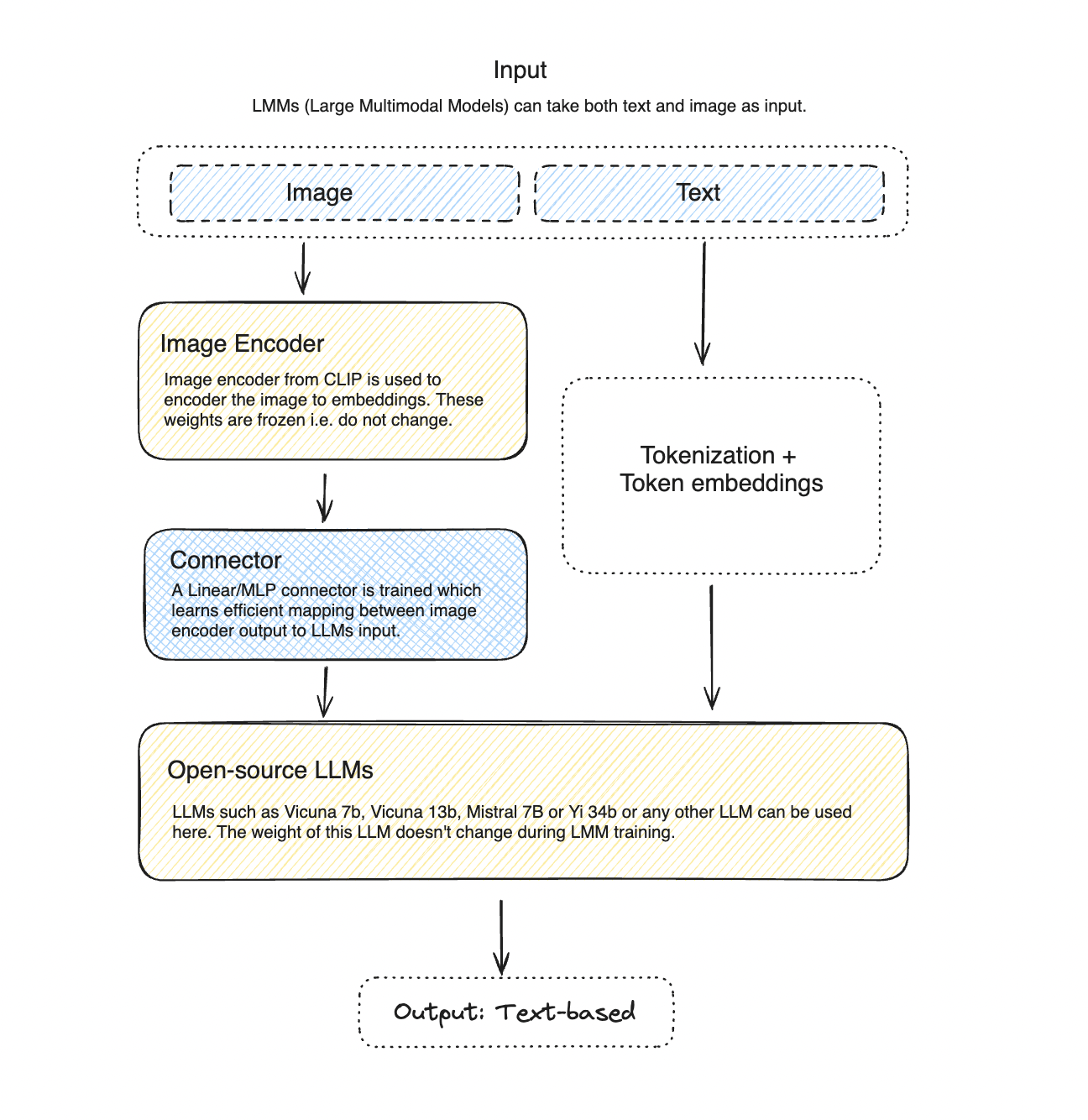
The image encoder, the projection module and the language model are learned parameters: weight matrices, frozen once training ends, shipped with the model. The 576 vectors of an image are computed activations: they come into existence when you submit that particular image, and vanish afterwards. When an architecture says "we freeze the image encoder," it means its weights stop being updated, not that previously computed vectors are being reused.
A concrete example: LLaVA
LLaVA (Large Language and Vision Assistant), published by Liu et al. in 2023, is the most-copied open VLM. Its architecture became the reference.
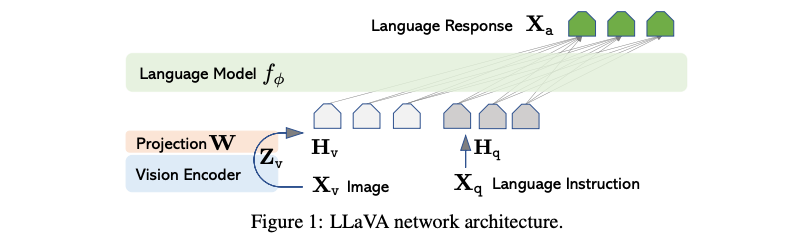
- Visual encoder: CLIP ViT-L/14, a model pre-trained to produce image vectors comparable to text vectors, see CLIP. LLaVA 1.5 takes its 336-pixel variant, hence 576 patches.
- Projection: a plain linear layer (one matrix multiplication) in LLaVA 1.0, replaced in LLaVA 1.5 by a small Multi-Layer Perceptron (MLP: two linear layers with a non-linearity between them), which is more expressive. The LLaVA 1.5 abstract stresses that this very simple connector is "surprisingly powerful and data-efficient."
- Language model: LLaMA or Vicuna as the base model.
- Two training phases:
- Alignment: 558,000 image-caption pairs. Only the projection module learns; encoder and LLM stay frozen. The goal is modest and precise: learn the translation between the two spaces.
- Instruction tuning: 665,000 visual instruction examples. This time the projection and the language model learn. The model learns to follow instructions about images.
Those two figures add to 1.22 million examples, matching the "1.2M publicly available data" claimed in the LLaVA 1.5 abstract, which also states that full training of the 13-billion-parameter model finishes in about one day on a single 8×A100 node.
Improved Baselines with Visual Instruction Tuning (Liu et al., 2023) - LLaVA 1.5Three ways to attach vision to language
Cross-attention (Flamingo): extra attention layers are inserted into the language model whose only job is to let text vectors "look at" image vectors at every level. Powerful, but the LLM's architecture has to be modified and retrained.
Early fusion (LLaVA): visual vectors are simply placed end to end with text vectors at the input. The LLM handles them with its usual attention, unmodified. Simpler, and surprisingly effective.
Multimodal from the start (GPT-4V, Gemini, Claude): the model is pre-trained from scratch on a mixture of text, images and sometimes audio. The deepest integration, but it assumes a training budget out of reach for most.
The LLaVA approach (lay the visual vectors end to end with the text ones) is the easiest to implement and gives excellent results. It became the default route for open VLMs, adopted by InternVL, Qwen-VL, Pixtral and many others.
Training a VLM
The data you need
| Data type | Example datasets | What the model learns there |
|---|---|---|
| Image captioning | COCO Captions, CC3M | tying an image to a global description |
| Visual Question Answering (VQA) | VQA v2, Visual Genome | answering a specific question about an image |
| Documents and text reading (Optical Character Recognition, OCR) | DocVQA, ChartQA | reading characters, tables, charts |
| Visual instructions | LLaVA-Instruct, ShareGPT4V | following an instruction about an image |
| Interleaved documents | MMC4, OBELICS | relating text and images inside a real document |
Volumes range, depending on type, from hundreds of thousands of examples for visual instructions to hundreds of millions for interleaved web documents; exact counts are specific to each dataset and stated on its card.
Interleaved documents deserve a note: these are web pages where text and images naturally alternate (illustrated articles, product pages). They teach the model the link between a text and its accompanying image in real-world messiness, not in the artificial "one image, one caption" format.
The phases, in order
- Visual pre-training: the encoder learns to represent images. In practice almost nobody does this themselves; you start from an already-trained ViT (CLIP, SigLIP).
- Alignment: the projection module learns to convert visual vectors into the LLM's format. A short phase, but decisive.
- Instruction tuning: fine-tuning on mixed text-and-image instructions, to make the model conversational.
Image resolution: quality against cost
More pixels, more detail, many more tokens
The higher the input resolution, the more detail the model sees, and the more tokens it consumes. With a 14 × 14 patch size the count follows directly, each line below being :
- 224 × 224: tokens. Fast, but fine detail disappears: small print is unreadable.
- 336 × 336: tokens. The compromise LLaVA 1.5 settled on.
- 672 × 672: tokens. High resolution, but four times the tokens of 336, and roughly sixteen times the attention compute, since that cost grows with the square of length.
- Dynamic resolution: adapt the cutting to each image rather than imposing one size.
This small calculation explains most VLM engineering choices: the whole craft is seeing detail without letting the token count explode.
The pragmatic answer: tiling
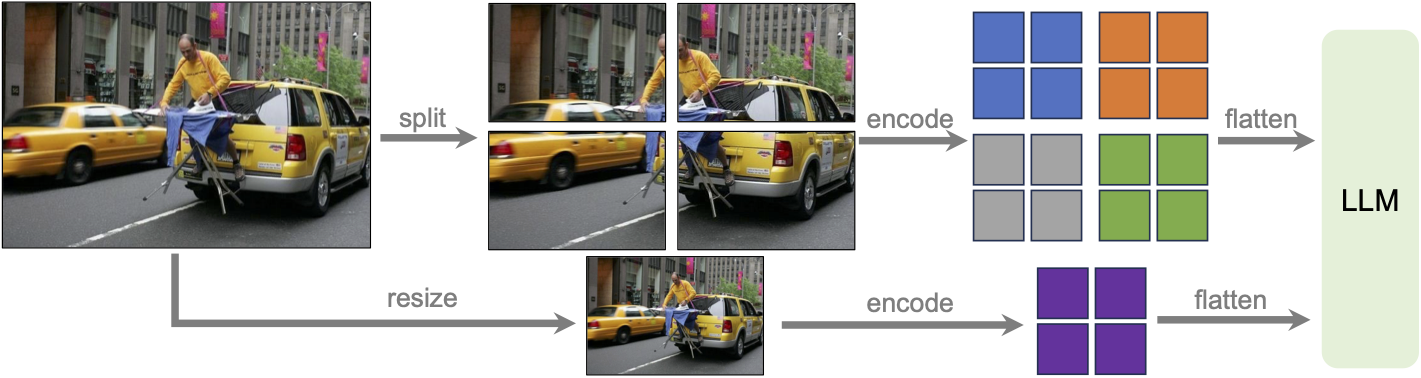
LLaVA-NeXT introduced AnyRes (for any resolution). Instead of force-resizing every image to whatever the encoder expects (which distorts proportions and smears small print) the image is cut into tiles at the encoder's native resolution, each tile encoded separately, plus a low-resolution overview so the model knows how the pieces fit together. Any resolution and any aspect ratio become processable. The price is direct and readable in the token count: four tiles plus a thumbnail is five times 576 tokens, i.e. 2,880 tokens for a single image.
What VLMs can do
Understanding an image
- Describe a scene (people, objects, context)
- Identify objects, places, situations
- Read text in the image, signs, storefronts, documents; see document understanding and OCR
- Interpret charts, tables and diagrams
Reasoning about an image
- Answer spatial questions ("is the cat in front of or behind the vase?")
- Count objects, still unreliably
- Carry a chain of reasoning over visual content
- Compare two images and point out the differences
Production uses
- Working through complex documents: invoices, contracts, financial reports
- Describing the surroundings of a visually impaired person
- Analyzing interface screenshots for automated testing
- Diagnostic support in medicine or quality control in industry
How they are evaluated
| Benchmark | What it measures |
|---|---|
| MMMU (Massive Multi-discipline Multimodal Understanding) | university-level questions across many disciplines, grounded in figures |
| MathVista | mathematical reasoning from an image |
| DocVQA | questions about scanned documents |
| ChartQA | questions about charts and tables |
| TextVQA | questions requiring you to read fine print in a photo |
Published scores on these benchmarks shift every month and depend heavily on the evaluation protocol, we do not reproduce them here. For what such a score does and does not tell you, see how to read a benchmark score; for a survey of the models, see the vision model comparison.
VLMs hallucinate: they describe objects absent from the image, invent text that is not there, miscount. It is the visual counterpart of textual hallucination. The POPE benchmark (Polling-based Object Probing Evaluation) was built to measure exactly this failure: the model is asked, object by object, whether it is present, including for objects that are absent but plausible in that kind of scene. On anything consequential, verify: how confidently the model phrases an answer is not an indicator of whether it is right.
Notable open models
- LLaVA-NeXT: the LLaVA family with dynamic resolution.
- InternVL: a Chinese family reaching tens of billions of parameters, with its own visual encoder (InternViT).
- Qwen-VL: Alibaba's Qwen series with vision, strong multilingual coverage.
- Idefics 2 / 3: Hugging Face's VLMs, fully open, with documented training data.
- Pixtral: Mistral AI's VLM, with a visual encoder trained from scratch to accept images at their native resolution, see Pixtral.
VLMs are among the fastest-moving areas of 2023-2026. But the underlying idea is the one from the top of this page, and it is simple: cut the image up, turn each piece into a vector, and slide them into the sentence.
1. How does a LLaVA-style VLM get a language model to « see » an image?
2. You send a single high-resolution image to a VLM billed per token, without typing a word. What happens?
3. A model card states: « during this phase, the image encoder is frozen ». What does that mean?
4. Why does LLaVA-NeXT's AnyRes scheme add a low-resolution thumbnail on top of the high-resolution tiles?
5. A VLM very confidently reads out a scanned invoice: vendor, amounts, VAT number. What should you keep in mind?